Secure Delete logo

Secure Delete 2026 v221

  • User Rating:
    ★★★★★
    ★★★★★
    0.0 0Votes
  • Requirements:
    Windows
  • Version: 2026 v221
  • Latest updated: 3 weeks ago
  • License: Freemium  
  • Publisher: Clean Space LTD
  • Size: 0.5 MB
× app stores

Secure Delete Professional is a Windows utility designed to permanently erase files and folders so they cannot be recovered. Unlike standard deletion methods that move files to the Recycle Bin, this tool overwrites and removes data using secure deletion algorithms, ensuring the selected content is fully destroyed.

The software focuses on simplicity while still offering multiple security levels, allowing users to choose between faster deletion or stronger data destruction methods depending on their needs. It supports common Windows systems from Windows 7 through Windows 11 and is designed to be lightweight, with a small installation size and minimal system resource usage.

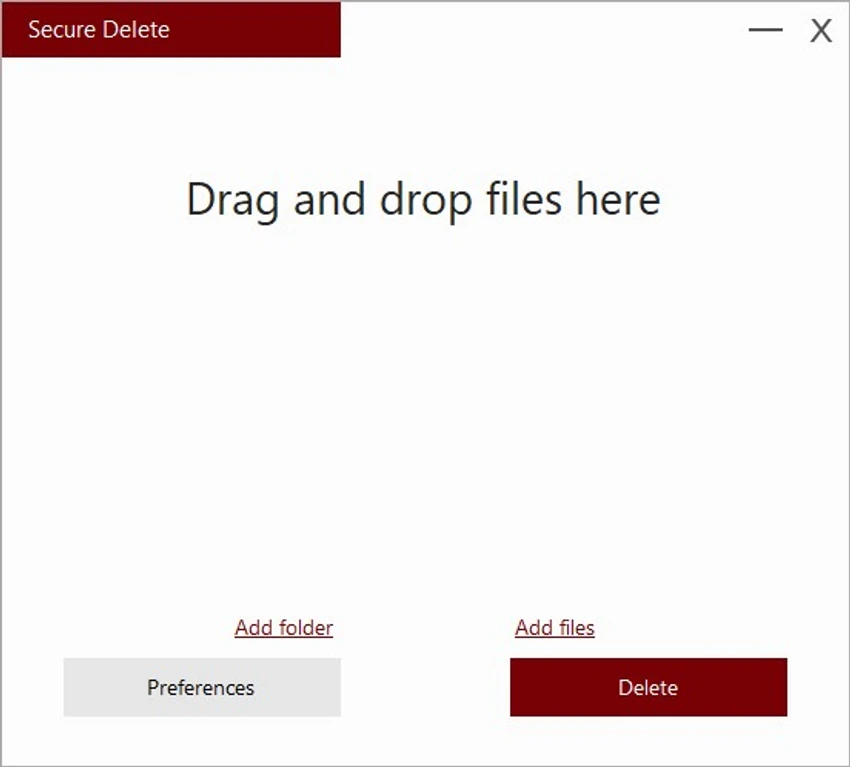
Users can delete files through drag-and-drop, a manual file selection option, or directly from Windows Explorer using the “Send To” menu. This flexibility makes it suitable for both quick file removal tasks and more controlled privacy-focused deletion workflows.

Features of Secure Delete

  • Permanently deletes files and folders without recovery
  • Multiple security levels for different deletion speeds and safety needs
  • Three deletion methods: drag-and-drop, file selection, and Windows Explorer “Send To”
  • Lightweight software with low system resource usage
  • Simple interface designed for easy use
  • Compatible with Windows 7, 8, 10, and 11
  • Secure data destruction using internal algorithms

Interface and Usability

Secure Delete Professional uses a minimal and straightforward interface focused on quick file removal. Users can simply drag files into the main window or select them manually, reducing the learning curve for beginners.

The integration with Windows Explorer through the “Send To” menu improves usability by allowing deletion directly from the file system without opening the application. Despite its simplicity, the tool provides configurable security levels, giving users some control over how thoroughly data is erased.

Who Should Use Secure Delete?

This software is suitable for users who want to permanently remove sensitive files such as personal documents, confidential data, or private media. It is especially useful for individuals concerned about data recovery tools or privacy risks after file deletion.

Conclusion

Secure Delete Professional is a lightweight and practical file erasure tool designed for users who need simple but effective data destruction. Its multiple deletion methods and security options make it flexible enough for both casual and privacy-focused users.

Pros & Cons

Pros

  • Permanently deletes files beyond recovery
  • Multiple secure deletion methods
  • Lightweight and fast installation (3 MB)
  • Easy-to-use interface
  • Windows Explorer integration

Cons

  • No advanced security suite beyond file deletion
  • Limited feature scope compared to full security tools

Frequently Asked Questions

What is Secure Delete used for?

Secure Delete is used to permanently erase files and folders so they cannot be recovered by standard data recovery tools.

Can deleted files be recovered after using Secure Delete?

No. The software is designed to securely overwrite data, making recovery extremely difficult or impossible.

How can I delete files using Secure Delete?

You can delete files by dragging them into the program, selecting them manually, or using the Windows Explorer “Send To” option.

Does Secure Delete support different security levels?

Yes. It provides multiple security options that let users choose between faster deletion or stronger data destruction.

Is Secure Delete easy to use for beginners?

Yes. The interface is simple and designed for quick operation, making it suitable for users with little technical experience.

Which Windows versions support Secure Delete?

It supports Windows 7, 8, 10, and 11, including the latest system updates.

Recommended apps [Freeware]:
  • darktable 5.6.0 darktable logo a free open-source RAW photo editor and photography workflow tool for professional image management
  • XnConvert 1.112.0.0 XnConvert logo batch image converter supporting 500 formats with 80+ editing actions and cross-platform compatibility
  • Youtube Downloader HD 6.0.0.0 Youtube Downloader HD logo a simple Windows tool for downloading and converting YouTube videos in HD formats
  • MEmu Android Emulator 9.5.5.1 MEmu Android Emulator logo Play Android games and run mobile apps on Windows with MEmu Android Emulator, featuring customizable controls and multi-instance support
  • Free Download Manager 6.34.3 Free Download Manager logo speeds up downloads, supports torrents, scheduling, and resuming broken files on Windows
  • LibreOffice 26.2.4 LibreOffice logo A free, open-source office suite with tools for documents, spreadsheets, presentations, databases, and broad file compatibility.
Recommended apps [Shareware]:
  • ThunderSoft Watermark Remover 6.3.0 ThunderSoft Watermark Remover logo removes watermarks, logos, and unwanted objects with easy selection and photo editing tools
  • HTTP Debugger Pro 10.5 HTTP Debugger Pro logo captures and analyzes HTTP and HTTPS traffic from browsers and apps, helping developers debug web requests in real time
  • PDF Eraser 1.9.9.1 PDF Eraser logo a Windows tool for removing text, images, and pages from PDFs with editing and rotation features
  • Ref-n-write 7.2 Ref-n-write logo a Microsoft Word add-in that helps improve academic writing with paraphrasing and phrase suggestions
  • UnHackMe 18.50.2026.708 UnHackMe logo Detect and remove rootkits, spyware, Trojans, and hidden malware with a security tool designed to protect your computer.
  • Vovsoft Speech to Subtitle Converter 2.0 Vovsoft Speech to Subtitle Converter logo Convert audio and video files into synchronized subtitles with support for over 50 languages and popular SRT and VTT formats.