


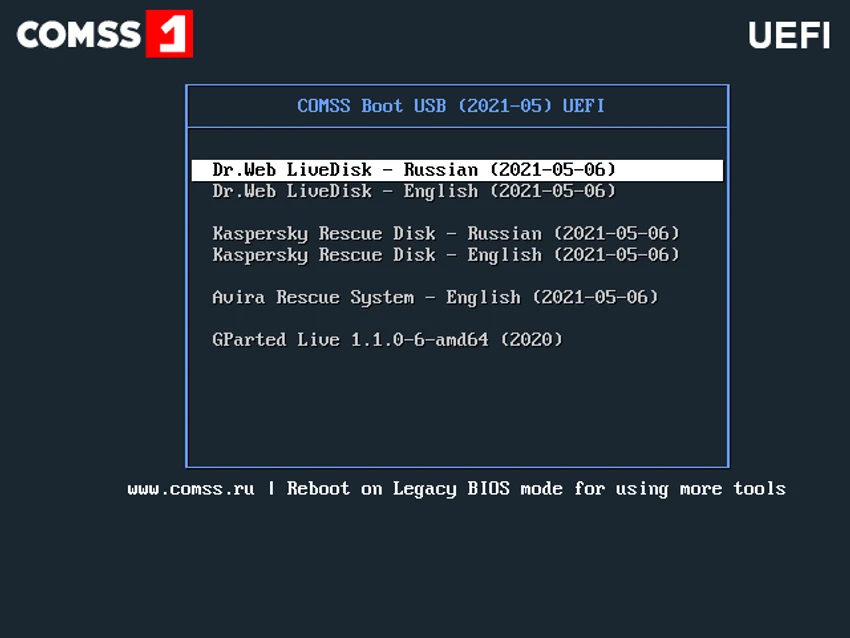

COMSS Boot USB is a comprehensive bootable toolkit designed for diagnosing, repairing, and recovering Windows computers and laptops that cannot boot normally. Instead of relying on a single recovery utility, it combines multiple antivirus rescue environments, disk management tools, hardware diagnostic utilities, and recovery software into one bootable USB drive.
After testing its structure and available utilities, I found that COMSS Boot USB is best suited for technicians, IT professionals, and advanced users who need an all-in-one emergency toolkit. Whether the goal is removing malware, checking hard drive health, recovering partitions, testing RAM, or gathering hardware information, the package provides an extensive collection of well-known utilities.
The software is available in two editions:
- Full – Includes 11 antivirus rescue scanners along with all available utilities.
- Lite – Includes only Dr.Web LiveDisk and Kaspersky Rescue Disk while retaining the remaining diagnostic and maintenance tools.
The toolkit supports both Legacy and UEFI boot modes, although only selected rescue environments are available when booting in UEFI mode. If Secure Boot causes compatibility issues, disabling it in BIOS/UEFI may be necessary.
Features of COMSS Boot USB
- Combines multiple bootable antivirus rescue environments into one USB toolkit
- Includes 11 antivirus scanners in the Full edition
- Offers a lightweight Lite edition with essential antivirus rescue disks
- Supports both Legacy and limited UEFI boot modes
- Includes disk partition management with GParted, DiskGenius, DFSee, and Partition-Saving
- Provides HDD and SSD diagnostic utilities such as HDAT2, Victoria, MHDD32, SeaTools, and WD Data Lifeguard Diagnostics
- Includes backup and cloning tools like AOMEI Backupper and HDClone X Free Edition
- Supports data recovery using TestDisk and PhotoRec
- Features RAM testing through Memtest86+ and Windows Memory Diagnostic
- Includes hardware information tools such as HWiNFO, ASTRA, and Hardware Detection Tool
- Offers monitor and video memory diagnostic utilities
- Includes Offline NT Password Changer for supported legacy Windows systems
- Provides FreeDOS installation utility
- Regularly updates included antivirus rescue environments and hardware databases
Interface and Usability
COMSS Boot USB is less of a traditional software application and more of a curated collection of independent bootable utilities. Once the USB media is created and the computer boots from it, users can select from a menu of available recovery environments and diagnostic tools. Because each utility maintains its own interface, the overall experience varies depending on which tool is launched. Linux-based rescue environments such as Dr.Web LiveDisk, Kaspersky Rescue Disk, and Avira Rescue System provide graphical interfaces, while several diagnostic tools use simple text-based menus.
Although beginners may need some familiarity with BIOS settings, boot modes, and disk utilities, the toolkit itself is logically organized, making it relatively easy to locate the appropriate recovery tool for a specific problem.
Who Should Use COMSS Boot USB?
- IT professionals maintaining multiple computers
- PC repair technicians
- System administrators
- Advanced home users
- Users recovering malware-infected systems
- Anyone troubleshooting boot failures or hard drive problems
- Users needing hardware diagnostics before replacing components
Conclusion
COMSS Boot USB is one of the more comprehensive bootable recovery toolkits available for Windows system maintenance. Instead of focusing on a single task, it combines antivirus rescue disks, storage diagnostics, backup utilities, partition management, hardware analysis, and memory testing into one portable solution. For IT technicians and experienced users, it can significantly reduce the time spent preparing separate recovery media for different situations. Even the Lite edition offers valuable recovery capabilities while keeping the package smaller.


