EaseUS VoiceWave logo

EaseUS VoiceWave 3.5.0

  • User Rating:
    ★★★★★
    ★★★★★
    0.0 ★ 0Votes
  • Requirements:
    Windows
  • Version: 3.5.0
  • Latest updated: 3 weeks ago
  • License: Freemium  
  • Publisher: EaseUS
  • Size: 4 MB
× app stores

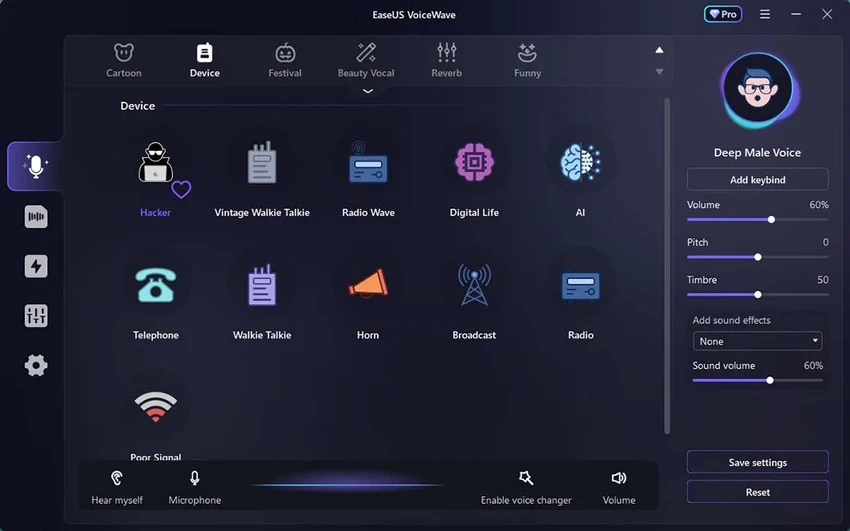
EaseUS VoiceWave is a real-time AI voice changer for Windows 10 and Windows 11 that lets users modify their voice instantly across popular communication, gaming, and streaming platforms. Whether you're chatting on Discord, attending Zoom meetings, streaming with OBS, or playing online games, VoiceWave provides a wide selection of AI-powered voice effects and soundboard options to make conversations more entertaining and engaging. With more than 200 voice effects, over 300 soundboard presets, AI-enhanced voice processing, and support for custom voice samples, EaseUS VoiceWave is designed for gamers, content creators, VTubers, and anyone who wants to personalize their voice in real time.

Features of EaseUS VoiceWave

  • Real-time AI voice changing for Windows 10 and 11.
  • Over 200 voice effects, including celebrity-inspired, anime, and custom voices.
  • More than 300 built-in soundboard presets.
  • AI-powered voice enhancement for more realistic voice output.
  • Noise reduction for clearer audio quality.
  • Built-in audio mixer for combining multiple audio tracks.
  • Record and export modified voices as MP3 files.
  • Upload custom voice samples.
  • Compatible with Discord, Zoom, OBS, Google Meet, Skype, Roblox, Valorant, Twitch, Steam, YouTube, and other supported applications.
  • Optional AI module with additional installation.
  • Latest version adds Arabic language support for the AI module.

User Experience

EaseUS VoiceWave is one of the easiest real-time voice changers I've used on Windows. Installation is straightforward, and the interface is clean enough that even first-time users can start experimenting with voice effects within minutes. The real-time voice processing works smoothly across supported applications, making it simple to switch between different voices during Discord chats, live streams, or online meetings. Voice changes happen instantly without noticeable delay, which is especially important during gaming sessions or live broadcasts.

The extensive library of voice effects offers plenty of variety, from fun character voices to more realistic AI-generated voices. The AI module noticeably improves voice quality by producing more natural-sounding output, although having to install it separately adds an extra step. The built-in soundboard and audio mixer are useful additions for streamers and content creators who want to enhance their productions without relying on multiple applications. I also found the ability to record and export modified voices as MP3 files convenient for creating content offline.

Performance is generally efficient, with relatively low system impact compared to some competing voice changers. However, users with older hardware may still notice increased resource usage when running VoiceWave alongside demanding games or video conferencing software.

Overall, EaseUS VoiceWave balances ease of use, performance, and a wide range of creative features, making it suitable for both casual users and experienced creators.

Who Should Use EaseUS VoiceWave?

  • Gamers who want to change their voice during online gameplay.
  • Discord communities and voice chat users.
  • Streamers using OBS, Twitch, or YouTube.
  • VTubers and content creators producing entertaining audio content.
  • Professionals looking to add creative voice effects during virtual meetings.
  • Anyone interested in experimenting with AI-generated voice transformations.

Conclusion

EaseUS VoiceWave successfully combines powerful AI voice processing with an easy-to-use interface that appeals to both beginners and experienced creators. Its large collection of voice effects, extensive soundboard, real-time performance, and broad software compatibility make it an excellent choice for gaming, streaming, online meetings, and content creation.

Pros & Cons

✓

Pros

  • Extensive library of over 200 AI voice effects.
  • More than 300 soundboard presets.
  • Real-time voice changing with minimal latency.
  • Clean and beginner-friendly interface.
  • AI module produces more realistic voices.
  • Noise reduction improves audio clarity.
  • Built-in audio mixer and MP3 recording.
  • Broad compatibility with communication, gaming, and streaming platforms.
  • Lower system load than some competing voice changers.
✕

Cons

  • AI module requires a separate installation.
  • Many premium voice effects require the Pro version.
  • Can consume noticeable system resources on older PCs.
  • Audio customization is not as advanced as dedicated professional audio software.

Frequently Asked Questions

What is EaseUS VoiceWave?

EaseUS VoiceWave is a real-time AI voice changer for Windows that allows users to modify their voice instantly while using applications such as Discord, Zoom, OBS, Skype, Google Meet, and many popular games.

Does EaseUS VoiceWave work in real time?

Yes. VoiceWave processes your voice in real time, allowing you to speak with different voice effects during live conversations, gaming sessions, streams, and online meetings.

How many voice effects does EaseUS VoiceWave include?

The software offers more than 200 voice effects, including celebrity-inspired voices, anime characters, and customizable voice options. It also includes over 300 soundboard presets.

Can I record my modified voice?

Yes. EaseUS VoiceWave lets you record your transformed voice and export the recordings as MP3 files.

Is the AI voice module included by default?

No. The AI voice enhancement module requires a separate installation, although it adds more realistic voice processing and additional features such as Arabic language support.

Is EaseUS VoiceWave free?

EaseUS VoiceWave offers a free version with limited functionality. Many advanced voice effects and premium features are available through the Pro version with monthly, annual, or lifetime licensing options.

Recommended apps [Freeware]:
  • Easy System Utility 1.1.67 Easy System Utility logo clean junk files, repair tools, passwords and system optimization.
  • SoundSwitch 7.1.0 / 7.1.1 Beta 1 SoundSwitch logo a lightweight Windows tool that lets you switch audio devices instantly using customizable hotkeys
  • PointerStick 7.17 PointerStick logo a virtual pointer to Windows desktops, helping presenters highlight mouse movements on large screens
  • LibreWolf 152.0.6-1 LibreWolf logo Browse privately with a Firefox-based browser focused on blocking tracking, removing telemetry, and improving online security.
  • CudaText 1.234.6.0 CudaText logo Edit code efficiently with a lightweight editor supporting many programming languages, syntax highlighting, plugins, and customization.
  • RJ TextEd 16.65 RJ TextEd logo Edit text, HTML, CSS, and source code with a powerful editor featuring syntax highlighting, FTP tools, auto-completion, and Unicode support.
Recommended apps [Shareware]:
  • Lyric Video Studio 1.5.49 Lyric Video Studio logo a Windows app for creating lyric videos with AI tools, subtitles, motion tracking, and 4K video editing
  • Net Monitor for Employees Professional 6.6.6 Net Monitor for Employees Professional logo track screen activity, usage, and productivity in business environments.
  • CoolUtils PDF Combine 8.1.0.76/13 CoolUtils PDF Combine logo Windows tool for merging multiple PDF files into one, with bookmarks, encryption, and batch processing
  • Coolmuster Android Eraser 4.0.25 Coolmuster Android Eraser logo permanently wipes Android data, making files unrecoverable before resale or donation
  • Draftable Desktop 26.6.200 Draftable Desktop logo compares PDF, Word, Excel, and PowerPoint files side by side securely on your computer without uploading documents online
  • Cisdem Duplicate Finder 5.0.0 Cisdem Duplicate Finder logo Find duplicate files and similar images with high accuracy, organize scan results, and safely remove unnecessary files to free up storage.