Zebra CardStudio logo

Zebra CardStudio 2.5.44

  • User Rating:
    ★★★★★
    ★★★★★
    0.0 ★ 0Votes
  • Requirements:
    Windows
  • Version: 2.5.44
  • Latest updated: 3 weeks ago
  • License: Commercial  
  • Publisher: Zebra
  • Size: 225 MB
× app stores

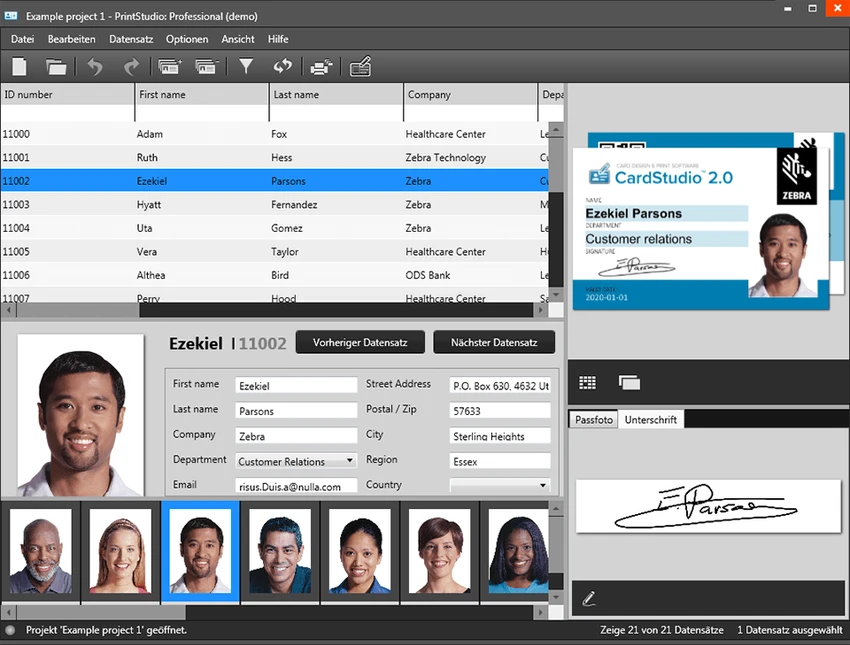
Zebra CardStudio is professional card design and issuance software developed for organizations that need to create, personalize, encode, and print identification cards. Designed to work with Zebra card printers, the software supports everything from employee badges and student IDs to membership cards, access control credentials, and digital IDs.

The latest CardStudio 2.0 expands beyond traditional plastic card production by introducing Digital ID creation, allowing organizations to issue credentials directly to mobile devices. Combined with advanced data integration and SmartCard encoding support, the software provides a comprehensive solution for modern card issuance. Whether producing a handful of employee badges or managing enterprise-scale card issuance projects, CardStudio offers the tools needed to streamline the entire process.

Features of Zebra CardStudio

  • Design and print professional ID cards
  • Create Digital IDs for mobile devices
  • Issue Digital IDs alongside physical cards or independently
  • Import data from databases, spreadsheets, and enterprise systems
  • Automatically populate cards with text, photos, graphics, and other data
  • Support for unlimited card designs, projects, and records in the Professional edition
  • SmartCard encoding support
  • Compatible with UHF contactless cards
  • Supports MIFARE Classic, MIFARE Plus, and DESFire technologies
  • Enhanced Unicode support for multilingual card designs
  • Improved online help resources
  • Updated signature pad support with newer drivers
  • Designed for use with Zebra card printers

Interface and Usability

Zebra CardStudio focuses on making professional card production accessible without requiring extensive design experience. The interface organizes card layout, data management, encoding, and printing into a structured workflow that is easy to follow. Creating cards typically involves selecting a template or building a layout, connecting a data source, and sending the finished design to a compatible Zebra printer. Users managing recurring card projects can benefit from automated data population, reducing repetitive manual work.

Although some advanced encoding and enterprise features may require additional configuration, the overall workflow remains efficient for organizations issuing cards regularly.

Who Should Use Zebra CardStudio?

  • Businesses issuing employee ID cards
  • Schools and universities creating student identification cards
  • Healthcare organizations producing staff credentials
  • Membership organizations
  • Government agencies
  • Security teams managing access control cards
  • Enterprises using Zebra card printers

Conclusion

Zebra CardStudio is a powerful card design and issuance solution built for organizations that rely on secure, professional identification systems. Its support for Digital IDs, enterprise data integration, SmartCard encoding, and high-quality card printing makes it a strong choice for businesses, educational institutions, healthcare providers, and government agencies.

Pros & Cons

✓

Pros

  • Professional card design and printing tools
  • Supports both physical cards and Digital IDs
  • Advanced enterprise data integration
  • SmartCard encoding support
  • Compatible with MIFARE, DESFire, and UHF cards
  • Strong multilingual (Unicode) support
  • Suitable for organizations of various sizes
✕

Cons

  • Requires a Zebra card printer driver before installation
  • Designed specifically for Zebra printer environments
  • Some advanced features are limited to the Professional edition
  • Beginners may need time to learn enterprise-level functions

Frequently Asked Questions

What is Zebra CardStudio used for?

Zebra CardStudio is used to design, personalize, encode, and print professional identification cards, membership cards, access cards, and Digital IDs for organizations.

Can Zebra CardStudio create Digital IDs?

Yes. CardStudio 2.0 allows users to create Digital IDs that can be stored on mobile devices. Digital IDs can be issued alongside physical cards or as standalone credentials.

Does Zebra CardStudio support SmartCard encoding?

Yes. The software supports SmartCard technologies including UHF contactless cards, MIFARE Classic, MIFARE Plus, and DESFire for secure credential encoding.

Can Zebra CardStudio import data from existing databases?

Yes. It can automatically populate card designs using information from databases, spreadsheets, and other enterprise data sources, including text, photos, graphics, and additional fields.

Do I need a Zebra printer to use CardStudio?

CardStudio is designed for Zebra card printers, and installing the appropriate Zebra Windows printer driver is required before installing the software.

Which operating systems does Zebra CardStudio support?

The software supports Microsoft Windows XP, Windows 7, Windows 8, Windows 10, and Windows 11, provided the required Zebra printer driver is installed.

Recommended apps [Freeware]:
  • Red Burner 19.7 Red Burner logo a portable disc burning tool for CD, DVD, and Blu-ray with fast ISO handling and a simple interface
  • Executor 2.3.9 Executor logo a customizable Windows launcher with hotkeys, keyword commands, automation tools, notes, and workflow enhancements
  • TeamViewer 15.79.4 TeamViewer logo a secure remote desktop tool for PC control, file transfer, and remote support worldwide
  • MuPDF 1.28.0 MuPDF logo a lightweight, no-frills PDF and XPS viewer designed for fast document viewing with minimal system usage
  • SmartImage 1.3.1 SmartImage logo Find matching images online quickly with a reverse image search tool supporting multiple search engines and flexible input options.
  • Volumouse 2.21 Volumouse logo Adjust Windows sound volume quickly using mouse wheel shortcuts with customizable rules and simple background controls.
Recommended apps [Shareware]:
  • VovSoft AI Requester 5.2 VovSoft AI Requester logo a program that can connect to OpenAI API and OpenAI-compatible APIs with ease
  • O&O SafeErase 21.3.26142 O&O SafeErase logo securely deletes files, drives, and internet traces using certified methods to prevent data recovery on Windows
  • reaConverter Pro 8.0.231 reaConverter Pro logo batch image converter and editor supporting 700+ formats with automation and advanced processing tools
  • LINQPad 9.9.10 LINQPad logo .NET development environment for C#, F#, and VB with database querying, scripting, debugging, and AI-assisted coding tools
  • NOD32 Antivirus 19.2.7.0 NOD32 Antivirus logo Protect your PC with ESET NOD32 Antivirus, offering real-time malware defense, fast scans, and low system impact
  • Hex Editor Neo 8.12.00.9421 Hex Editor Neo logo Edit and analyze binary files of any size with advanced hex editing, data inspection, patch creation, and developer-focused tools.