Q-Dir logo

Q-Dir 12.69

  • User Rating:
    ★★★★★
    ★★★★★
    0.0 0Votes
  • Requirements:
    Windows
  • Version: 12.69
  • Latest updated: 5 days ago
  • License: Freeware  
  • Publisher: Nenad Hrg
  • Size: 1 MB
× app stores

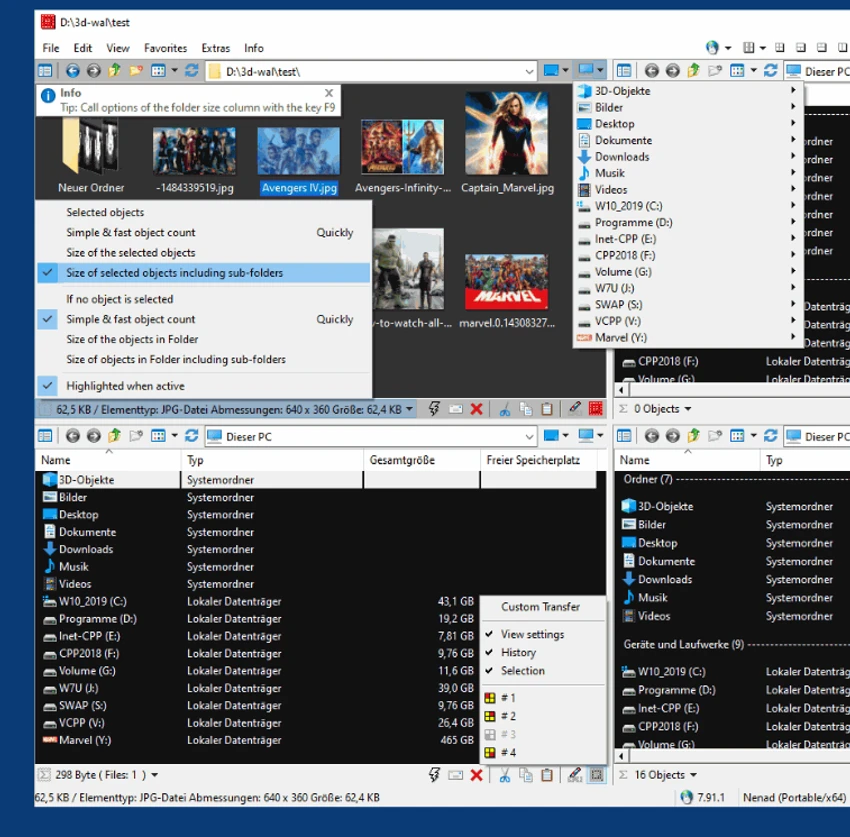
Q-Dir (Quad Explorer) is a lightweight and portable file management tool for Windows that enhances how users browse, organize, and transfer files. It introduces a unique quad-view interface, allowing users to work with up to four folders at once for faster file operations.

Overview

Q-Dir is designed as an alternative to the standard Windows File Explorer, focusing on efficiency and multi-folder management. Instead of switching between windows, users can view multiple directories side-by-side in a single interface. The software supports both installed and portable modes, making it convenient for use on USB drives or systems where installation is not preferred. It integrates smoothly with Windows functions such as drag-and-drop, clipboard operations, and context menus.

With support for multiple file views and export options, Q-Dir is especially useful for users who frequently manage large numbers of files across different locations.

Key Features of Q-Dir

  • Quad-pane (4-window) file management interface
  • Fast access to hard drives, USB drives, network folders, and system directories
  • Portable version available (no installation required)
  • Drag-and-drop file management between panes
  • Clipboard support for copy and paste operations
  • Multiple view modes (icons, list, details, thumbnails, tiles)
  • Favorites for quick folder access
  • File filtering and highlight tools
  • Color-coded file type visualization
  • Export file lists to XLS, CSV, TXT, and HTML formats
  • Built-in folder tree navigation
  • Quick-link shortcuts for frequently used folders
  • Support for ZIP, FTP, network, and system folders
  • Screen magnifier tool for better visibility
  • Multi-configuration INI support for customization

User Experience

Using Q-Dir feels like upgrading Windows File Explorer into a multi-tasking workspace. The quad-view layout significantly reduces the need to open multiple windows, especially when transferring or comparing files between folders. Drag-and-drop operations are smooth, and the ability to view multiple directories simultaneously improves workflow efficiency. The interface is simple but functional, prioritizing speed over visual design.

Its portable nature is a major advantage, allowing users to run it directly from USB drives without installation. This makes it useful for IT technicians or users who frequently work across different computers.

Who Should Use Q-Dir?

  • Users who manage multiple folders frequently
  • IT technicians and system administrators
  • USB-based portable workflow users
  • People who prefer multi-pane file navigation
  • Anyone looking for faster file transfer workflows

Conclusion

Q-Dir provides a simple yet powerful improvement over traditional file browsing by introducing a quad-pane layout and portable functionality. It is especially useful for users who regularly move or compare files across multiple locations.

Pros & Cons

Pros

  • Unique quad-pane file management system
  • Lightweight and portable
  • Improves file transfer efficiency
  • Supports drag-and-drop across multiple folders
  • Works without installation
  • Export file lists in multiple formats
  • Highly customizable interface

Cons

  • Interface looks dated compared to modern file managers
  • Limited advanced automation features
  • May feel unusual for users accustomed to standard Explorer layout

Frequently Asked Questions

What is Q-Dir used for?

Q-Dir is used to manage and navigate files across multiple folders simultaneously using a quad-pane interface.

Is Q-Dir portable?

Yes. Q-Dir can run without installation and is suitable for use on USB drives.

Does Q-Dir replace Windows Explorer?

It does not fully replace it but offers an alternative interface with additional multitasking features.

Can I drag and drop files in Q-Dir?

Yes. It supports full drag-and-drop file operations between panes and other Windows programs.

What file views does Q-Dir support?

It supports icons, details, list, thumbnails, and tile views.

Can Q-Dir export file lists?

Yes. It can export directory listings to formats such as XLS, CSV, TXT, and HTML.

What operating systems does Q-Dir support?

It supports Windows 7, 8, 10, and 11.

Recommended apps [Freeware]:
  • Universal USB Installer 2.0.3.7 Universal USB Installer logo create bootable Linux USB drives easily with ISO support and persistence options on Windows.
  • DriversCloud 12.1.6 DriversCloud logo scan system hardware, update drivers, monitor performance, and analyze blue screen errors (BSODs) on Windows.
  • K-Lite Codec Pack Mega 19.8.2 K-Lite Codec Pack Mega logo Play all audio and video formats on Windows with K-Lite Codec Pack Mega, a full multimedia codec and filter package
  • FluentCleaner 26.06.04 FluentCleaner logo a lightweight Windows cleaning tool designed to remove unnecessary files using a modern, minimal WinUI 3 interface
  • Bulk Crap Uninstaller 6.2 Bulk Crap Uninstaller logo a free Windows tool that quickly removes multiple applications and cleans leftover files
  • Pale Moon 34.3.1 Pale Moon logo fast, open-source web browser based on Firefox technology, offering customization, stability, and efficient performance
Recommended apps [Shareware]:
  • Teorex FolderIco 9.3.0 Teorex FolderIco logo Change folder colors or icons in one click and organize your files visually, so you can find everything instantly
  • Gilisoft Screen Recorder Pro 13.1 Gilisoft Screen Recorder Pro logo a Windows tool for capturing screen, webcam, and audio with editing features, GPU acceleration, and multiple formats
  • FileCenter 12.5.36 FileCenter logo organize documents, scan files, manage PDFs, and build an efficient digital filing system
  • GiliSoft USB Lock 11.2 GiliSoft USB Lock logo restricts USB, disk, program, and website access to prevent data leaks and misuse
  • DocuFreezer 7.0.2606.20080 DocuFreezer logo a Windows batch converter for documents and images, converting files to PDF, JPG, TIFF, PNG, and TXT formats
  • ON1 Effects 2026.4 ON1 Effects logo AI-powered photo effects, creative filters, presets, LUTs, and masking tools for stunning image enhancements