BackUp Maker logo

BackUp Maker 8.406

  • User Rating:
    ★★★★★
    ★★★★★
    0.0 ★ 0Votes
  • Requirements:
    Windows
  • Version: 8.406
  • Latest updated: 3 weeks ago
  • License: Free Trial  
  • Publisher: ASCOMP Software GmbH
  • Size: 10 MB
× app stores

BackUp Maker is a Windows backup solution designed to help users protect important files from accidental deletion, hardware failures, malware, and system crashes. With an emphasis on simplicity, the software makes it easy to create backup jobs, automate them on a schedule, and store archives across multiple destinations.

The application supports backing up files into compressed ZIP archives, helping reduce storage usage while keeping data organized. Users can save backups to local hard drives, USB flash drives, cloud storage, or upload them to a web server using FTP or FTPS. To protect sensitive information, BackUp Maker also includes AES encryption with key lengths of up to 256 bits.

Whether you're safeguarding personal documents or maintaining regular backups on business systems, BackUp Maker provides practical tools for automated and secure data protection.

Features of BackUp Maker

  • Create automatic backups of important files.
  • Schedule backup jobs to run automatically.
  • Store backups in ZIP archive format.
  • Save backups to:
    • Local hard drives
    • USB flash drives
    • Cloud storage
  • Upload backups to web servers using FTP or FTPS.
  • Protect backup archives with AES encryption of up to 256 bits.
  • Back up only new or modified files to reduce backup time.
  • Create unlimited backup jobs.
  • Split backup archives across multiple storage devices.
  • Execute custom operations before or after backup jobs.
  • Simple setup with an intuitive user interface.
  • Compatible with Windows 11, Windows 10, Windows 8.1, Windows 8, Windows 7, and Windows Server editions from 2012 through 2025.

Interface and Usability

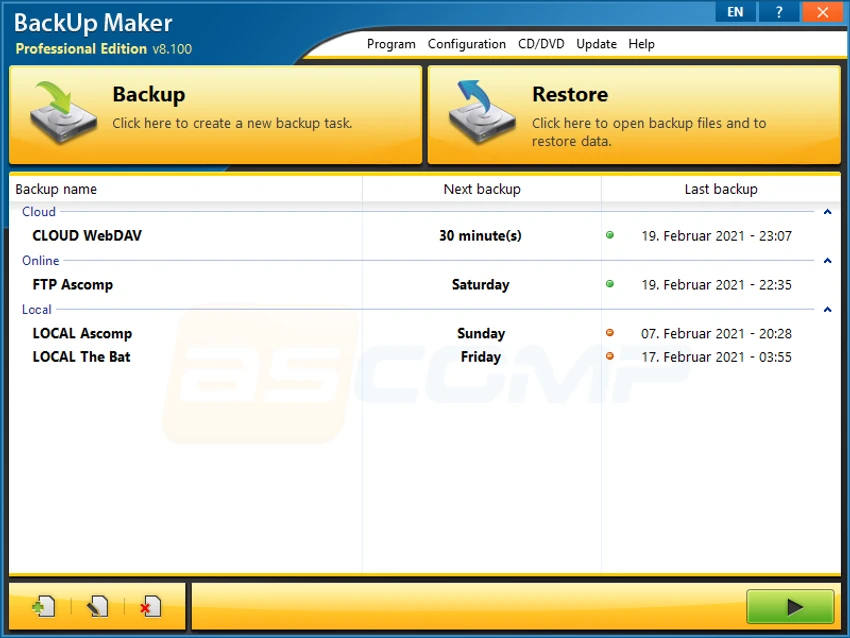
BackUp Maker is designed with ease of use in mind. The setup process guides you through selecting the files to protect, choosing a backup destination, and configuring an optional schedule. This workflow makes it straightforward to create backup jobs without requiring advanced technical knowledge. The interface keeps essential options organized while still providing access to more advanced features such as encryption, archive splitting, FTP uploads, and pre- or post-backup actions. For most users, creating recurring backups requires only a few steps.

Who Should Use BackUp Maker?

  • Home users protecting personal documents and photos.
  • Professionals who need scheduled file backups.
  • Small businesses safeguarding important data.
  • Users who want encrypted backup archives.
  • Anyone looking for automated backups to local, removable, or cloud storage.
  • Windows Server administrators who require a straightforward file backup solution.

Conclusion

BackUp Maker delivers a straightforward yet capable solution for protecting important files on Windows systems. Its combination of scheduled backups, ZIP compression, AES encryption, and support for multiple storage destinations makes it a practical choice for users who want reliable file protection without a complicated setup.

Pros & Cons

✓

Pros

  • Easy-to-use backup setup.
  • Supports automatic scheduled backups.
  • Creates compressed ZIP archives.
  • AES encryption of up to 256 bits for backup security.
  • Supports local, USB, cloud, FTP, and FTPS backup destinations.
  • Can back up only new or modified files.
  • Supports archive splitting across multiple storage devices.
  • Compatible with modern Windows and Windows Server versions.
✕

Cons

  • Focuses on file backup rather than full system imaging.
  • Cloud storage integration depends on the configured destination.

Frequently Asked Questions

What is BackUp Maker used for?

BackUp Maker is a Windows backup application that helps users protect important files by creating automated backup jobs and storing the data in compressed ZIP archives.

Can BackUp Maker create scheduled backups?

Yes. The software allows you to schedule backup jobs so they run automatically at specified times or under configured conditions, helping ensure your files are backed up regularly.

Does BackUp Maker encrypt backup files?

Yes. BackUp Maker supports AES encryption with key lengths of up to 256 bits, allowing you to protect backup archives with strong encryption.

Where can BackUp Maker save backups?

BackUp Maker can store backups on local hard drives, USB flash drives, cloud storage, and web servers using FTP or FTPS connections.

Can BackUp Maker back up only changed files?

Yes. The software supports incremental-style file selection by backing up only new or modified files, which helps reduce backup time and storage requirements.

Which Windows versions are supported?

According to the provided information, BackUp Maker supports Windows 11, Windows 10, Windows 8.1, Windows 8, Windows 7, and Windows Server 2012, 2016, 2019, 2022, and 2025.

Recommended apps [Freeware]:
  • Subtitle Edit 5.0.0 Subtitle Edit logo a free subtitle editor for creating, syncing, translating, and fixing subtitles on Windows
  • VSDC Free Video Editor 11.2.3.729 VSDC Free Video Editor logo a non-linear video editing tool for creating videos with effects, transitions, and multi-format support on Windows
  • Trellix Stinger 26.07.27.4 Trellix Stinger logo portable malware removal tool for Windows designed to detect and remove specific viruses from infected systems
  • Avast Free Antivirus 26.6.11050 Avast Free Antivirus logo real-time malware protection, phishing defense, and scam detection with minimal impact on Windows performance
  • Rufus 4.15 Rufus logo Create bootable USB drives quickly with Rufus, a lightweight Windows tool for installing OS, recovery, and firmware tasks
  • Mumble 1.5.901 Mumble logo A low-latency encrypted voice communication app with positional audio, noise suppression, and gaming-focused features.
Recommended apps [Shareware]:
  • Adobe Acrobat Pro DC 2026 Adobe Acrobat Pro DC logo create, edit, and secure PDFs easily. Professional PDF solution for individuals and businesses.
  • Allavsoft 3.29.4.9686 Allavsoft logo video downloader and converter for batch downloads, HD quality, and audio extraction on Windows.
  • Fast Video Cutter Joiner 7.1.4.0 Fast Video Cutter Joiner logo a lightweight video editing tool for quickly cutting, trimming, and joining videos
  • Catalyst Production Suite 2026.1.1 Catalyst Production Suite logo a professional media tool for browsing, preparing, transcoding, and managing Pro video formats.
  • Visual Subst 6.0 Visual Subst logo Create virtual drives from folders with Visual Subst. Easily map directories to drive letters on Windows with persistence and labels
  • Adobe Animate 2024 Adobe Animate logo Create interactive animations, characters, web content, games, and multimedia projects with professional drawing and publishing tools.