HWiNFO logo

HWiNFO 8.50

  • User Rating:
    ★★★★★
    ★★★★★
    0.0 ★ 0Votes
  • Requirements:
    Windows
  • Version: 8.50
  • Latest updated: 2 weeks ago
  • License: Freeware  
  • Publisher: REALiX
  • Size: 20 MB
× app stores

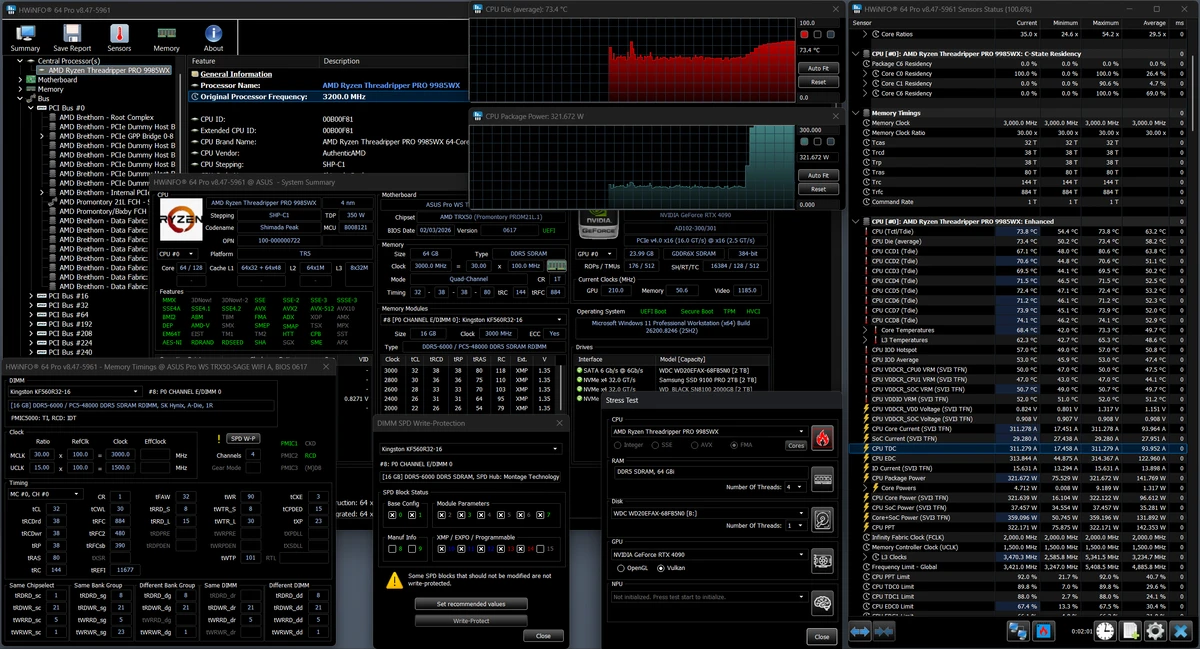
HWiNFO is a free hardware information and diagnostic utility designed to identify, analyze, and display detailed information about virtually every hardware component in a Windows computer. Whether you want to inspect your processor, storage devices, memory, motherboard, or other system components, HWiNFO provides an extensive overview through an organized and easy-to-navigate interface.

One of the software's strengths is its portable design, allowing it to run without installation. This makes it especially useful for technicians, IT professionals, and enthusiasts who need to examine multiple computers without installing software on each device. Hardware information is presented in a structured tree view, while detailed reports make it easy to understand system specifications and component status.

Beyond hardware identification, HWiNFO can display processor details and supported hardware sensor information for monitoring system health. It also includes benchmarking capabilities for evaluating system performance and allows users to export comprehensive reports in HTML, XML, or plain text formats. Combining detailed hardware analysis, reporting, and monitoring in a lightweight package, HWiNFO is a valuable utility for diagnosing and evaluating Windows PCs.

Features of HWiNFO

  • Comprehensive hardware information and diagnostics
  • Detects and identifies hardware components
  • Displays detailed system information in a tree-view layout
  • Portable application that can run without installation
  • Hardware sensor monitoring (when supported)
  • Detailed processor information
  • System benchmarking capabilities
  • Generate comprehensive hardware reports
  • Export reports in HTML, XML, or text formats
  • Useful for system analysis and performance evaluation
  • Lightweight and free to use

Interface and Usability

After using HWiNFO, I found the interface highly organized despite the large amount of information it presents. Hardware components are grouped in a logical tree structure, making it easy to navigate through categories such as processors, memory, storage devices, and other system components.

Detailed information is displayed clearly for each selected component, while report generation is straightforward for users who need to document system specifications. Although the volume of technical information may seem overwhelming for beginners, experienced users and technicians will appreciate the depth of detail and the efficient layout.

Who Should Use HWiNFO?

  • PC enthusiasts who want detailed hardware information
  • IT professionals and system administrators
  • Computer technicians diagnosing hardware issues
  • Users monitoring hardware sensors and system health
  • Anyone evaluating computer performance or generating hardware reports

Conclusion

HWiNFO is one of the most comprehensive free hardware diagnostic tools available for Windows. It combines detailed hardware identification, sensor monitoring, benchmarking, and reporting in a lightweight portable application that requires no installation. Whether you need to inspect system specifications, monitor hardware health, or generate detailed reports, HWiNFO provides the necessary tools in a well-organized interface.

Pros & Cons

✓

Pros

  • Comprehensive hardware detection and analysis
  • Portable and free to use
  • Detailed hardware sensor monitoring
  • Organized tree-view interface
  • Generates reports in multiple formats
  • Includes benchmarking capabilities
  • Lightweight application
✕

Cons

  • Large amount of technical information may be overwhelming for beginners
  • Some sensor information depends on hardware support

Frequently Asked Questions

What is HWiNFO used for?

HWiNFO is used to identify hardware components, display detailed system information, monitor supported hardware sensors, and generate comprehensive reports about a computer's hardware.

Is HWiNFO free?

Yes. HWiNFO is available as a free hardware information and diagnostic utility.

Does HWiNFO require installation?

No. HWiNFO is portable, which means it can be run directly without installing it on a Windows computer.

Can HWiNFO monitor hardware temperatures and sensors?

Yes. HWiNFO can display information from supported hardware sensors, including system monitoring data when the hardware provides it.

Can HWiNFO generate hardware reports?

Yes. HWiNFO allows users to generate detailed system reports and export them in HTML, XML, or plain text formats.

Who should use HWiNFO?

HWiNFO is suitable for PC enthusiasts, IT professionals, technicians, and anyone who needs detailed hardware information, system diagnostics, or performance analysis for Windows computers.

Recommended apps [Freeware]:
  • Stretchly 1.22.0 Stretchly logo reminds you to take breaks while working on your computer, promoting better health and productivity.
  • DiskMax 7.33 DiskMax logo cleans unnecessary files, optimizes Windows storage, and helps improve PC performance with automated maintenance tools
  • Disk Benchmark 1.0 Disk Benchmark logo measures SSD, HDD, NVMe, and USB drive performance with detailed speed, IOPS, and latency tests
  • Brave Browser 1.92.141 Brave Browser logo Browse faster and more privately, block ads, earn BAT rewards, and enjoy Chromium compatibility.
  • WinPaletter 1.0.9.8 WinPaletter logo Customize Windows themes, colors, icons, cursors, fonts, and visual styles
  • DuckDuckGo 0.164.1 DuckDuckGo logo Browse privately with tracker blocking, ad protection, private search, cookie controls, and secure browsing tools built in.
Recommended apps [Shareware]:
  • UPDF 2.5.5 UPDF logo AI-powered PDF editor for Windows that simplifies editing, annotating, converting, and managing PDFs
  • Text Edit Plus 16.5 Text Edit Plus logo a lightweight text editor with text analysis, word frequency statistics, and document editing tools
  • O&O SafeErase 21.3.26142 O&O SafeErase logo securely deletes files, drives, and internet traces using certified methods to prevent data recovery on Windows
  • iNMR 7.1.9 iNMR logo Analyze and process NMR spectroscopy data with iNMR, featuring 1D–3D processing, scripting, simulations, and broad format support
  • SynthFont2 2.9.2.1 SynthFont2 logo a MIDI editor and player that renders MIDI files into audio using SoundFonts, VST instruments, and SFZ
  • CrawlRhino SEO Crawler 1.1.36.0 CrawlRhino SEO Crawler logo Analyze website structure, detect SEO issues, audit backlinks, and generate detailed reports with a comprehensive website crawler.