FileLegit Windows Multimedia Media Players YouTube Music (Desktop App)
YouTube Music (Desktop App) logo

YouTube Music (Desktop App) 3.12.0

  • User Rating:
    ★★★★★
    ★★★★★
    0.0 ★ 0Votes
  • Requirements:
    Windows
  • Version: 3.12.0
  • Latest updated: 3 weeks ago
  • License: Open Source  
  • Publisher: pear-devs
  • Size: 274 MB
× app stores

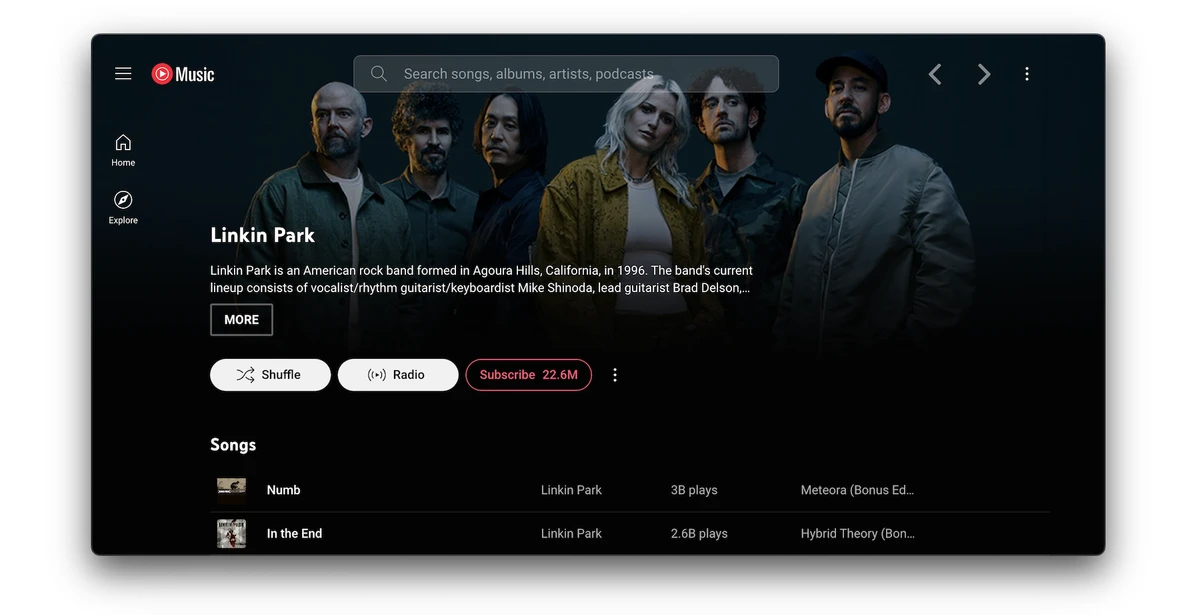
YouTube Music Desktop App is an open-source, cross-platform desktop application that brings the YouTube Music service to Windows, macOS, and Linux in a dedicated desktop environment. Rather than using the service inside a web browser, the application delivers a standalone experience while preserving the familiar YouTube Music interface.

What makes this desktop client stand out is its extensive plugin ecosystem. Users can customize the application with optional features ranging from ad blocking and keyboard shortcuts to synchronized lyrics, equalizer controls, visualizers, media key support, and playback enhancements. The plugin-based approach allows you to enable only the features you need with a single click, making the app flexible without changing the familiar YouTube Music experience.

Features of YouTube Music Desktop App

  • Open-source and cross-platform desktop application
  • Preserves the familiar YouTube Music interface
  • Runs independently from your web browser
  • One-click plugin management
  • Built-in ad blocker
  • Integrated downloader plugin
  • Keyboard shortcuts and global media controls
  • Audio equalizer plugin
  • Crossfade between songs
  • Playback speed controls
  • Synchronized lyrics support
  • Genius lyrics integration
  • SponsorBlock integration for skipping non-music sections
  • Visualizer plugins
  • Ambient lighting effects
  • Dynamic album color themes
  • Picture-in-Picture mode
  • Windows taskbar media controls
  • macOS Touch Bar support
  • Linux MPRIS media key support
  • Discord Rich Presence integration
  • Last.fm and ListenBrainz scrobbling
  • Playlist sharing with Music Together
  • Video/song mode switching
  • Notification support
  • Precise volume controls
  • Optional compact sidebar
  • Plugin framework for further customization

Interface and Usability

One of the first things I noticed is how closely the desktop application mirrors the official YouTube Music web experience. Navigation feels immediately familiar, so there is virtually no learning curve if you've already used YouTube Music in a browser. Running as a standalone desktop application is a practical improvement. Music playback remains separate from browser tabs, making multitasking cleaner and reducing distractions.

The plugin system is another highlight. Instead of overwhelming users with every feature enabled by default, the application lets you activate or disable plugins individually. This modular approach makes customization straightforward while keeping the interface uncluttered. Keyboard shortcuts, media key integration, and notification support also contribute to a desktop experience that feels more natural than simply opening YouTube Music in a browser tab.

Who Should Use YouTube Music Desktop App?

  • Regular YouTube Music listeners
  • Users who prefer dedicated desktop applications over browser tabs
  • Music enthusiasts who enjoy customizing their software
  • Users looking for keyboard shortcuts and desktop media controls
  • Open-source software supporters
  • Windows, macOS, and Linux users seeking a native-like music experience

Conclusion

The YouTube Music offers a thoughtful desktop alternative for anyone who regularly uses YouTube Music. Instead of reinventing the interface, it enhances the familiar experience with desktop-specific conveniences and a powerful collection of optional plugins. Features like ad blocking, keyboard shortcuts, synchronized lyrics, equalizer controls, playback enhancements, and desktop media integration make the application feel much closer to a native music player than a browser shortcut.

Pros & Cons

✓

Pros

  • Clean standalone desktop experience
  • Familiar YouTube Music interface
  • Open-source and cross-platform
  • Extensive plugin ecosystem
  • Built-in ad blocker
  • Integrated downloader plugin
  • Excellent keyboard shortcut support
  • Flexible customization options
  • Supports lyrics, equalizer, and visualizers
  • Easy plugin management
✕

Cons

  • Unofficial desktop client
  • Some advanced features depend on optional plugins
  • Certain plugins may not be useful for every user

Frequently Asked Questions

What is YouTube Music?

YouTube Music Desktop App (Unofficial) is an open-source desktop client for YouTube Music that provides a dedicated application for Windows, macOS, and Linux while preserving the familiar YouTube Music interface.

Is YouTube Music Desktop App an official Google application?

No. This is an unofficial desktop application developed by the open-source community. It connects users to the YouTube Music service but is not an official Google product.

Which operating systems are supported?

The application is designed to run across multiple platforms, including Windows, macOS, and Linux.

Can I customize the application?

Yes. One of the application's main strengths is its plugin framework. Users can enable or disable individual plugins to add features such as ad blocking, synchronized lyrics, equalizer controls, playback speed adjustments, visualizers, media shortcuts, and more.

Does the application support keyboard shortcuts?

Yes. It includes keyboard shortcut support and media key integration, allowing users to control playback without switching back to the application window.

Does YouTube Music Desktop App require YouTube Music?

Yes. The application serves as a desktop client for the YouTube Music service. You use it to access your YouTube Music library and playback in a dedicated desktop environment rather than through a web browser.

Recommended apps [Freeware]:
  • Burp Suite 2026.4.3 Burp Suite logo Test, analyze, and secure web applications with Burp Suite’s advanced proxy, scanning, and penetration testing tools
  • UniGetUI 2026.2.3 UniGetUI logo graphical interface for Winget, Scoop, and Chocolatey, making software installation, updates, and removal easy on Windows
  • Dropbox 260.4.2926 Dropbox logo cloud storage service for syncing files, backup, and sharing documents across Windows, mobile, and web devices
  • Youtube Downloader HD 6.0.0.0 Youtube Downloader HD logo a simple Windows tool for downloading and converting YouTube videos in HD formats
  • GnuCash 5.16 GnuCash logo open-source accounting software for tracking personal and small business finances with double-entry bookkeeping
  • cPicture LE 4.14 cPicture LE logo Manage, browse, crop, search, and process digital photos with a lightweight image workflow application supporting plugins and JPEG tools.
Recommended apps [Shareware]:
  • Adobe Illustrator 2026 Adobe Illustrator logo professional vector graphic editor for creating logos, illustrations, and scalable designs.
  • Duplicate Photos Fixer Pro 1.3.1086.1158 Duplicate Photos Fixer Pro logo finds and removes duplicate and similar photos to organize your library and save space
  • SQL Backup Master 8.5.1120 SQL Backup Master logo SQL Server backups with cloud storage, encryption, scheduling, and recovery features
  • n-Track Studio 10.3.1.10935 n-Track Studio logo a powerful multitrack audio recording and editing software with MIDI support, VST plugins, live effects, and professional mixing tool
  • MusConv 4.10.471 MusConv logo music transfer tool that helps users move playlists between Spotify, Apple Music, and other streaming services easily
  • ManyCam 9.3.0.11 ManyCam logo Enhance video calls and live streams with webcam effects, screen recording, voice changing, and multi-platform broadcasting tools.