Image for Windows logo

Image for Windows 4.12

  • User Rating:
    ★★★★★
    ★★★★★
    0.0 0Votes
  • Requirements:
    Windows
  • Version: 4.12
  • Latest updated: 3 days ago
  • License: Free Trial  
  • Publisher: TeraByte Unlimited
  • Size: 198 MB
× app stores

Image for Windows is a professional disk imaging and backup solution designed to protect entire systems, including operating systems, applications, and user data. Instead of backing up individual files, it creates complete image-based backups of hard drives or partitions, allowing full system restoration when needed. It is part of the broader TeraByte Drive Image Backup and Restore Suite and works with technologies such as Volume Shadow Copy Service (VSS) and PHYLock to create consistent backups even while Windows is running.

Features of Image for Windows

  • Full system, disk, and partition backup.
  • Create image backups while Windows is running (via VSS or PHYLock).
  • Restore entire systems or selected partitions.
  • Save backups to:
    • USB drives
    • Internal or network drives
    • CD, DVD, or Blu-ray media
  • Bootable recovery media creation (MakeDisk wizard).
  • Support for AES-256 encryption for secure backups.
  • Backup verification for data integrity.
  • Incremental-style “changed data only” backups.
  • Compression options for balancing speed and storage size.
  • Support for large GPT disks over 2TB.
  • Restore individual files using TBIView and TBIMount tools.
  • Supports multiple file systems including:
    • NTFS, FAT32, exFAT
    • Ext2/3/4, XFS, BTRFS, ReiserFS
    • HFS+
  • Network backup and restore support (including UNC paths).
  • Command-line automation support.
  • Scheduling via Windows Task Scheduler.
  • Hardware-independent restore capabilities.
  • Physical-to-virtual and virtual-to-physical conversion support.

User Experience

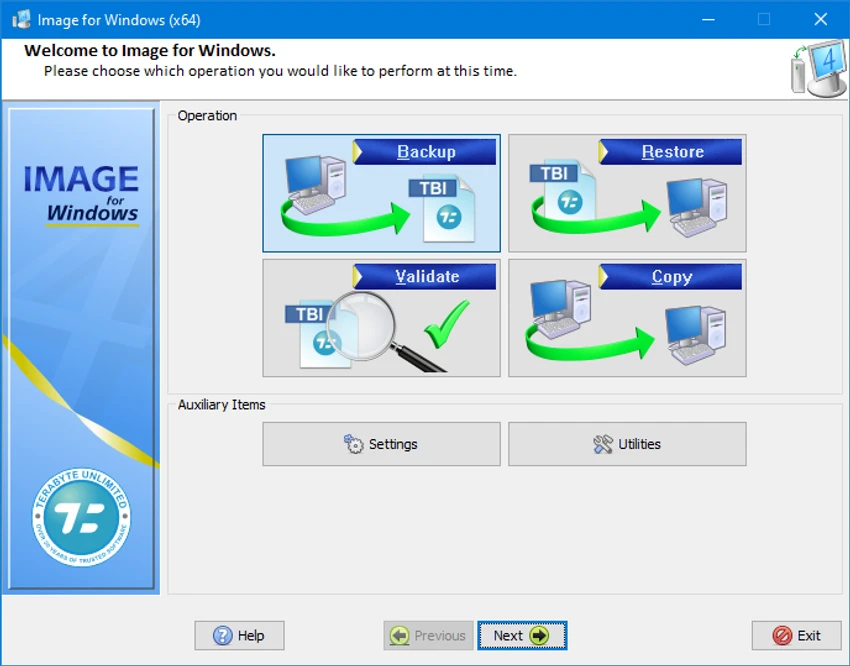
Image for Windows is designed with a wizard-driven interface that simplifies the process of creating and restoring system backups. Even though it is a professional-grade tool, users are guided step-by-step when creating disk images or recovery media.

The ability to back up a running system without rebooting is particularly useful, thanks to VSS integration. Backup operations are stable and include verification options that help ensure data integrity. Restoration is straightforward: users boot from a recovery disc and restore entire drives or partitions. Advanced users benefit from command-line support and scheduling options, which allow full automation of backup strategies.

Who Should Use Image for Windows?

  • Users who want full system backup and recovery.
  • IT professionals managing multiple systems.
  • Businesses needing reliable disaster recovery solutions.
  • Users migrating systems or upgrading hardware.
  • Advanced users needing automation and scripting support.

Conclusion

Image for Windows is a powerful and comprehensive disk imaging tool that provides complete system protection through reliable backups, encryption, and recovery options. It is especially valuable for users who want full control over system backup strategies and disaster recovery planning.

Pros & Cons

Pros

  • Full system and disk imaging solution.
  • Supports live backups using VSS/PHYLock.
  • Strong encryption and compression options.
  • Bootable recovery media included.
  • Supports many file systems and disk types.
  • Advanced automation and scheduling features.
  • Physical-to-virtual and virtual-to-physical support.

Cons

  • Interface may feel technical for beginners.
  • Focused on full imaging rather than simple file backup.
  • Advanced features require learning for optimal use.

Frequently Asked Questions

What is Image for Windows used for?

It is used to create full disk and system backups and restore them when needed.

Can it back up a running system?

Yes. It uses VSS or PHYLock to create backups while Windows is running.

Does it support encryption?

Yes. It supports AES-256 encryption for secure backups.

Can it restore to different hardware?

Yes. It supports hardware-independent restore features.

Is it suitable for businesses?

Yes. It supports automation, scheduling, and network-based backups for enterprise use.

Recommended apps [Freeware]:
  • FBackup 9.9.1044 FBackup logo a free Windows backup tool offering automatic backups, cloud support, encryption, and easy file recovery options
  • Far Manager 3.0 Build 6699 Far Manager logo Manage files efficiently with Far Manager's fast text-based interface, plugins, and archive support
  • Clean Space 2026 v721 Clean Space logo a Windows utility for removing system junk files, cache, logs, and improving online privacy protection.
  • KiCad 10.0.4 KiCad logo electronic design tool for creating schematics, PCB layouts, 3D models, and circuit designs on Windows
  • UniGetUI 2026.2.2 UniGetUI logo graphical interface for Winget, Scoop, and Chocolatey, making software installation, updates, and removal easy on Windows
  • Uninstalr 3.1 Uninstalr logo a free software uninstaller featuring batch uninstall, leftover cleanup, and portable support
Recommended apps [Shareware]:
  • Adobe Acrobat Pro DC 2026 Adobe Acrobat Pro DC logo create, edit, and secure PDFs easily. Professional PDF solution for individuals and businesses.
  • My Music Collection 3.4.16.178 My Music Collection logo organize CDs, vinyl, and MP3s with cataloging, tracking, and export features on Windows
  • EF Duplicate MP3 Finder 26.05 EF Duplicate MP3 Finder logo Find and remove duplicate MP3, FLAC, WMA, and OGG audio files using tag-based and similarity analysis
  • Pazu StreamGet 3.1.5 Pazu StreamGet logo Download movies and TV shows from major streaming platforms to MP4 or MKV
  • Lansweeper 12.8.1.3 Lansweeper logo network discovery and IT asset management tool for software inventory, compliance reporting, and device tracking
  • DaVinci Resolve 21.0.1 DaVinci Resolve logo a professional video editor with advanced color grading, AI tools, and high-end post-production features.