


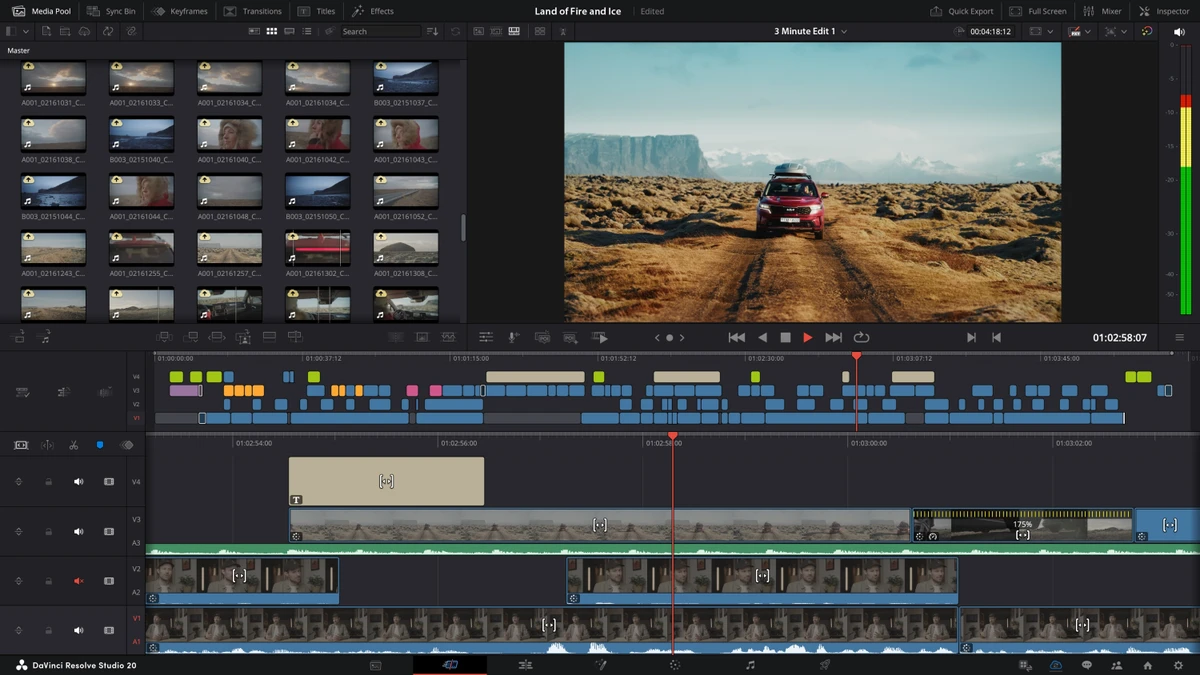

DaVinci Resolve is a professional all-in-one video editing, color grading, visual effects, and audio post-production software. It is widely used in the film, television, and content creation industries for its high-end tools, AI-powered features, and advanced rendering capabilities.
Overview
DaVinci Resolve combines editing, color correction, visual effects, motion graphics, and audio post-production into a single integrated platform. It is designed to handle demanding workflows ranging from standard video editing to high-end cinematic production. The software is known for its industry-leading color grading tools and powerful GPU acceleration, allowing real-time playback of high-resolution formats up to 32K and support for multiple GPUs. It also includes advanced AI-powered tools such as voice isolation and music separation, making it a comprehensive solution for modern video production.
With support for HDR workflows, stereoscopic 3D editing, remote collaboration, and scripting automation, DaVinci Resolve is built for both independent creators and large production studios.
Features of DaVinci Resolve
- Professional non-linear video editing tools
- Advanced color grading and color correction system
- Support for up to 32K resolution and 120fps workflows
- Multi-GPU acceleration for real-time playback
- AI-powered tools including voice isolation and dialogue separation
- Music remixer and advanced audio tools via Fairlight
- Dolby Vision and HDR10+ grading support
- 45+ built-in Resolve FX visual effects
- AI UltraNR noise reduction system
- SuperScale image upscaling technology
- Lens distortion correction tools
- Stereoscopic 3D editing and grading support
- Professional HDR scopes with nit-based scaling
- Remote collaboration and live grading capabilities
- Media asset management and workflow integration tools
- Python and Lua scripting support
- API support for custom automation workflows
- Rendering and encoding plugin support
- Second-monitor full-screen playback support
User Experience
Using DaVinci Resolve feels like working inside a full-scale post-production studio. The interface is structured into distinct workspaces for editing, color grading, audio, and effects, which helps separate complex tasks into manageable sections.
The color grading tools are particularly powerful and are often considered industry-leading. Users have precise control over exposure, tone, and color balance, making it suitable for cinematic-quality projects. Performance is highly dependent on hardware, but when properly configured, the software delivers real-time playback even with complex effects and high-resolution footage. Multi-GPU support significantly improves responsiveness in professional environments.
The inclusion of AI tools such as voice isolation and dialogue separation simplifies audio cleanup tasks that would otherwise require specialized software. Similarly, features like noise reduction and SuperScale upscaling help enhance footage quality without extensive manual work. While powerful, DaVinci Resolve has a steep learning curve. New users may require time to become comfortable with its workflow, but the depth of functionality rewards long-term use.
Who Should Use DaVinci Resolve?
- Professional video editors
- Filmmakers and cinematographers
- YouTubers and content creators
- Colorists and post-production specialists
- Audio engineers working in video production
- Studios requiring collaborative workflows
- Users seeking an all-in-one editing solution
System Requirements
- Windows 10 (Creators Update or later)
- 16 GB RAM (32 GB recommended for Fusion)
- GPU with at least 4 GB VRAM
- OpenCL 1.2 or CUDA 12.8 support
- 16 GB VRAM recommended for advanced AI tools
- 32 GB RAM and 12 GB VRAM for heavy background rendering
- NVIDIA Studio Driver 581.57 or newer (recommended)
- Blackmagic Design Desktop Video 12.9 or later (for monitoring)
Conclusion
DaVinci Resolve is a complete professional post-production solution that combines video editing, color grading, VFX, and audio tools in a single platform. Its advanced capabilities, AI features, and industry adoption make it one of the most powerful editing tools available today.


