


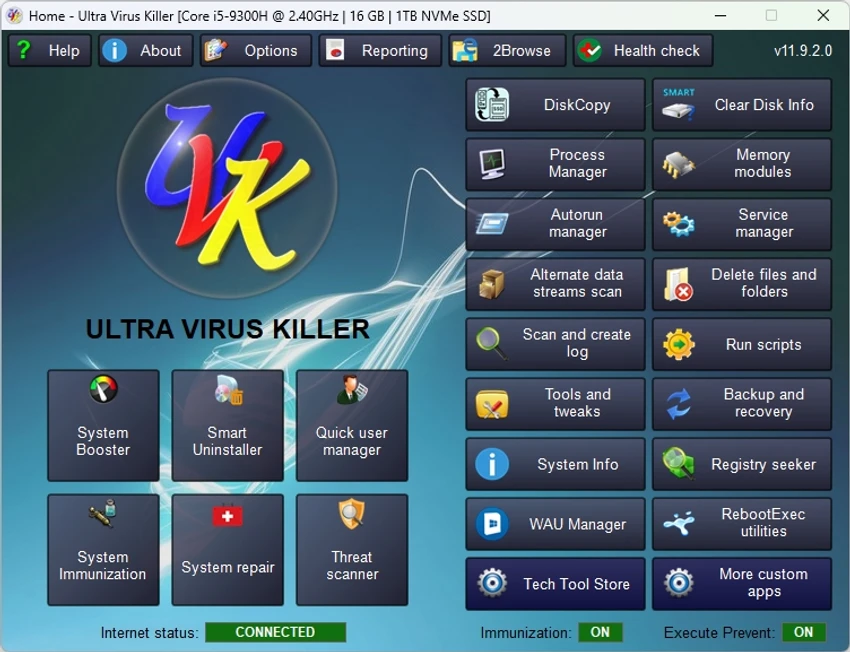

UVK Ultra Virus Killer is a comprehensive Windows utility designed for malware detection, removal, and deep system repair. It goes beyond traditional antivirus tools by offering manual control over processes, startup entries, services, drivers, and system files. The software is aimed at advanced users, IT technicians, and system administrators who need detailed control over infected or unstable systems. It combines malware removal capabilities with powerful system repair and diagnostic tools.
Features of UVK Ultra Virus Killer
- Detect and remove malware and spyware from infected systems
- Advanced process manager with bulk process control
- Kill, pause, resume, and analyze running processes
- Verify digital signatures of running processes
- Startup entries and scheduled task management
- Remove or modify services and drivers
- Hide or filter Microsoft-signed system components
- Submit file hashes to VirusTotal for analysis
- Delete or replace locked and in-use files
- Force deletion of stubborn files and folders
- Scan system and generate detailed diagnostic logs
- Custom UVK scripting for automated system repairs
- Built-in system repair toolkit (50+ repair functions)
- Reset Windows update, DNS cache, registry settings, and system components
- Restore point management and system recovery tools
- System information reporting and export
- Registry protection and system immunization features
- Backup and restore Windows registry settings
- File and registry permission control tools
User Experience
During my experience with UVK Ultra Virus Killer, the software felt more like a professional system recovery suite than a standard malware scanner. Instead of relying on automatic detection alone, it provides granular control over system processes, services, and startup behavior.
The process manager is particularly powerful, allowing users to terminate multiple processes at once, verify signatures, and investigate suspicious activity directly through online lookup or VirusTotal integration. This makes it useful for diagnosing infected or compromised systems. The startup and services management modules provide deep access to system-level configurations. Users can remove unwanted entries, disable suspicious services, and inspect driver behavior, which is especially helpful when dealing with persistent malware infections.
One of the strongest aspects of UVK is its system repair capability. It includes a wide range of built-in fixes for common Windows issues such as broken updates, registry corruption, DNS problems, and system component failures. These tools make it useful not only for malware removal but also for general system recovery. The scripting and automation features add another layer of flexibility, allowing users to run predefined fixes, execute cleanup routines, and automate system repair workflows.
Who Should Use UVK Ultra Virus Killer?
- IT technicians and system administrators
- Advanced users dealing with malware infections
- Users repairing heavily damaged Windows systems
- Security professionals analyzing system behavior
- Users needing deep control over startup and services
- Anyone performing advanced system cleanup or recovery
Conclusion
UVK Ultra Virus Killer is not a typical antivirus tool—it is a deep system recovery and malware removal suite. Its ability to control processes, repair system components, and remove stubborn infections makes it a powerful utility for advanced troubleshooting.


