Coolutils PDF Splitter logo

Coolutils PDF Splitter 5.2.0.43

  • User Rating:
    ★★★★★
    ★★★★★
    0.0 0Votes
  • Requirements:
    Windows
  • Version: 5.2.0.43
  • Latest updated: 4 days ago
  • License: Free Trial  
  • Publisher: Coolutils
  • Size: 111 MB
× app stores

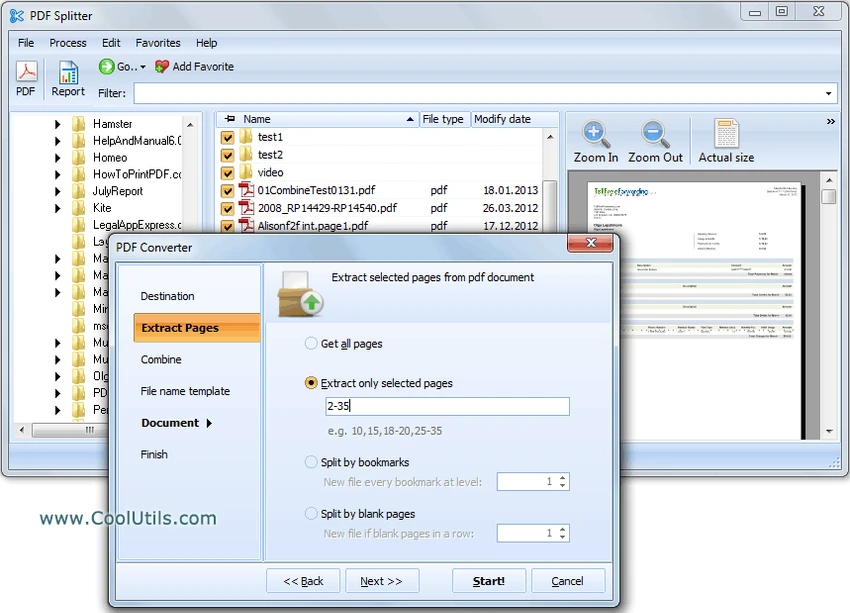
Coolutils PDF Splitter is a dedicated PDF utility designed to divide large PDF documents into smaller, more manageable files. It supports several splitting methods, including manual page breaks and automatic keyword detection, making it particularly useful for businesses that work with invoices, purchase orders, shipping documents, or other repetitive PDF records. The software is built to process large documents efficiently while simplifying document organization.

Features of Coolutils PDF Splitter

  • Split extremely large PDF files quickly
  • Automatically split PDFs using custom keywords
  • Detect document boundaries based on recurring phrases
  • Split PDFs by invoice number
  • Split PDFs by shipping number
  • Split PDFs by purchase order
  • Split PDFs by medical insurance claim forms
  • Automatically include detected numbers in output filenames
  • Manual PDF splitting with page preview
  • Create custom page breaks for documents without a fixed template

User Experience

After using Coolutils PDF Splitter, I found that the software focuses on one task and performs it efficiently. The interface is straightforward, making it easy to choose a splitting method depending on the structure of the PDF document.

The keyword-based splitting feature is particularly useful when handling business documents. Instead of manually separating hundreds of pages, the software can automatically detect predefined phrases—such as invoice identifiers, company names, purchase orders, or shipping numbers—and split the document accordingly. This significantly reduces repetitive manual work when processing large batches of files. Another practical feature is automatic file naming. When splitting invoices or similar documents, the software can append the detected document number to the output filename, making the resulting files easier to identify and organize.

For documents without a consistent layout, the manual splitting mode offers greater flexibility. By previewing pages and placing custom break points, users can divide PDFs exactly where needed. Overall, Coolutils PDF Splitter delivers a focused and efficient experience for users who frequently work with large PDF files and structured business documents.

Who Should Use Coolutils PDF Splitter?

  • Businesses processing large collections of PDF documents
  • Accounting departments managing invoices
  • Offices handling purchase orders or shipping documentation
  • Healthcare organizations working with insurance claim forms
  • Users who need to split lengthy PDF files into smaller documents

Conclusion

Coolutils PDF Splitter is a specialized PDF utility that simplifies the process of separating large PDF documents into individual files. Its keyword-based splitting, automatic filename generation, and manual page selection provide flexible options for handling both standardized and custom PDF documents.

Pros & Cons

Pros

  • Fast processing of very large PDF files
  • Automatic splitting using custom keywords
  • Supports invoice, shipping number, purchase order, and claim form detection
  • Automatic output file naming based on detected numbers
  • Manual page splitting with document preview
  • Simple and easy-to-use interface

Cons

  • Designed specifically for splitting PDFs rather than full PDF editing

Frequently Asked Questions

What is Coolutils PDF Splitter used for?

Coolutils PDF Splitter is used to divide large PDF documents into smaller files using keywords or manually selected page breaks.

Can it split PDFs automatically?

Yes. The software can automatically split PDF files when it detects predefined keywords or phrases, such as invoice numbers, company names, purchase orders, or shipping numbers.

Does the software support manual PDF splitting?

Yes. It includes a manual mode that lets you preview pages and define custom split points.

Can output files be named automatically?

Yes. When splitting documents such as invoices, the software can include the detected document number in the output filename for easier organization.

Which Windows versions are supported?

Coolutils PDF Splitter supports Windows 7, Windows 8, Windows 10, and Windows 11.

Recommended apps [Freeware]:
  • Red Burner 19.7 Red Burner logo a portable disc burning tool for CD, DVD, and Blu-ray with fast ISO handling and a simple interface
  • DAEMON Tools Lite 12.6.0.2458 DAEMON Tools Lite logo Create, mount, and manage ISO, MDF, and other disc images with virtual CD/DVD/Blu-ray drives
  • VidCoder 12.20 VidCoder logo Convert, encode, and rip DVDs and Blu-rays with VidCoder, a powerful open-source video transcoding tool for Windows
  • FluentCleaner 26.06.04 FluentCleaner logo a lightweight Windows cleaning tool designed to remove unnecessary files using a modern, minimal WinUI 3 interface
  • 3D Youtube Downloader 1.26.6 3D Youtube Downloader logo download videos, playlists, and subtitles from YouTube and other sites
  • WildBit Viewer 6.20.1 WildBit Viewer logo a fast, lightweight image viewer for Windows with slideshow, compare tools and EXIF metadata support
Recommended apps [Shareware]:
  • Adobe Premiere Pro 2026 Adobe Premiere Pro logo professional 4K video editor with advanced audio, color, and motion graphics tools.
  • Secret Disk 2026 v323 Secret Disk logo create hidden, password-protected virtual drives to securely store private files on Windows
  • Total Audio Converter 6.1.0.299 Total Audio Converter logo convert MP3, WAV, FLAC, AAC and more with batch processing, CD ripping, and Windows integration.
  • ExamDiff Pro 17.0.1.4 ExamDiff Pro logo a Windows file comparison tool for code review, folder sync, and document diffing with merge support.
  • LumaBooth 8.2.1.0 LumaBooth logo professional photo booth software for photos, GIFs, videos, 360 booths, and event customization
  • Axialis IconVectors 1.70 Axialis IconVectors logo a lightweight SVG icon editor for developers, featuring live code previews, vector editing tools, and workflow integration