


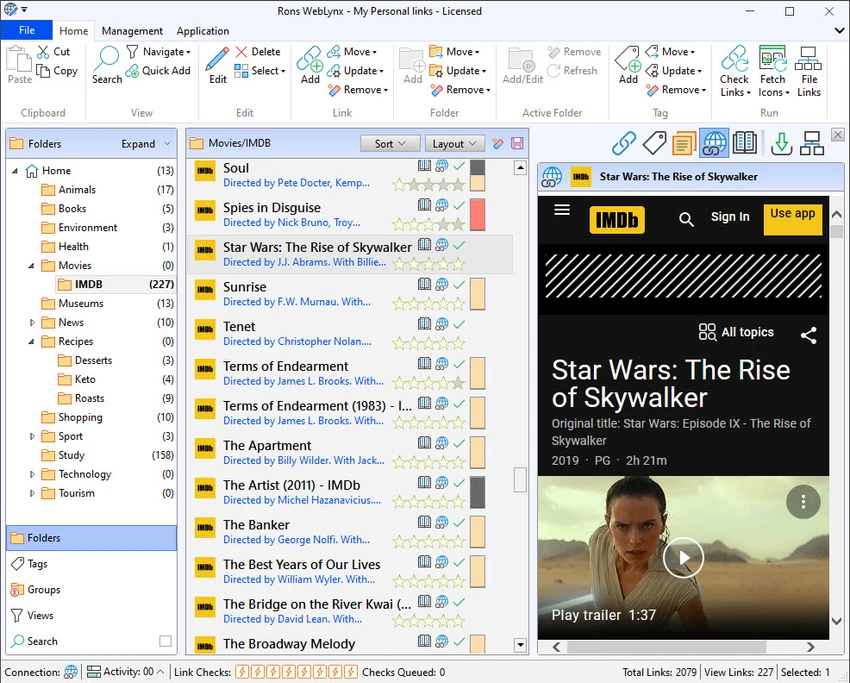

Rons WebLynx is a Windows desktop application designed for organizing, managing, and maintaining large collections of web bookmarks. Unlike browser-based bookmark systems, it stores links locally in WebLynx documents, keeping everything offline and independent from cloud services or third-party storage. The software is aimed at users who deal with large volumes of links—such as researchers, marketers, analysts, or anyone who needs structured control over thousands of saved URLs. It focuses on combining organization, automation, and link validation into a single dedicated environment.
Features of Rons WebLynx
- Local, offline bookmark storage in WebLynx documents
- Folder and tag-based organization system
- Views for identifying new, broken, and duplicate links
- Cross-folder and cross-tab search functionality
- Grouping system for folders and tags to create custom views
- Import bookmarks from browsers and external sources
- Drag-and-drop support for text, files, and folders
- Import links from Outlook, Word documents, websites, and other tools
- Export bookmarks to HTML, XML, Linker Exchange, or content formats
- Clipboard and file export options
- Automatic link checking and periodic validation
- Manual re-checking, cleaning, and organization tools
- Automatic filing rules for link management
- Built-in RSS reader with feed extraction from web pages
- “Page with Feed” view for feed discovery
- RSS feed grouping and inbox-style organization
- Browser integration for Chrome, Edge, Brave, and Firefox
- Landing Zone for centralized link capture
User Experience
Using Rons WebLynx feels closer to working with a professional data management tool than a simple bookmark manager. The interface is structured around folders, tags, and views, which makes it suitable for users who want strict control over large link collections. The import system is one of its most practical strengths. Being able to pull links from browsers, documents, emails, or even entire websites makes it easy to build a centralized repository without manual effort. Drag-and-drop support also helps streamline daily use.
Another strong point is automation. Features like automatic link checking, duplicate detection, and rule-based filing reduce the need for manual maintenance, which becomes especially valuable when managing thousands of bookmarks. The built-in RSS reader adds another layer of usefulness, turning the application into a hybrid between a bookmark manager and a lightweight content monitoring tool. However, the interface is more functional than modern or visually minimal, reflecting its focus on utility over aesthetics.
Who Should Use Rons WebLynx?
- Researchers managing large collections of reference links
- Digital marketers tracking campaigns, competitors, or resources
- Knowledge workers organizing structured web archives
- Users who want offline, private bookmark storage
- Professionals handling thousands of URLs across projects
- Power users who need automation and link validation tools
Conclusion
Rons WebLynx is a highly capable offline bookmark management system built for serious link organization and automation. Its strength lies in its structured approach to managing large-scale bookmark collections, combined with powerful features like automatic link checking, import flexibility, and RSS integration. While it may feel more technical than typical browser bookmark tools, it delivers strong value for users who need reliability, organization, and long-term control over their web resources. For anyone dealing with heavy research or large digital libraries of links, it is a practical and efficient solution.


