Wise Disk Cleaner logo

Wise Disk Cleaner 11.3.6.856

  • User Rating:
    ★★★★★
    ★★★★★
    0.0 ★ 0Votes
  • Requirements:
    Windows
  • Version: 11.3.6.856
  • Latest updated: 3 weeks ago
  • License: Freeware  
  • Publisher: WiseCleaner
  • Size: 11.8 MB
× app stores

Wise Disk Cleaner is a free Windows utility designed to help users reclaim storage space and improve overall system performance. By scanning for junk files, temporary data, browser caches, and other unnecessary files, it helps keep your computer clean and responsive. Beyond basic cleanup, Wise Disk Cleaner also includes privacy protection features, disk defragmentation, and scheduled maintenance, making it a practical solution for routine PC optimization.

Features of Wise Disk Cleaner

  • Remove temporary files and unnecessary system data.
  • Clean system logs and outdated files.
  • Delete old downloads and other storage-consuming clutter.
  • Clear browsing history, cookies, and cached data from major web browsers.
  • Disk defragmentation and optimization.
  • Fast system scanning.
  • Customizable cleanup options.
  • Schedule automatic daily, weekly, or monthly cleanups.
  • Lightweight design with easy-to-use interface.

User Experience

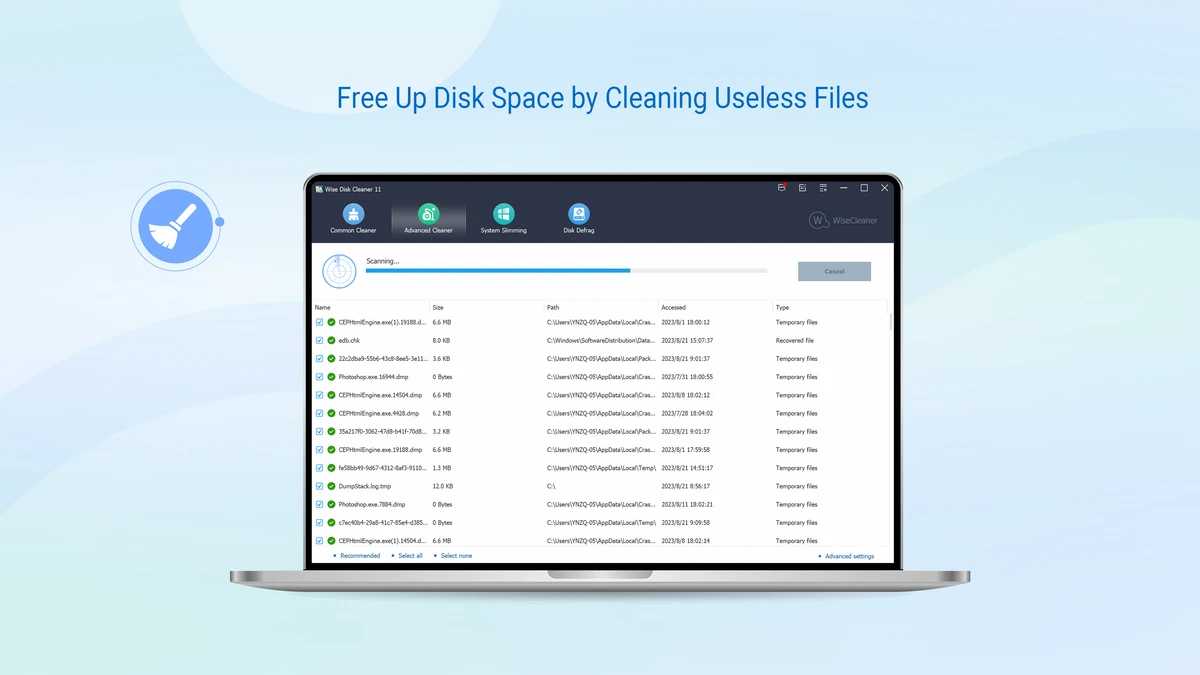
Wise Disk Cleaner is designed to make routine PC maintenance simple, even for users with little technical experience. The interface is straightforward, making it easy to start a scan and review the results before removing unwanted files.

The scanning process is fast and identifies a wide range of temporary files, system junk, browser caches, and other unnecessary data that can accumulate over time. I appreciated that cleanup options are customizable, allowing you to decide exactly which areas should be cleaned rather than deleting everything automatically. The built-in privacy cleaning features are also useful, making it easy to remove browsing history, cookies, and cached data from supported browsers without navigating multiple browser settings.

Another standout feature is the inclusion of disk defragmentation and optimization. Having cleanup and disk optimization in a single application makes regular maintenance more convenient. Automatic scheduling is equally valuable. Once configured, Wise Disk Cleaner can perform maintenance on a daily, weekly, or monthly basis, helping keep the system clean without requiring manual intervention. Overall, the software remains lightweight, responsive, and suitable for everyday Windows maintenance.

Who Should Use Wise Disk Cleaner?

  • Windows users running low on storage space.
  • Users looking to improve PC responsiveness.
  • Gamers who want to free up disk space for new installations.
  • Office users managing large files.
  • Privacy-conscious users who want to clear browser data regularly.
  • Anyone seeking an easy-to-use Windows maintenance utility.

Conclusion

Wise Disk Cleaner is a dependable and user-friendly maintenance tool that helps Windows users recover storage space and keep their systems running efficiently. Its combination of junk file removal, privacy cleaning, disk optimization, and automated scheduling covers the essential tasks needed for regular PC maintenance.

Pros & Cons

✓

Pros

  • Completely free to use.
  • Fast and efficient junk file scanning.
  • Frees up valuable disk space.
  • Cleans browser history, cookies, and cache.
  • Includes disk defragmentation and optimization.
  • Supports automatic scheduled cleanups.
  • Customizable cleaning options.
  • Lightweight and easy to use.
✕

Cons

  • Disk defragmentation is primarily beneficial for traditional hard drives rather than SSDs.
  • Advanced users may prefer more detailed system optimization options.

Frequently Asked Questions

What is Wise Disk Cleaner?

Wise Disk Cleaner is a free Windows utility that removes junk files, temporary data, browser caches, and other unnecessary files to free up storage space and improve system performance.

Can Wise Disk Cleaner improve PC performance?

Yes. By removing unnecessary files and optimizing disk storage, Wise Disk Cleaner can help improve system responsiveness and free up valuable disk space.

Does Wise Disk Cleaner protect my privacy?

Yes. The software can remove browsing history, cookies, and cached data from major web browsers, helping reduce traces of your online activity.

Does Wise Disk Cleaner include disk optimization?

Yes. In addition to cleaning junk files, Wise Disk Cleaner includes disk defragmentation and optimization features to improve storage performance.

Can I schedule automatic cleanups?

Yes. Wise Disk Cleaner allows you to schedule automatic cleanups on a daily, weekly, or monthly basis, helping keep your PC maintained with minimal effort.

Is Wise Disk Cleaner free?

Yes. Wise Disk Cleaner is available as a free utility for Windows and includes its core cleanup, privacy protection, scheduling, and disk optimization features.

Recommended apps [Freeware]:
  • 3D Youtube Downloader 1.26.7 3D Youtube Downloader logo download videos, playlists, and subtitles from YouTube and other sites
  • Jux 4.900 Jux logo fractal explorer for Mandelbrot and Julia sets with advanced coloring, lighting effects, and high-resolution rendering tools
  • Kalmuri 4.2.5 Kalmuri logo screen capture and recording tool that supports screenshots, MP4 recording, and multiple export formats with hotkey support
  • PropertySystemView 1.22 PropertySystemView logo View and modify Windows file metadata, timestamps, and system properties with this portable utility designed for advanced users.
  • Xlideit Image Viewer 1.0.260712 Xlideit Image Viewer logo View, organize, and make quick image adjustments with a lightweight viewer featuring thumbnails, slideshows, zoom, crop, and resize tools.
  • LosslessCut 3.69.0 LosslessCut logo Cut and trim videos quickly without re-encoding using a lightweight editor designed for fast, lossless video processing.
Recommended apps [Shareware]:
  • Screenpresso 2.3.0 Screenpresso logo a versatile screen capture and video recording tool with editing and annotation features.
  • EF File Catalog 26.05 EF File Catalog logo Catalog disks, folders, archives, and media for fast offline browsing, searching, and file organization
  • EF Mailbox Manager 26.05 EF Mailbox Manager logo Manage multiple POP3 email accounts, remove spam on the server, and download messages securely
  • Bandicam 8.3.1.2537 Bandicam logo Record your screen, gameplay, and streaming videos with Bandicam, a fast screen recorder for Windows with high-quality compression
  • YT Downloader 10.6.8 YT Downloader logo a fast video downloader and converter for YouTube, playlists, MP3 and HD formats on Windows
  • 3delite Duplicate Picture Finder 1.0.112.122 3delite Duplicate Picture Finder logo Find duplicate and similar pictures on your PC with image comparison, previews, EXIF details, and multi-threaded scanning tools.