FileLegit Windows Multimedia Video Editors Fast Video Cutter Joiner
Fast Video Cutter Joiner logo

Fast Video Cutter Joiner 7.1.4.0

  • User Rating:
    ★★★★★
    ★★★★★
    0.0 0Votes
  • Requirements:
    Windows
  • Version: 7.1.4.0
  • Latest updated: 2 days ago
  • License: Free Trial  
  • Publisher: XiangJi Software Studio
  • Size: 23 MB
× app stores

Not every video editing task requires a professional editing suite. If your goal is simply to trim unwanted sections from a video or combine multiple clips into one file, Fast Video Cutter Joiner offers a lightweight and straightforward solution. Designed with simplicity in mind, it focuses on two core functions—cutting and joining videos—without overwhelming users with advanced editing tools.

Overview

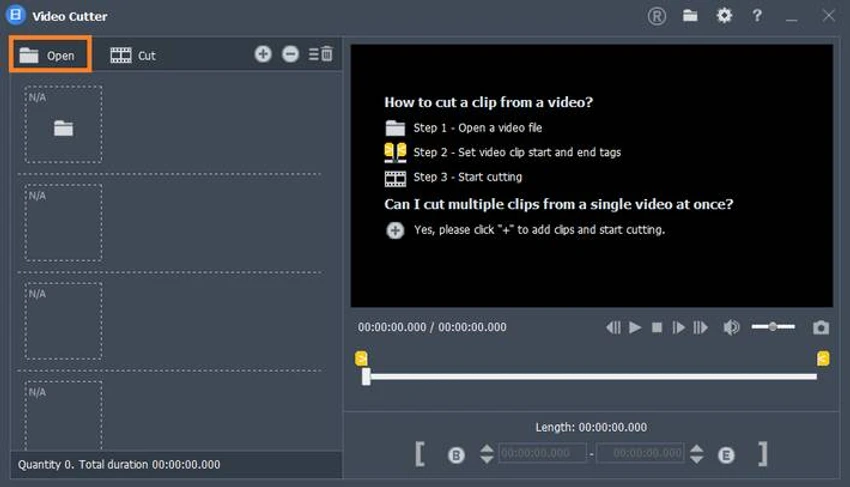
Fast Video Cutter Joiner is a Windows application designed to help users cut individual video files or merge multiple videos into a single output. Rather than providing a full-featured editing environment, it concentrates on these essential editing functions through an easy-to-use interface. The application offers both Simple and Advanced processing modes. While Simple mode emphasizes speed and ease of use, Advanced mode provides additional control over output settings, including video format and audio characteristics. A basic built-in video player also allows users to preview clips before processing.

Features of Fast Video Cutter Joiner

  • Cut or trim individual video files
  • Join multiple video clips into a single file
  • Simple, uncluttered user interface
  • Separate Cut and Join workflows
  • Simple and Advanced processing modes
  • Advanced mode allows adjustment of:
    • Output video format
    • Audio characteristics
  • Built-in video preview player
  • Straightforward file importing
  • Suitable for beginner users
  • Compatible with Windows 11, 10, 8, and 7 (32-bit and 64-bit)

User Experience

Fast Video Cutter Joiner focuses on ease of use from the moment it's launched. Instead of presenting users with dozens of editing tools, the application immediately asks whether the goal is to cut a video or join multiple clips together. This streamlined approach keeps the workflow clear and easy to follow.

Importing videos is straightforward, and starting the processing requires only a few steps. Even users with little editing experience should have no difficulty understanding how the software operates. The inclusion of both Simple and Advanced modes provides useful flexibility. Simple mode is ideal for quick editing tasks, while Advanced mode allows users to adjust output-related settings such as the video format and audio characteristics when additional control is needed.

Although the built-in media player is fairly basic, it serves its intended purpose well by allowing users to preview videos before cutting or joining them. This helps confirm edits without requiring an external media player. Overall, Fast Video Cutter Joiner prioritizes speed and simplicity over advanced editing functionality, making it a practical choice for everyday trimming and merging tasks.

Who Should Use Fast Video Cutter Joiner?

  • Beginners learning basic video editing
  • Users who only need to trim or merge videos
  • Home users creating simple video clips
  • Anyone looking for a lightweight alternative to complex video editing software
  • Users who prefer a clean and uncomplicated interface

Conclusion

Fast Video Cutter Joiner delivers exactly what its name promises: a straightforward way to cut and merge video files without the complexity of a full-featured editing suite. Its uncluttered interface, beginner-friendly workflow, and dual editing modes make it suitable for users who need to perform quick video editing tasks efficiently.

Pros & Cons

Pros

  • Easy-to-use interface
  • Simple workflow for cutting and joining videos
  • Suitable for beginners
  • Simple and Advanced processing modes
  • Built-in video preview player
  • Quick file importing
  • Lightweight design
  • Compatible with modern and older Windows versions

Cons

  • Limited to basic cutting and joining functions
  • Built-in video player offers only basic preview capabilities
  • Lacks the advanced editing tools found in professional video editors

Frequently Asked Questions

What is Fast Video Cutter Joiner?

Fast Video Cutter Joiner is a Windows video editing application designed to cut individual videos or merge multiple clips into a single file.

Can I trim videos with Fast Video Cutter Joiner?

Yes. The software allows users to cut or trim sections from individual video files.

Can I combine multiple videos?

Yes. One of the application's primary functions is joining multiple video clips into a single output file.

Does the software have different editing modes?

Yes. It includes both Simple and Advanced modes. Advanced mode provides additional control over output video format and audio characteristics.

Can I preview videos before editing?

Yes. Fast Video Cutter Joiner includes a built-in video player for previewing loaded videos before processing.

Is Fast Video Cutter Joiner suitable for beginners?

Yes. Its clean interface and straightforward workflow make it easy for users with little or no video editing experience.

Which Windows versions are supported?

Fast Video Cutter Joiner supports Windows 11, Windows 10, Windows 8, and Windows 7 in both 32-bit and 64-bit versions.

Recommended apps [Freeware]:
  • DirPrintOK 7.61 DirPrintOK logo fast and portable tool to print or export directory contents in XLS, HTML, CSV, or TXT formats.
  • CalendarTask 3.30.290.9088 CalendarTask logo lightweight desktop calendar with note-taking, cloud sync, reminders, and desktop scheduling tools
  • DriversCloud 12.1.6 DriversCloud logo scan system hardware, update drivers, monitor performance, and analyze blue screen errors (BSODs) on Windows.
  • TickTick 8.1.0.1 TickTick logo Organize tasks, manage schedules, and stay focused with TickTick's calendar, Pomodoro timer, and collaboration tools
  • ShotCut 26.6.25 ShotCut logo free video editor for Windows with multi-format support, timeline editing, filters, and advanced video/audio tools
  • Monkey's Audio 13.13 Monkey's Audio logo a free lossless audio compressor that reduces file size while preserving original sound quality
Recommended apps [Shareware]:
  • EF Commander 26.06 EF Commander logo a feature-rich Windows file manager with FTP, media tools, archiving, and advanced file control
  • Sync Breeze 18.2.32 Sync Breeze logo fast and reliable file synchronization tool for local drives, NAS devices, and enterprise storage systems.
  • Bulk Image Downloader 6.64 Bulk Image Downloader logo Download full-size images and videos from galleries, forums, and image hosts with Bulk Image Downloader
  • Total Image Converter 8.5.0.320 Total Image Converter logo Windows tool for converting, resizing, and editing images in bulk with support for RAW, TIFF, PSD, and more
  • Modern CSV 2.4.3 Modern CSV logo high-performance CSV editor for Windows with fast large-file handling, multi-cell editing, filtering, and sorting tools
  • ezAccounting 3.16.18 ezAccounting logo Manage accounting, payroll, invoicing, and tax forms locally with ezAccounting, an affordable desktop solution for small businesses