



GiliSoft USB Lock is a Windows-based security utility designed to prevent unauthorized data transfer and device usage. It focuses on controlling access to USB drives, optical media, system ports, applications, and websites, helping users reduce the risk of data leakage in shared or managed computers.
Overview
GiliSoft USB Lock is a data leak prevention and endpoint control tool that allows administrators or individual users to restrict how external devices and system functions are used on a PC. Once installed, it can block USB storage devices, limit CD/DVD access, restrict program execution, and even control access to specific websites. The software is designed for environments where data security and controlled access are important, such as shared office computers or family PCs. Instead of relying on complex security suites, it provides direct control over devices and system functions through a centralized interface.
Key Features of GiliSoft USB Lock
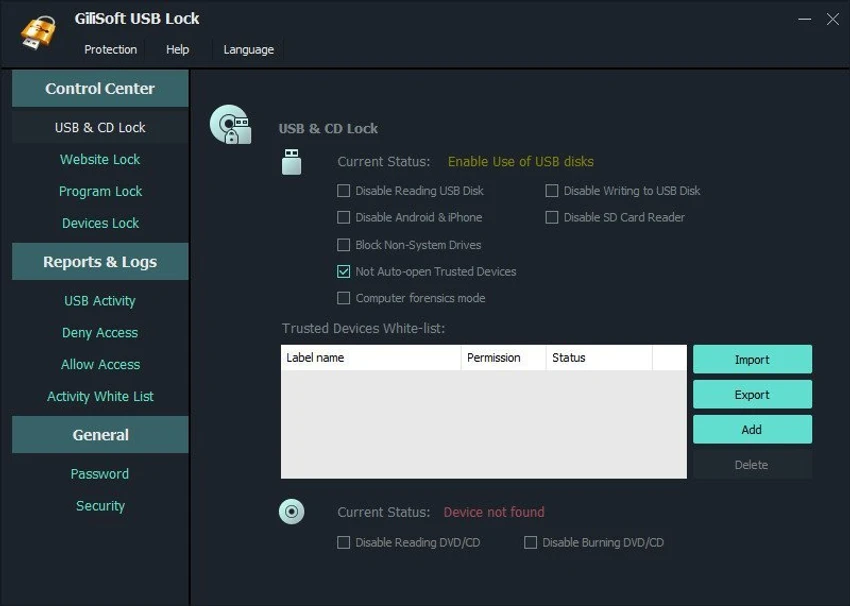
- USB Drive Control: Blocks or restricts read/write access to USB storage devices and external drives unless explicitly authorized.
- CD/DVD and Blu-ray Restrictions: Disables reading or writing to optical media, including CD, DVD, and Blu-ray formats.
- Website Blocking: Restricts access to selected websites and redirects blocked pages to a blank or restricted page.
- Program Access Control: Prevents selected applications from running, including system tools like Control Panel if configured.
- Device Locking System: Restricts access to multiple hardware interfaces such as printers, Bluetooth, modem ports, COM/LPT ports, and more.
- Password Protection: Ensures only authorized users can modify or unlock restrictions.
- Alarm Notifications: Sends email alerts after multiple incorrect password attempts.
- Data Leak Prevention: Helps prevent unauthorized copying or duplication of data to external storage devices.
User Experience
From a usability perspective, GiliSoft USB Lock presents a straightforward interface focused on toggling restrictions rather than complex configuration. The control panel allows users to quickly enable or disable access rules for USB devices, programs, and websites.
The experience is more functional than modern-looking, but it is practical for users who want direct control over system-level restrictions without navigating complicated security suites. Once configured, restrictions work in the background without requiring continuous monitoring.
Who Should Use GiliSoft USB Lock?
- Office administrators managing shared computers
- Parents looking to control device and website access on family PCs
- Organizations needing basic endpoint restriction tools
- Users who want to prevent USB-based data copying
Conclusion & Recommendation
GiliSoft USB Lock focuses on one core idea: restricting physical and digital access points to prevent unauthorized data movement. It does this by offering control over USB ports, disks, applications, and websites in a single tool.


