


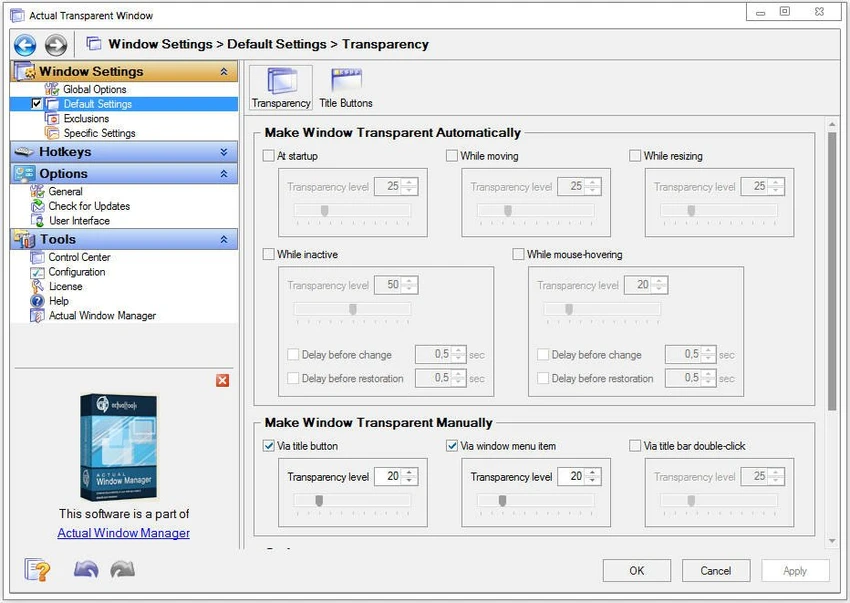

Actual Transparent Window is a Windows desktop enhancement tool designed to improve multitasking by allowing users to adjust the transparency of individual application windows. Instead of constantly minimizing or switching between windows, users can make one window semi-transparent and continue working across multiple applications more efficiently.
The software introduces a flexible way to manage screen space by letting users visually stack and organize windows using customizable transparency levels. Each window can have its own transparency setting, which helps create a more layered and efficient desktop experience. It is especially useful for users who frequently reference information from one application while working in another.
Features of Actual Transparent Window
- Set custom transparency levels for any window (0% to 100%)
- Assign individual transparency settings per application
- Automatic transparency when a window becomes inactive
- Restore full opacity when the window is active
- Ghost mode to allow mouse clicks through transparent windows
- Apply transparency effects while moving or resizing windows
- Toggle transparency on/off by double-clicking the title bar
- Add a “Make Transparent” button to window title bars
- Quickly switch between predefined transparency levels
- Hotkey support (e.g., Win + T for toggle transparency)
- Per-window customization for different workflows
- Multilingual support (multiple international languages)
Interface and Usability
Actual Transparent Window integrates directly into the Windows environment by adding transparency controls to application windows. Users can adjust opacity using title bar buttons, hotkeys, or context menus, making it quick and intuitive to control window visibility. The software is designed to be lightweight and non-intrusive, allowing users to focus on their tasks while managing window transparency in the background. Once configured, transparency rules can be applied automatically based on window activity or user preferences. Although the feature set is focused, users benefit from a smooth and simple workflow that does not require complex setup.
Who Should Use Actual Transparent Window?
- Office users working with multiple documents and browsers
- Students researching while writing notes or papers
- Developers referencing documentation while coding
- Designers and creatives managing multiple tools
- Multitaskers who frequently switch between applications
- Anyone wanting a cleaner and more layered desktop workspace
Conclusion
Actual Transparent Window is a simple yet powerful desktop enhancement tool that improves multitasking by giving users precise control over window transparency. It helps reduce clutter and makes it easier to work across multiple applications without constantly switching focus.


