


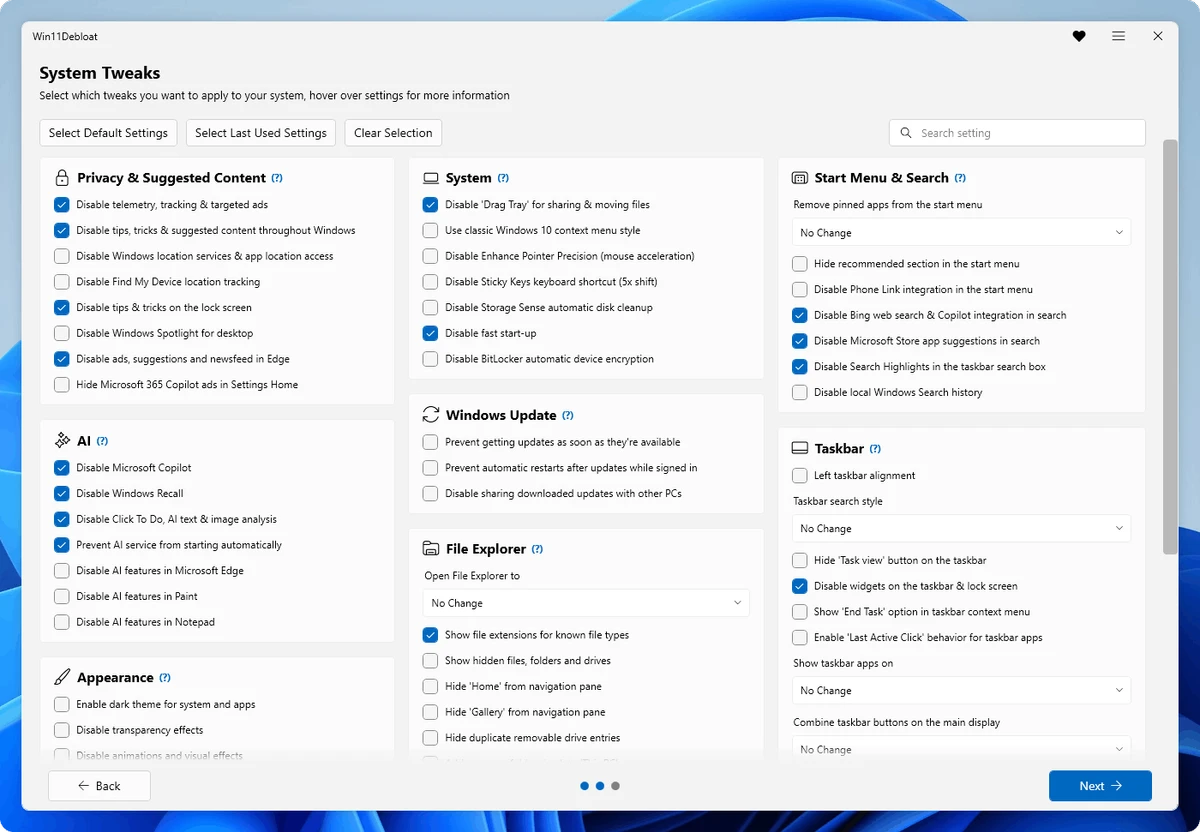

Win11Debloat is a lightweight PowerShell script designed to help users clean up and customize their Windows experience without requiring a traditional installation. The tool focuses on removing unnecessary pre-installed applications, reducing unwanted system features, and adjusting Windows settings that many users may find intrusive.
Instead of manually searching through multiple Windows settings or uninstalling applications individually, Win11Debloat provides a streamlined way to apply common system changes through an automated script. It can remove selected bloatware apps, disable telemetry and diagnostic data collection, turn off targeted advertising, and simplify various Windows interface elements. The script supports both Windows 10 and Windows 11 customization options. Users can choose recommended default changes for their operating system or select individual modifications based on their preferences. This flexibility makes it suitable for users who want more control over their Windows setup without applying unnecessary changes.
Win11Debloat also includes features aimed at advanced users and system administrators. It offers command-line support, Windows Audit mode compatibility, and the ability to apply settings to other Windows user accounts. Users can export and import their preferred configurations, making it easier to apply the same setup across multiple systems.
The tool does not install additional software and can be customized directly by editing the PowerShell script. Users can modify which actions are performed by adjusting the script settings before running it. A restore point is recommended before making changes, and included registry files allow users to reverse certain modifications if needed.
Features of Win11Debloat
- Removes selected pre-installed Windows applications and bloatware
- Disables telemetry, diagnostic data collection, and targeted advertisements
- Removes unwanted Windows interface elements and suggestions
- Supports Windows 10 and Windows 11 default cleanup settings
- Provides PowerShell-based automation without installation
- Allows users to choose individual modifications
- Supports command-line arguments for specific actions
- Includes export and import options for preferred configurations
- Supports Windows Audit mode for advanced users
- Allows customization by editing the PowerShell script
Interface and Usability
Win11Debloat works differently from traditional Windows applications because it runs as a PowerShell script rather than using a graphical interface. Users interact with the tool through PowerShell commands and configuration options.
The setup process is straightforward for users familiar with command-line tools. After extracting the files, users open PowerShell, navigate to the script location, adjust execution settings, and run the script. The available options allow users to apply default Windows 10 or Windows 11 configurations or select specific changes manually. The ability to customize the script is a useful feature for experienced users who want precise control over what gets changed. However, users unfamiliar with PowerShell may need additional guidance before making system-level modifications.
Who Should Use Win11Debloat?
- Windows users looking to reduce unnecessary pre-installed apps
- Power users who want to customize Windows settings
- System administrators managing multiple Windows systems
- Users preparing fresh Windows installations
- Anyone who prefers script-based system customization tools
Conclusion
Win11Debloat is a practical solution for users who want to simplify their Windows environment without manually changing dozens of settings. Its script-based approach makes it lightweight, flexible, and suitable for both personal computers and more advanced system management tasks.


