


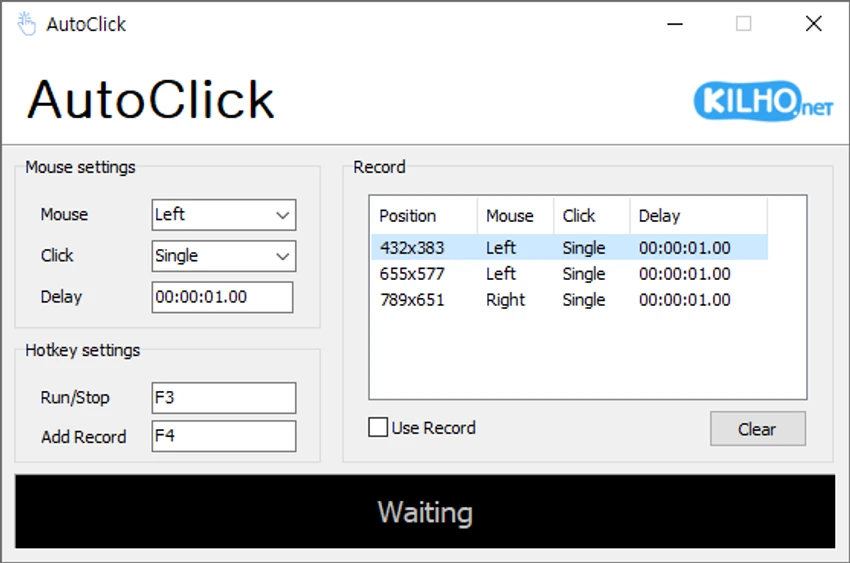

KILHO AutoClick is a lightweight automation utility designed to simplify repetitive mouse-clicking tasks. Instead of manually clicking the same location over and over, the application allows users to create customized click sequences with specific timing, mouse buttons, and screen coordinates. This makes it suitable for repetitive workflows, click-intensive games, and other situations where automated mouse input can improve efficiency.
The software focuses on ease of use rather than advanced macro programming. Users can define individual click actions, choose between left, right, or middle mouse buttons, specify single or double clicks, and configure delays between each action. Every recorded step is displayed in an organized table, making it easy to review and edit the click sequence before execution.
Activation is handled through a keyboard hotkey, allowing users to start automated clicking without repeatedly interacting with the interface. The application can also help prevent a computer from becoming idle during lengthy tasks by maintaining continuous mouse activity.
While KILHO AutoClick offers the essential features expected from a basic auto-clicking utility, it lacks the ability to save click profiles for future use. Users must clear existing sequences and record new ones whenever they need a different automation setup. Despite this limitation, its straightforward design makes it an accessible solution for beginners as well as users who simply need reliable click automation without unnecessary complexity.
Features of KILHO AutoClick
- Automates repetitive mouse clicking tasks.
- Configure custom time intervals between clicks.
- Record click sequences with precise screen coordinates.
- Supports left-click, right-click, and middle mouse button actions.
- Perform single clicks, double clicks, or mouse wheel actions.
- Set custom delays between consecutive actions.
- Start automation using a configurable keyboard hotkey.
- Displays recorded actions in an organized table for easy review.
- Clear existing click sequences and create new ones when needed.
- Can help prevent the computer from entering idle mode during long-running tasks.
Interface and Usability
KILHO AutoClick prioritizes simplicity over feature overload. During use, the interface feels straightforward and easy to understand, even for first-time users. Creating a click sequence follows a logical workflow: position the cursor, choose the desired mouse button, select the click type, configure any delay, and add the action using the assigned hotkey.
One aspect I appreciated is the organized table that lists every recorded action along with its mouse position and click type. This makes it easy to verify the sequence before running the automation.
The learning curve is minimal, making the software accessible for casual users as well as those who only need basic click automation. However, the inability to save click profiles is noticeable. Every new automation task requires clearing the existing sequence and recording it again, which can become inconvenient for users who frequently switch between different click routines. Overall, the interface succeeds in delivering a clean, uncomplicated experience focused on quick setup and execution.
Who Should Use KILHO AutoClick?
- Users who perform repetitive mouse-clicking tasks.
- Gamers who need repeated click actions for supported gameplay scenarios.
- Users handling repetitive data entry or routine desktop workflows.
- Anyone looking for a simple auto-clicking utility with minimal setup.
- Beginners who prefer an easy-to-use automation tool without advanced scripting.
Conclusion
KILHO AutoClick delivers exactly what many users expect from a basic auto-clicking utility: quick setup, customizable click timing, and reliable mouse automation without unnecessary complexity. The software is easy to learn, making it suitable for beginners while still offering enough flexibility for common repetitive tasks and click-intensive applications. Its biggest drawback is the lack of profile saving, which limits convenience for users who frequently switch between different automation routines. Even so, if your primary goal is straightforward mouse click automation with customizable click actions and timing, KILHO AutoClick is a practical choice worth considering.


