Comfort Keys Pro logo

Comfort Keys Pro 9.6.2.0

  • User Rating:
    ★★★★★
    ★★★★★
    0.0 ★ 0Votes
  • Requirements:
    Windows
  • Version: 9.6.2.0
  • Latest updated: 3 weeks ago
  • License: Free Trial  
  • Publisher: Comfort Software
  • Size: 11 MB
× app stores

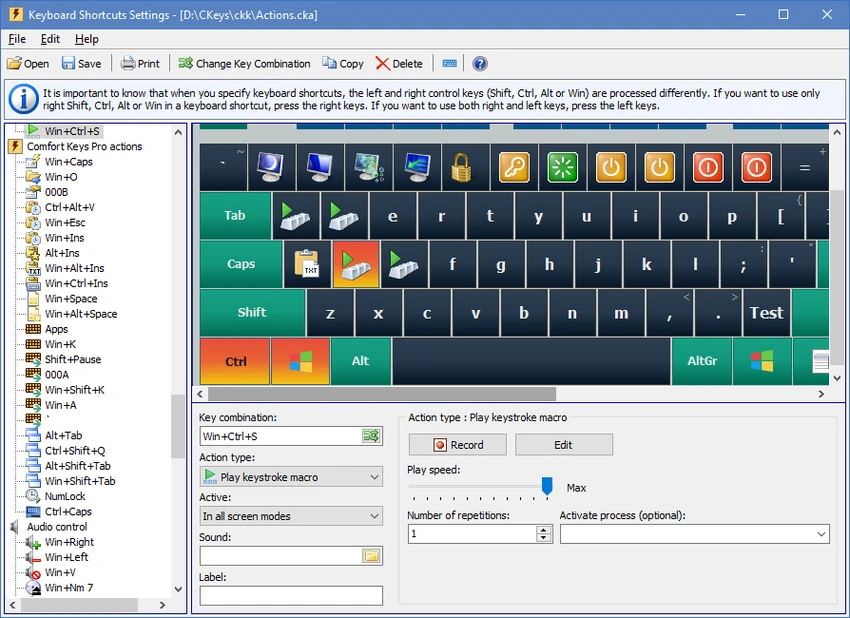
Comfort Keys Pro is a comprehensive Windows productivity suite designed to automate repetitive keyboard tasks and streamline everyday computer use. Rather than serving as a simple hotkey utility, it combines keyboard macros, text expansion, clipboard history, shortcut management, and an on-screen keyboard into a single application. After exploring its features, I found it particularly useful for reducing repetitive typing and speeding up common workflows without requiring any programming knowledge. Whether you frequently insert standard text, launch applications with hotkeys, or automate repetitive actions, Comfort Keys Pro offers a flexible set of tools that can save considerable time during daily work.

Features of Comfort Keys Pro

  • Keyboard macro recording and playback
  • Custom keyboard shortcut (hotkey) manager
  • Text templates and text expansion
  • Auto-text replacement
  • Clipboard history manager
  • Supports text, images, links, files, and other clipboard formats
  • Launch programs and websites using hotkeys
  • On-screen keyboard
  • Change text case (uppercase, lowercase, etc.)
  • Switch input language using shortcuts
  • Volume control via keyboard shortcuts
  • Block selected keys
  • Simulate alternative key presses
  • Supports macros within text templates (date, time, keystrokes, random text, and more)
  • No programming knowledge required

Interface and Usability

Comfort Keys Pro offers a feature-rich interface while remaining accessible to users with different experience levels. Setting up hotkeys, text templates, and macros is straightforward, with configuration options organized into dedicated modules.

I found the text expansion feature especially practical for inserting frequently used content such as email signatures, greetings, and addresses. The clipboard manager also adds convenience by storing previously copied items in multiple formats, making it easy to retrieve content that would normally be lost after copying something new. Although the application includes numerous productivity features, its modular design helps keep everything manageable. Once configured, most actions can be performed with simple keyboard shortcuts, allowing everyday tasks to be completed much faster.

Who Should Use Comfort Keys Pro?

  • Office professionals handling repetitive typing
  • Customer support representatives
  • Writers and editors
  • Developers and IT professionals
  • Administrative staff
  • Users who frequently work with templates or standard responses
  • Anyone looking to automate everyday Windows tasks

Conclusion

Comfort Keys Pro is much more than a keyboard shortcut utility. It provides a complete automation toolkit that helps reduce repetitive work, improve typing efficiency, and simplify everyday computer tasks. Its extensive customization options, macro capabilities, and clipboard management make it suitable for both personal and professional use.

Pros & Cons

✓

Pros

  • Comprehensive keyboard automation suite
  • Powerful hotkey manager
  • Built-in text expansion and templates
  • Macro recording and playback
  • Clipboard history supports multiple data formats
  • Includes an on-screen keyboard
  • No programming skills required
  • Highly customizable shortcuts and automation
  • Compatible with a wide range of Windows versions
✕

Cons

  • Initial configuration may take time for advanced workflows
  • Some features may be more than casual users need

Frequently Asked Questions

What is Comfort Keys Pro used for?

Comfort Keys Pro is a Windows productivity application that automates repetitive keyboard tasks through hotkeys, keyboard macros, text expansion, clipboard history, and shortcut management.

Can Comfort Keys Pro record keyboard macros?

Yes. The software allows you to record keyboard actions and play them back whenever needed, helping automate repetitive tasks without programming.

Does Comfort Keys Pro include a clipboard manager?

Yes. It features a clipboard manager that stores clipboard history and supports multiple data formats, including text, images, links, and files.

Can I automatically insert frequently used text?

Yes. The built-in text templates and auto-text features let you expand predefined abbreviations into longer text such as email signatures, addresses, greetings, passwords, and other commonly used content.

Is Comfort Keys Pro suitable for beginners?

Yes. Although it offers many advanced features, no programming knowledge is required. Basic hotkeys and text templates can be configured through the graphical interface.

Which operating systems are supported?

Comfort Keys Pro supports Windows 11, Windows 10, Windows 8.1, Windows 8, Windows 7, Windows Vista, Windows XP, as well as Windows Server 2025, 2022, 2019, 2016, 2012, and 2008.

Recommended apps [Freeware]:
  • NirLauncher Package 1.30.24 NirLauncher Package logo a portable Windows utility suite with 180+ NirSoft tools for system, network, and recovery tasks
  • Mozilla Firefox 152.0.6 Mozilla Firefox logo Browse the web securely and quickly with Mozilla Firefox, a customizable browser with strong privacy and add-on support
  • Brave Browser 1.92.141 Brave Browser logo Browse faster and more privately, block ads, earn BAT rewards, and enjoy Chromium compatibility.
  • Winstep Nexus 26.6 Winstep Nexus logo customizable desktop dock for Windows with app launch shortcuts, widgets, and multi-monitor support
  • StaticDesktopRuler 1.04 StaticDesktopRuler logo Windows utility that adds customizable on-screen rulers to improve alignment, navigation, and productivity on large monitors
  • SoftPerfect Ping Monitor 26.6 SoftPerfect Ping Monitor logo Monitor network hosts in real time with SoftPerfect Ping Monitor, featuring latency tracking, packet loss analysis, and customizable alerts
Recommended apps [Shareware]:
  • priPrinter Server 7.0.1.2625 priPrinter Server logo virtual printer driver that lets users preview, edit, and optimize print jobs before printing or exporting to PDF and image formats
  • CareUEyes Pro 2.6.1 CareUEyes Pro logo eye care software for Windows that reduces blue light, adjusts brightness, and helps prevent eye strain
  • 4K YouTube to MP3 26.2.0 4K YouTube to MP3 logo a simple tool to extract audio from YouTube, Vimeo, and more into MP3, M4A, or OGG
  • Actual Window Manager 8.15.4 Actual Window Manager logo advanced window controls, virtual desktops, transparency, and automation tools for Windows
  • Secure Delete 2026 v221 Secure Delete logo a Windows tool that permanently erases files and folders, making them unrecoverable with multiple security levels
  • UnHackMe 18.50.2026.708 UnHackMe logo Detect and remove rootkits, spyware, Trojans, and hidden malware with a security tool designed to protect your computer.