FolderMatch logo

FolderMatch 5.1.3.0

  • User Rating:
    ★★★★★
    ★★★★★
    0.0 ★ 0Votes
  • Requirements:
    Windows
  • Version: 5.1.3.0
  • Latest updated: 3 weeks ago
  • License: Free Trial  
  • Publisher: Salty Brine Software
  • Size: 18 MB
× app stores

FolderMatch is a comprehensive Windows utility designed to simplify file and folder management. It combines folder comparison, file comparison, duplicate file detection, synchronization, and several additional maintenance tools into a single application.

Whether you're verifying backups, synchronizing folders across drives, comparing document revisions, or cleaning duplicate files from your storage, FolderMatch provides a wide range of tools to streamline these tasks. Its side-by-side comparison interface and flexible filtering options make it easier to identify differences between folders and files without manually inspecting each item.

Beyond comparison and synchronization, FolderMatch also includes utilities such as a batch file renamer, timestamp editor, hexadecimal viewer, and atomic clock synchronization tool, making it a versatile addition to a Windows productivity toolkit.

Features of FolderMatch

  • Compare folders and subfolders side by side.
  • Compare individual files, including text content.
  • Supports comparison of:
    • Microsoft Office documents
    • OpenDocument files
    • PDF files
    • RTF
    • HTML
    • XML
  • Multiple comparison methods:
    • File name
    • File size
    • Date and time
    • File contents
    • Attributes
    • Version information
  • Folder synchronization tools.
  • Find duplicate files, even when filenames differ.
  • Duplicate detection based on:
    • Name
    • Size
    • Date
    • Content
  • Batch file and folder renaming.
  • Batch timestamp editing.
  • Hexadecimal file viewer.
  • Atomic clock synchronization utility.
  • Export and print comparison results.
  • Save and load unlimited comparison sessions.
  • Supports Unicode filenames.
  • Handles files larger than 4 GB.
  • Compatible with local, removable, optical, and network drives.

Interface and Usability

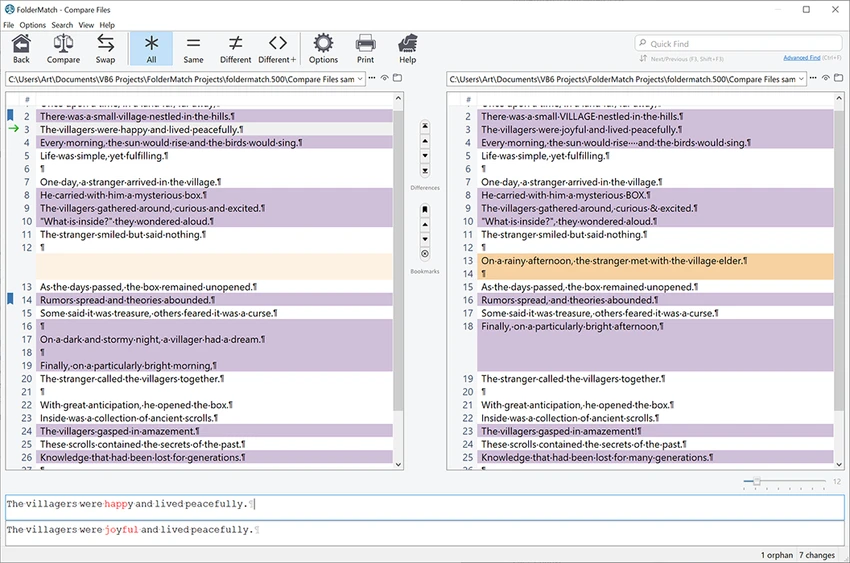
FolderMatch presents folder and file comparisons in a clear side-by-side layout that makes identifying differences straightforward. Filters allow users to narrow results by criteria such as file name, size, type, or date, helping reduce clutter during large comparisons.

The interface exposes a wide range of tools without making basic operations overly complicated. Users can manually copy, move, rename, or delete files directly from comparison results, while synchronization features simplify keeping folders aligned. Although the application includes many advanced functions, its organization makes common tasks relatively easy to perform after a short learning period.

Who Should Use FolderMatch?

  • Users comparing backup folders.
  • IT professionals managing file synchronization.
  • Developers comparing project folders.
  • Users cleaning duplicate files from storage.
  • Anyone organizing large document collections.
  • Professionals comparing Office or PDF documents.
  • Users needing batch file management tools.

Conclusion

FolderMatch is much more than a simple folder comparison utility. It combines file comparison, folder synchronization, duplicate detection, and several maintenance tools into one well-rounded application. This makes it particularly valuable for users who regularly organize, verify, or synchronize large collections of files.

Pros & Cons

✓

Pros

  • Comprehensive folder and file comparison tools.
  • Side-by-side comparison interface.
  • Built-in folder synchronization.
  • Fast duplicate file detection.
  • Supports Office, PDF, HTML, XML, and other document formats.
  • Includes batch renaming and timestamp editing.
  • Supports large files and Unicode filenames.
  • Works with local and network drives.
✕

Cons

  • Large feature set may require some time to learn.
  • Interface focuses more on functionality than modern design.
  • Some advanced features are intended for power users.

Frequently Asked Questions

What is FolderMatch used for?

FolderMatch is used to compare folders and files, synchronize directories, find duplicate files, batch rename files, and perform various file management tasks on Windows.

Can FolderMatch compare the contents of documents?

Yes. It can compare the text content of supported file formats, including Microsoft Office documents, OpenDocument files, PDF files, RTF, HTML, and XML, displaying differences in a side-by-side view.

Does FolderMatch synchronize folders?

Yes. In addition to showing differences between folders, FolderMatch includes synchronization features to help keep directories consistent.

Can FolderMatch find duplicate files with different names?

Yes. According to the provided information, it can identify duplicate files based on criteria such as content, size, date, or name, even when filenames are different.

Does FolderMatch support large files?

Yes. The software supports comparing files larger than 4 GB and works with Unicode filenames across multiple Windows-supported file systems.

What additional tools are included in FolderMatch?

Besides comparison and synchronization, FolderMatch includes a batch file renamer, timestamp editor, hexadecimal file viewer, atomic clock synchronization utility, and options to print or export comparison results.

Recommended apps [Freeware]:
  • Training Manager 2026 v4.10.4002 Training Manager logo Track employee training, compliance, certifications, and class schedules with centralized training management tools
  • Personal Backup 6.4.11.0 Personal Backup logo Schedule and automate file backups to local drives, networks, or FTP servers with Personal Backup for Windows
  • Image Sort 2.14.7 Image Sort logo a free, open-source photo organizer that helps you quickly sort, move, rename, and delete images
  • DBeaver 26.1.3 DBeaver logo Manage multiple databases with a powerful graphical interface for SQL editing, data handling, visualization, and administration tasks.
  • Converseen 0.15.2.6-1 Converseen logo Convert, resize, compress, and edit multiple images at once with a free cross-platform batch image processing tool.
  • VUPlayer 4.24 VUPlayer logo Play music with a lightweight audio player supporting multiple formats, playlists, customization, and enhanced listening controls.
Recommended apps [Shareware]:
  • UPDF 2.5.5 UPDF logo AI-powered PDF editor for Windows that simplifies editing, annotating, converting, and managing PDFs
  • UVK Ultra Virus Killer 11.10.26.0 UVK Ultra Virus Killer logo removes malware, manages system processes, repairs Windows issues, and provides advanced system cleanup tools
  • Total Image Converter 8.5.0.322 Total Image Converter logo Windows tool for converting, resizing, and editing images in bulk with support for RAW, TIFF, PSD, and more
  • Karaosoft Karma 2026.6.26 Karaosoft Karma logo Manage karaoke shows using drag-and-drop rotation, triple display support, and smart search tools.
  • QILING Disk Master Professional 8.8 QILING Disk Master Professional logo a backup and recovery tool for Windows offering system imaging, restore, and disk management
  • Apowersoft Video Download Capture 6.6.4.0 Apowersoft Video Download Capture logo Download, record, convert, and edit online videos with a versatile tool supporting multiple formats, resolutions, and streaming sources.