ManicTime logo

ManicTime 2026.1.5.0

  • User Rating:
    ★★★★★
    ★★★★★
    0.0 0Votes
  • Requirements:
    Windows
  • Version: 2026.1.5.0
  • Latest updated: 23 hours ago
  • License: Freeware  
  • Publisher: ManicTime
  • Size: 99 MB
×

ManicTime is an automatic time-tracking and productivity management tool designed to help individuals and businesses monitor computer activity, track work hours, and generate accurate reports. By recording application usage, website visits, document activity, and idle time, it provides a detailed overview of how time is spent throughout the workday.

Overview

Keeping track of work hours manually can be time-consuming and often inaccurate. ManicTime solves this problem by automatically recording computer activity in the background, eliminating the need for constant manual time entries. The software tracks applications, websites, documents, and inactive periods, presenting all collected information through a clear and easy-to-understand interface. Unlike many cloud-based tracking solutions, ManicTime stores all data locally on the user's machine, providing greater privacy and allowing the software to function without an internet connection.

With reporting tools, timesheet generation, project tracking integrations, and company-wide reporting capabilities, ManicTime serves both freelancers and organizations looking to improve productivity and time management.

Features of ManicTime

  • Automatic tracking of computer activity
  • Records application usage and active work time
  • Tracks website visits and document activity
  • Local data storage for enhanced privacy
  • Offline functionality without internet dependency
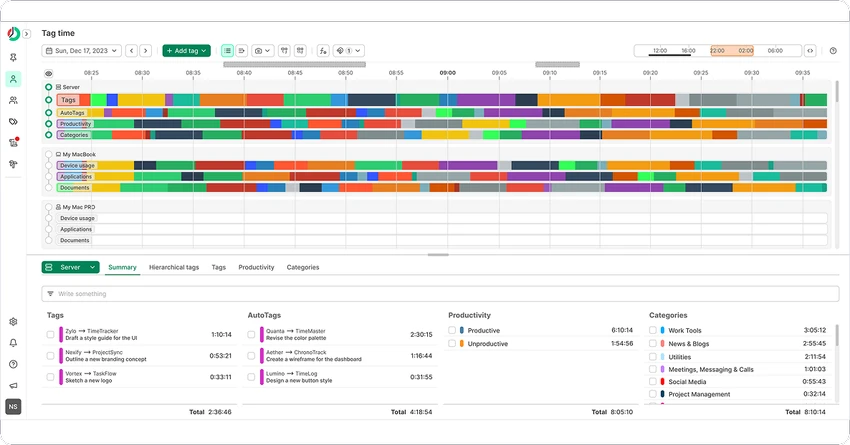
  • Visual timeline and graphical activity reports
  • Accurate work-hour tracking
  • Easy timesheet creation and reporting
  • Export reports for use in Excel and invoicing tools
  • Integration with Jira and GitHub
  • Company-wide reporting through ManicTime Server
  • Automatic activity tagging and categorization
  • Away time detection and tracking
  • Manual stopwatch for time recording
  • Detailed productivity monitoring tools

User Experience

One of ManicTime's biggest strengths is its ability to work quietly in the background while automatically collecting activity data. After installation, there is very little setup required before the software begins building a detailed timeline of daily work activities. The visual interface makes it easy to understand how time is spent throughout the day. Activities are organized clearly, allowing users to identify productive periods, task switching, breaks, and idle time without manually recording every activity.

The automatic tagging system can further simplify time management by categorizing activities based on applications or websites used. This reduces the effort required when creating reports or reviewing productivity trends.

Conclusion

ManicTime is a highly effective time-tracking solution that removes the burden of manual time entry while providing detailed insights into daily work habits. Its automatic activity recording, privacy-focused local storage, and comprehensive reporting tools make it stand out among productivity applications.

Pros & Cons

Pros

    • Fully automatic time tracking
    • Tracks applications, websites, and document usage
    • Local data storage enhances privacy
    • Works without an internet connection
    • Clear visual timeline and reporting tools
    • Easy timesheet generation
    • Supports Jira and GitHub integrations
    • Away time tracking improves reporting accuracy
    • Suitable for individuals and teams

Cons

    • Extensive activity tracking may feel intrusive for some users
    • Advanced reporting features may require initial configuration
    • Primarily focused on tracking and reporting rather than project management

Frequently Asked Questions

What is ManicTime used for?

ManicTime is a time-tracking and productivity monitoring application that automatically records computer activity, helping users track work hours and generate reports.

Does ManicTime work without an internet connection?

Yes. ManicTime uses local data storage and functions normally whether or not an internet connection is available.

Is my data stored in the cloud?

No. The software stores collected data locally on your machine and does not automatically send information to third parties.

Can ManicTime generate timesheets?

Yes. The software can generate timesheets and reports based on recorded work activity, which can be exported for invoicing or further analysis.

Does ManicTime integrate with other tools?

Yes. ManicTime supports integration with task management systems such as Jira and GitHub.

Can ManicTime track time away from the computer?

Yes. The software automatically detects idle periods and records them as Away Time, allowing users to add notes describing offline activities.

What are the system requirements?

ManicTime supports Windows 10 and Windows 11 operating systems.

Recommended apps [Freeware]:
  • EarthView 7.16.4 EarthView logo dynamic wallpapers and screensavers with day, night, and weather effects
  • EarthTime 6.33.4 EarthTime logo displays world clocks, weather, and local times for 120,000+ cities with customizable alarms and maps.
  • UltraSearch 4.9.2.1208 UltraSearch logo locates files and folders on local NTFS drives in seconds without building an index. Fast, precise, and lightweight.
  • iTop Easy Desktop 4.3.0.342 iTop Easy Desktop logo declutter, organize, and manage Windows desktop items efficiently and quickly
  • Android Studio 2026.1.1.9 Android Studio logo Google’s official IDE for Android, offering intelligent coding, fast emulators, and cloud integration.
  • Vivaldi Browser 8.0.4033.46 Vivaldi Browser logo a Chromium-based browser with built-in mail, calendar, notes, ad blocker, and deep customization features.
Recommended apps [Shareware]:
  • Quick Heal AntiVirus Pro 26.1.0.2 Quick Heal AntiVirus Pro logo real-time malware protection, ransomware defense, and email security
  • Adobe Premiere Pro 2026 Adobe Premiere Pro logo professional 4K video editor with advanced audio, color, and motion graphics tools.
  • Foxit PDF Editor 2026.1.1.36485 Foxit PDF Editor logo complete PDF solution for businesses, offering advanced editing, collaboration, and document security features.
  • Charles 5.2.0 Charles logo HTTP proxy tool for web debugging, allowing developers to inspect, modify, and analyze network traffic in real time
  • Fast Video Cataloger 10.0.4.0 Fast Video Cataloger logo Organize, search, browse, and manage large video collections with Fast Video Cataloger for Windows
  • Automatic PDF Processor 2.3.2 Automatic PDF Processor logo Automate PDF processing, renaming, printing, data extraction, and document organization on Windows.