FileLegit Windows Utilities File Managers Cisdem Duplicate Finder
Cisdem Duplicate Finder logo

Cisdem Duplicate Finder 5.0.0

  • User Rating:
    ★★★★★
    ★★★★★
    0.0 ★ 0Votes
  • Requirements:
    Windows
  • Version: 5.0.0
  • Latest updated: 1 week ago
  • License: Free Trial  
  • Publisher: Cisdem
  • Size: 25 MB
× app stores

Cisdem Duplicate Finder is a file management utility designed to locate and remove duplicate files as well as similar images from your computer and supported storage locations. By comparing file content instead of relying solely on file names, the software accurately identifies duplicate documents, photos, videos, music, archives, and other file types, helping users recover valuable storage space without manually searching through folders.

The software supports scanning internal drives, external hard drives, cloud storage services such as OneDrive and Dropbox, and network volumes, making it suitable for users who manage files across multiple locations. In addition to detecting exact duplicates, Cisdem Duplicate Finder can intelligently identify similar images with minor differences, making it easier to select the best version from burst photos or nearly identical pictures.

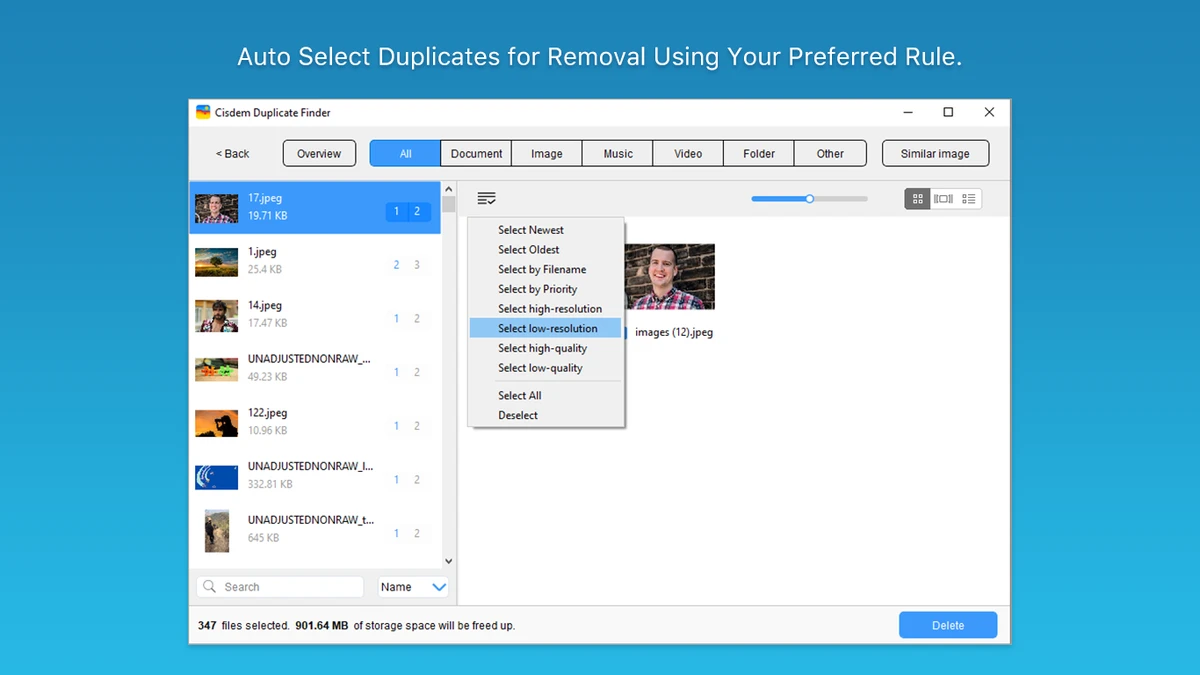
Scan results are organized into clear categories, allowing users to sort duplicate files by name, size, type, or quantity. Built-in search tools and customizable auto-selection rules simplify the cleanup process, while multiple deletion methods provide greater control over file removal. Combining high detection accuracy with an organized interface, Cisdem Duplicate Finder offers an efficient way to reduce clutter and optimize storage space.

Features of Cisdem Duplicate Finder

  • Find duplicate files based on identical file content
  • Detect duplicate photos, videos, music, documents, archives, and other file types
  • Search for similar images with AI-assisted detection
  • Scan internal drives, external hard drives, cloud storage, and network volumes
  • Support for OneDrive and Dropbox
  • Filter scans by file type or file size
  • Create ignore lists for selected files and folders
  • Organize duplicate results by category, name, size, type, or quantity
  • Built-in search tool for locating specific duplicate files
  • Customizable auto-selection rules for duplicate removal
  • Move duplicates to the Trash, a custom folder, or permanently delete them
  • One-click removal of selected duplicate files

Interface and Usability

Cisdem Duplicate Finder offers a clean and organized interface that makes duplicate file management straightforward. Users can quickly choose folders or storage locations to scan and customize the scan by filtering file types, file sizes, or ignored locations. This flexibility helps reduce scan time while focusing on the files that matter most.

Once scanning is complete, duplicate files are grouped into easy-to-understand categories, making it simple to review large collections of results. Sorting by file name, size, type, or duplicate count helps identify which files occupy the most storage space. The software also automatically selects duplicate copies while preserving the original files, although users can customize the selection rules to better match their preferences before deleting files.

Who Should Use Cisdem Duplicate Finder?

  • Users running low on storage space
  • Photographers managing large image collections
  • Anyone organizing documents, music, videos, and archives
  • Users with files stored across external drives or cloud services
  • People who want to remove duplicate files safely without manual searching
  • Users looking for an organized duplicate cleanup solution

Conclusion

Cisdem Duplicate Finder provides a reliable way to locate and remove duplicate files without relying on file names alone. Its ability to identify exact duplicates and similar images, combined with support for cloud storage, external drives, and network locations, makes it a practical tool for keeping storage organized. The flexible filtering options, intelligent auto-selection rules, and multiple deletion methods help simplify the cleanup process while reducing the risk of accidentally removing important files.

Pros & Cons

✓

Pros

  • Detects duplicate files based on file content
  • Finds similar images using AI-assisted technology
  • Supports internal, external, cloud, and network storage
  • Well-organized scan results with multiple sorting options
  • Customizable auto-selection rules
  • Multiple safe deletion methods
  • Supports a wide variety of file types
✕

Cons

  • Advanced selection options may require some familiarity for first-time users
  • Focused specifically on duplicate file management

Frequently Asked Questions

What does Cisdem Duplicate Finder do?

Cisdem Duplicate Finder scans your storage for duplicate files with identical content and similar images, helping you remove unnecessary copies and recover disk space.

Can Cisdem Duplicate Finder find duplicate photos?

Yes. The software can detect both exact duplicate images and similar photos with slight differences, making it useful for organizing photo libraries and burst-shot collections.

Does Cisdem Duplicate Finder support cloud storage?

Yes. It supports scanning duplicate files stored in OneDrive and Dropbox, along with external hard drives and network volumes.

How does the software identify duplicate files?

Instead of relying only on file names, Cisdem Duplicate Finder compares file content to accurately detect identical files, even if they have different names or are stored in different locations.

Can I choose which duplicate files to delete?

Yes. The software automatically selects duplicate copies while preserving the original files, and users can customize the selection rules or manually review the results before removing files.

Is it safe to remove duplicate files with Cisdem Duplicate Finder?

Yes. The software offers multiple removal methods, including moving duplicates to the Trash, sending them to a custom folder, or permanently deleting them, giving users control over the cleanup process.

Recommended apps [Freeware]:
  • PortKiller 3.3.3 PortKiller logo a network utility for monitoring TCP ports, managing processes, and handling tunnels on Windows.
  • Personal Backup 6.4.11.0 Personal Backup logo Schedule and automate file backups to local drives, networks, or FTP servers with Personal Backup for Windows
  • TreeSheets 3223 TreeSheets logo combines spreadsheets, outlines, notes, and mind mapping into a lightweight data organization tool
  • VSDC Free Video Editor 11.2.3.729 VSDC Free Video Editor logo a non-linear video editing tool for creating videos with effects, transitions, and multi-format support on Windows
  • Media Player Codec Pack 5.1.2.625 Media Player Codec Pack logo enables smooth playback of audio and video formats on Windows by adding essential codecs and filters.
  • Beeper 4.2.972 Beeper logo Bring multiple messaging services together in one app with unified chats, cross-platform support, searchable conversations, and synced notifications.
Recommended apps [Shareware]:
  • EF Commander 26.06 EF Commander logo a feature-rich Windows file manager with FTP, media tools, archiving, and advanced file control
  • Digimizer 6.5.4 Digimizer logo image analysis tool for precise measurements, object detection, and scientific image processing
  • Fast Video Cutter Joiner 7.1.4.0 Fast Video Cutter Joiner logo a lightweight video editing tool for quickly cutting, trimming, and joining videos
  • NOD32 Antivirus 19.2.7.0 NOD32 Antivirus logo Protect your PC with ESET NOD32 Antivirus, offering real-time malware defense, fast scans, and low system impact
  • Abelssoft YouTube Song Downloader 2026 v26.13 Abelssoft YouTube Song Downloader logo Download YouTube music and videos in multiple formats with Abelssoft YouTube Song Downloader for Windows
  • Elcomsoft Distributed Password Recovery 5.0.1788 Elcomsoft Distributed Password Recovery logo GPU-accelerated enterprise tool for recovering passwords and encryption keys across networked systems