


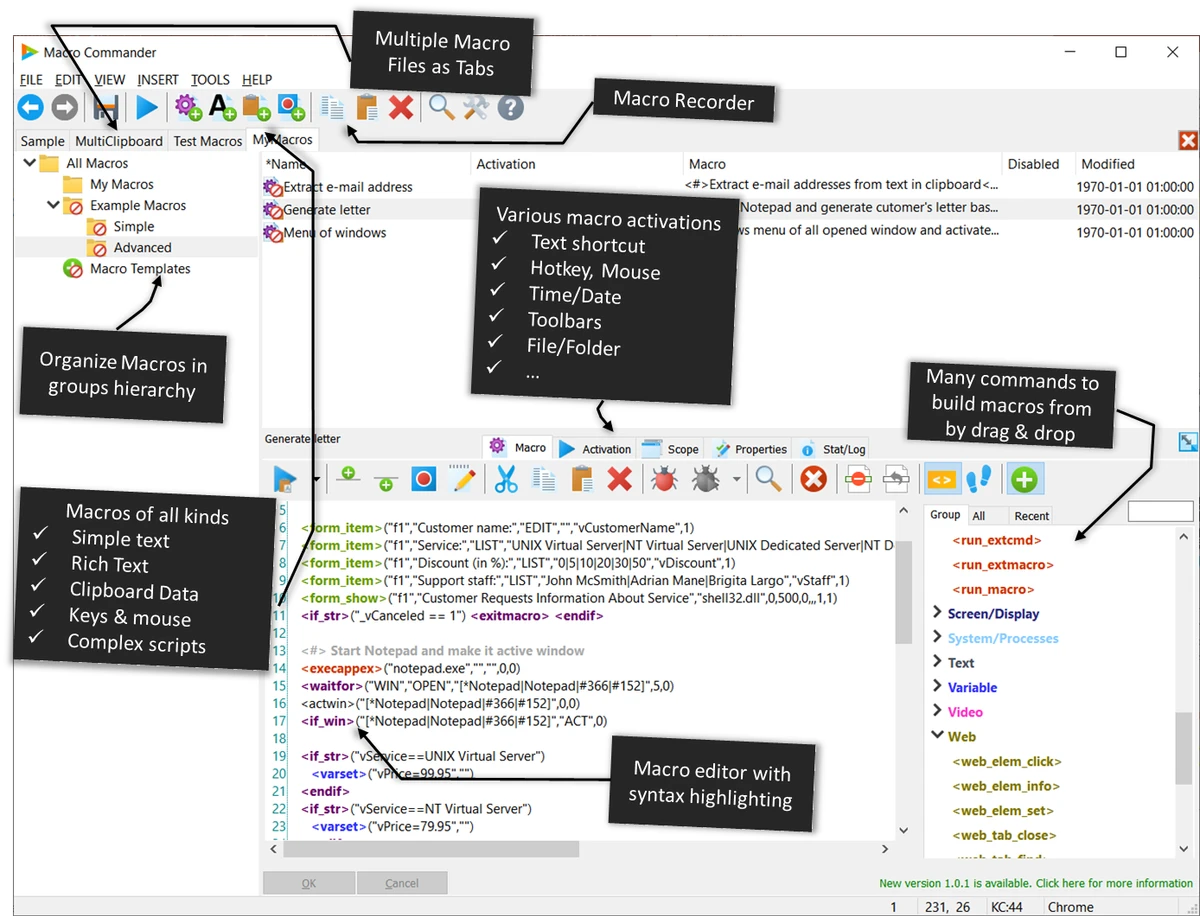

Macro Commander Pro is an all-in-one desktop automation and data entry solution designed to eliminate repetitive tasks through customizable macros and scripts. Whether you need to automate text entry, manage files, manipulate images, interact with web pages, or control desktop applications, the software provides an extensive collection of built-in automation tools.
With a visual macro recorder, dual editing modes, and more than 300 built-in commands, Macro Commander Pro caters to both users who prefer simple automation and those looking to build more advanced workflows.
Features of Macro Commander Pro
- Create and manage macros using a clean, organized interface.
- Built-in macro recorder for recording keyboard and mouse actions.
- More than 300 built-in automation commands.
- Create Text Macros, General Macros, and Clipboard Macros.
- Rich text support with formatting, images, hyperlinks, and custom fonts.
- Personalized data entry using variable placeholders.
- Import data from Excel, Word, CSV files, remote files, and web sources.
- Automate text manipulation, including:
- Find and replace
- Uppercase and lowercase conversion
- Prefix and suffix insertion
- Row insertion and deletion
- Text trimming
- Automate file and folder operations:
- Copy
- Move
- Rename
- Delete
- Zip and unzip
- Encrypt and decrypt
- Upload and download
- Image automation tools for:
- Resize
- Crop
- Rotate
- Convert (including HEIC)
- Watermark
- Text insertion
- Quality adjustment
- Automate Microsoft Word and Excel tasks.
- Automate Windows desktop applications.
- Automate web browser interactions.
- Search and extract information from:
- Excel spreadsheets
- Word documents
- CSV files
- Text files
- Clipboard
- Web pages
- Images using OCR
- Supports wildcard and regular expression searches.
- Macro editor with:
- Syntax highlighting
- Autocomplete
- Drag-and-drop editing
- Code and Step editing modes
- Integrates with PowerShell.
- Launch macros using:
- Hotkeys
- Text shortcuts
- Auto-complete
- Mouse gestures
- Custom toolbars
- Schedule unattended macro execution.
- Trigger macros when files or folders change.
- Scope macro activations to specific applications or windows.
User Experience
Macro Commander Pro is designed to streamline repetitive computer tasks without forcing users to write scripts from scratch. The interface is well organized, making it easy to browse, create, and organize macros, while the built-in recorder simplifies capturing repetitive keyboard and mouse actions. I found the dual editing approach particularly useful. Beginners can work in the descriptive Steps mode, while experienced users can switch to the code editor, which offers syntax highlighting, autocomplete, and drag-and-drop editing for more complex automation.
One of the software's strongest areas is its flexibility. Beyond simple text expansion, it can automate files, folders, Office documents, images, web pages, and Windows applications. The extensive command library makes it possible to build sophisticated workflows without relying entirely on external scripting. The scheduling and event-based triggers further enhance productivity. Macros can run automatically at scheduled times or respond to changes in files and folders, making unattended automation practical for many routine tasks.
Overall, Macro Commander Pro offers an impressive balance between accessibility and advanced automation, making it suitable for a wide range of productivity scenarios.
System Requirements
- Windows 11
- Windows 10
- Windows Server 2016
- Windows Server 2019
- Windows Server 2022
- Windows Server 2025
Who Should Use Macro Commander Pro?
Macro Commander Pro is ideal for office professionals, developers, IT administrators, customer support teams, data entry specialists, and power users who regularly perform repetitive tasks. It is also a strong choice for businesses looking to automate document processing, data entry, Office workflows, file management, and routine desktop operations without building custom software.
Conclusion
Macro Commander Pro is a feature-rich automation tool designed to save time and reduce manual work across a wide range of Windows tasks. From simple text expansion to complex workflow automation involving files, Office applications, images, and web browsers, it offers the tools needed to build efficient, repeatable processes.


