Scriptboxie logo

Scriptboxie 2.0.1.4

  • User Rating:
    ★★★★★
    ★★★★★
    0.0 0Votes
  • Requirements:
    Windows
  • Version: 2.0.1.4
  • Latest updated: 1 day ago
  • License: Open Source  
  • Publisher: gemilepus
  • Size: 116 MB
× app stores

Scriptboxie is a Windows automation tool designed to help users create and manage scripts without requiring extensive programming knowledge. Instead of writing code manually, users simply record their actions, review the generated script, and reuse it whenever repetitive tasks need to be performed. Its straightforward recording approach makes Scriptboxie a practical solution for automating routine workflows while remaining accessible to users with little or no scripting experience.

Features of Scriptboxie

  • Create automation scripts without coding
  • Record user actions to generate scripts automatically
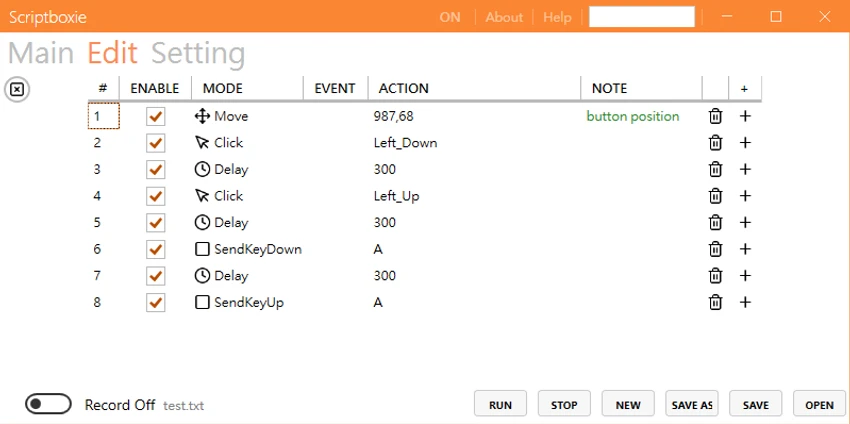
  • Modern interface with dedicated Main, Edit, and Settings tabs
  • Toggle recording on or off directly from the interface
  • Review and modify recorded actions in the Edit tab
  • Manage and organize automation scripts
  • Suitable for automating repetitive workflows
  • Can be used to automate routine tasks such as recurring file and folder backup processes

User Experience

Scriptboxie offers a clean and intuitive interface that makes task automation approachable for non-programmers. The application is organized into three primary sections—Main, Edit, and Settings—which keeps recording, editing, and configuration separate and easy to navigate. Creating a script is straightforward. After enabling the recording function, every action performed is captured automatically and listed in the Edit tab. This allows users to inspect the recorded workflow and make adjustments before using it again.

The recording-based workflow removes much of the complexity associated with traditional scripting. Rather than learning programming syntax, users simply perform the task once while recording is enabled, making automation significantly more accessible.

For repetitive daily operations, such as recurring file and folder backup routines or other multi-step workflows, Scriptboxie can help reduce manual effort and improve consistency. While advanced scripting features are not highlighted, the simplicity of its recording mechanism makes the application easy to learn and practical for everyday automation tasks.

Who Should Use Scriptboxie?

  • Home users looking to automate repetitive computer tasks
  • Office workers performing recurring workflows
  • Users with little or no programming experience
  • Anyone wanting to save time on routine Windows operations
  • Professionals seeking a simple automation tool without writing code

Conclusion

Scriptboxie offers a practical and beginner-friendly approach to workflow automation by replacing manual scripting with action recording. Its intuitive interface and editable recordings make it easy to automate repetitive tasks while reducing the need for technical expertise.

Pros & Cons

Pros

  • No programming knowledge required
  • Easy-to-use recording-based automation
  • Clean and modern user interface
  • Scripts can be reviewed and edited before use
  • Helps automate repetitive workflows
  • Suitable for beginners and everyday users

Cons

  • Advanced scripting capabilities are not mentioned
  • Best suited for repetitive desktop tasks rather than complex automation
  • Limited feature information is available

Frequently Asked Questions

What is Scriptboxie?

Scriptboxie is a Windows automation utility that allows users to create scripts by recording their actions instead of writing code manually.

Do I need programming knowledge to use Scriptboxie?

No. Scriptboxie is specifically designed for users who want to automate tasks without extensive coding or scripting experience.

How does Scriptboxie create scripts?

The software records your actions while recording mode is enabled. Those actions are then listed in the Edit tab, where they can be reviewed and modified before being reused.

Can Scriptboxie automate file backups?

Yes. One example provided is automating the routine steps involved in backing up files and folders by recording the process and replaying it when needed.

Is Scriptboxie suitable for beginners?

Yes. Its recording-based workflow and user-friendly interface make it accessible for beginners who want to automate repetitive tasks without learning a scripting language.

Recommended apps [Freeware]:
  • EarthView 7.16.6 EarthView logo dynamic wallpapers and screensavers with day, night, and weather effects
  • Android Studio 2026.1.1.9 Android Studio logo Google’s official IDE for Android, offering intelligent coding, fast emulators, and cloud integration.
  • Directory Opus 13.24 Directory Opus logo a powerful Windows file manager with dual-pane navigation, FTP support, file tagging, and Explorer replacement
  • Kali Linux 2026.2 Kali Linux logo a powerful penetration testing OS with tools for cybersecurity, digital forensics, and ethical hacking
  • R-Photo 2.0.180048 R-Photo logo Restore media from HDDs, SSDs, SD cards, USB drives, RAID, and more
  • Youtube Downloader HD 5.9.9.13 Youtube Downloader HD logo a simple Windows tool for downloading and converting YouTube videos in HD formats
Recommended apps [Shareware]:
  • DBConvert Studio 4.3.1 DBConvert Studio logo simplifies database migration and synchronization across multiple database platforms.
  • HWMonitor Pro 1.58 HWMonitor Pro logo extends HWMonitor with remote monitoring, logging graphs, and improved sensor interface tools.
  • Syncovery 12.2.1 Syncovery logo fast backup and file synchronization tool with real-time sync, versioning, and advanced automation features
  • GiliSoft Exe Lock 12.0.0 GiliSoft Exe Lock logo Protect Windows applications with passwords and prevent unauthorized access using GiliSoft Exe Lock
  • Photo Supreme 2026.3.0.9285 Photo Supreme logo Organize, search, and manage thousands of photos with Photo Supreme's powerful cataloging features
  • Remo Recover Windows 6.0.0.260 Remo Recover Windows logo Recover deleted, formatted, and lost files with Remo Recover Windows, a comprehensive data recovery solution