


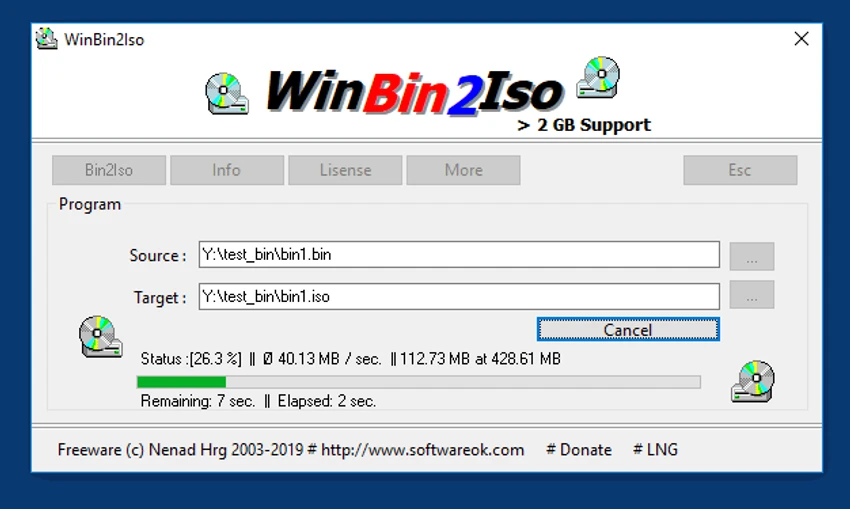

WinBin2Iso is a small and straightforward utility designed to convert BIN disc image files into ISO format. Built for speed and simplicity, it requires no installation and supports large image files, making it a convenient solution for users who need occasional or frequent image conversions.
Overview
Converting disc images shouldn't require a complex suite of tools, and that's exactly where WinBin2Iso excels. The application focuses on a single task: transforming BIN CD and DVD images into ISO files quickly and efficiently. Its portable design allows users to run the software directly from a USB drive or desktop without installation. Despite its lightweight footprint, WinBin2Iso supports image files larger than 2GB, making it suitable for modern DVD backups and larger disc images. For users seeking a no-frills conversion utility, WinBin2Iso delivers a streamlined experience without unnecessary features or resource consumption.
Features of WinBin2Iso
- Convert BIN CD images to ISO format
- Convert BIN DVD images to ISO format
- Supports files larger than 2GB
- Portable application with no installation required
- Low CPU usage during conversion
- Lightweight and compact program size
- Easy desktop or USB drive operation
- Compatible with modern Windows systems
User Experience
WinBin2Iso is designed with simplicity in mind. After launching the application, users are presented with a minimal interface focused entirely on the conversion process. There are no complicated settings, advanced menus, or lengthy setup procedures. Users simply select a BIN file, choose an output location, and start the conversion. This straightforward workflow makes the software accessible even to users with little technical experience.
The portable nature of the application is another advantage. Because it doesn't require installation, it can be stored on a USB flash drive and used across multiple computers when needed. Performance is also impressive considering the application's small size. It handles large image files efficiently while maintaining low system resource usage.
Who Should Use WinBin2Iso?
- Users converting BIN files to ISO format
- Retro gaming and disc image enthusiasts
- IT technicians managing disc images
- Users creating ISO archives from CD/DVD images
- Anyone needing a portable image conversion utility
Conclusion
WinBin2Iso is a practical utility for users who need a quick and reliable way to convert BIN disc images into ISO files. Its portable design, low resource usage, and support for large image files make it particularly appealing for occasional conversions and on-the-go use.


