TKO Auto Clicker logo

TKO Auto Clicker 2.0

  • User Rating:
    ★★★★★
    ★★★★★
    0.0 ★ 0Votes
  • Requirements:
    Windows
  • Version: 2.0
  • Latest updated: 2 weeks ago
  • License: Freeware  
  • Publisher: TkoSoft
  • Size: 4 MB
× app stores

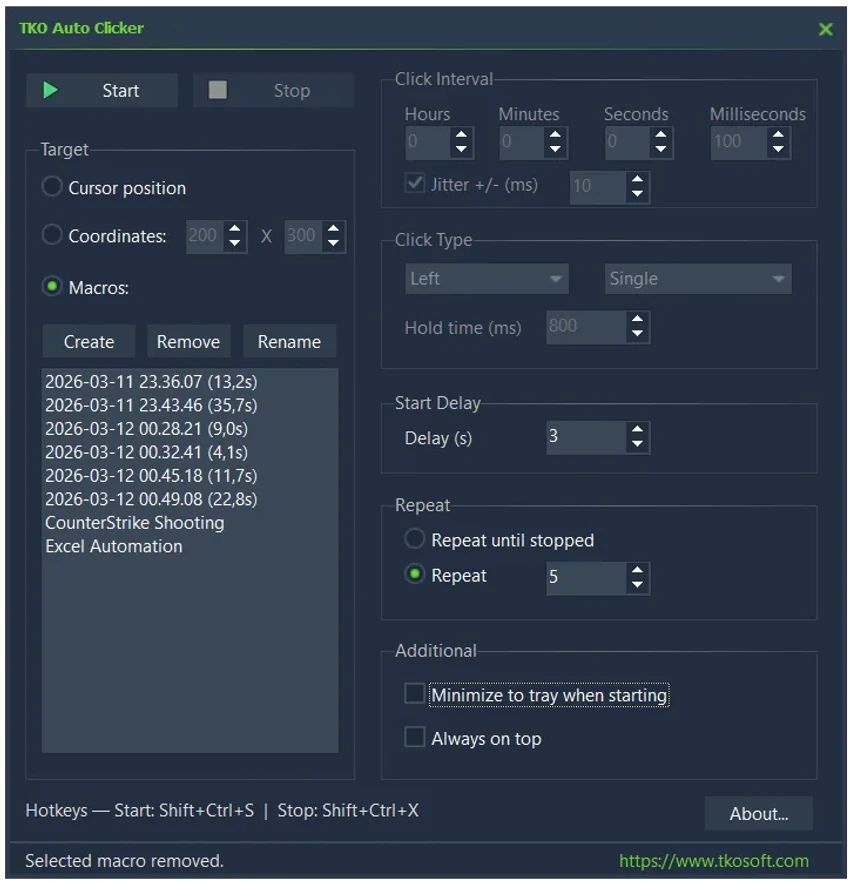
TKO Auto Clicker is a free Windows automation utility designed to automate repeated mouse clicks, cursor actions, and recorded mouse sequences. The software provides a simple way to reduce repetitive manual tasks by allowing users to configure automatic clicking behavior or record mouse movements and actions for later playback.

The application supports left, right, and middle mouse button automation, along with different click modes including single clicks, double clicks, and hold clicks. Users can customize click timing with controls for hours, minutes, seconds, and milliseconds, making it suitable for tasks that require precise intervals.

Beyond basic auto clicking, TKO Auto Clicker includes a built-in mouse macro recorder. This feature can capture mouse movements, button presses, and releases, allowing users to save and replay more complex action sequences. Recorded macros can be managed by saving, renaming, or deleting them as needed.

The software also provides global hotkeys, allowing users to control clicking and recording functions without returning to the main interface. With support for cursor-based clicking and fixed screen coordinates, TKO Auto Clicker offers flexible automation options for various Windows tasks.

Features of TKO Auto Clicker

  • Free auto clicker for Windows
  • Automates left, right, and middle mouse clicks
  • Supports single click, double click, and hold click modes
  • Adjustable click intervals with millisecond precision
  • Start delay configuration
  • Repeat clicks continuously or a specific number of times
  • Optional timing jitter feature
  • Click at current cursor position
  • Click at fixed X/Y screen coordinates
  • Built-in mouse macro recorder
  • Records mouse movement and button actions
  • Save, rename, delete, and replay macros
  • Global hotkeys for quick control
  • Lightweight freeware application

Interface and Usability

After using TKO Auto Clicker, I found the software focused on simplicity and quick setup. The main functions are centered around configuring click behavior, recording actions, and controlling automation without unnecessary complexity.

The ability to choose between cursor position clicking and fixed coordinates provides flexibility for different tasks. Users can easily adjust timing settings depending on whether they need rapid clicking or slower automated actions.

The macro recording feature expands the software beyond a basic clicker, allowing users to automate sequences of mouse actions. Global hotkeys are also useful because they allow control while another application is active. The lightweight design makes TKO Auto Clicker easy to run without requiring complicated configuration.

Who Should Use TKO Auto Clicker?

  • Users who need to automate repetitive mouse clicks
  • People creating simple mouse macros
  • Users performing repeated tasks in Windows applications
  • Gamers who need customizable clicking automation
  • Anyone looking for a lightweight automation utility

Conclusion

TKO Auto Clicker is a practical Windows utility for users who want to automate repetitive mouse actions. Its combination of customizable clicking options, macro recording, and global hotkeys makes it more versatile than a basic auto clicker.

Pros & Cons

✓

Pros

  • Free and lightweight
  • Supports multiple mouse buttons
  • Precise click timing controls
  • Includes macro recording functionality
  • Supports coordinate-based clicking
  • Provides global hotkeys
  • Easy to set up for basic automation tasks
✕

Cons

  • Focused mainly on mouse automation rather than full workflow automation
  • Advanced users may need more extensive automation features

Frequently Asked Questions

What is TKO Auto Clicker used for?

TKO Auto Clicker is used to automate repeated mouse clicks and record mouse actions on Windows computers.

Can TKO Auto Clicker record mouse movements?

Yes. The built-in mouse macro recorder can capture mouse movements, button presses, and button releases for later playback.

Does TKO Auto Clicker support different mouse buttons?

Yes. The software supports left, right, and middle mouse button automation.

Can I control TKO Auto Clicker with keyboard shortcuts?

Yes. Global hotkeys allow users to start clicking, stop automation, and begin macro recording without opening the main window.

Can TKO Auto Clicker click at specific locations?

Yes. Users can choose to click at the current cursor position or use fixed X/Y screen coordinates.

Is TKO Auto Clicker free?

Yes. TKO Auto Clicker is described as a free Windows auto clicker and mouse macro recorder.

Recommended apps [Freeware]:
  • Tixati 3.43 Tixati logo a fast, ad-free BitTorrent client offering advanced peer control, bandwidth management, and detailed swarm analysis
  • PointerStick 7.17 PointerStick logo a virtual pointer to Windows desktops, helping presenters highlight mouse movements on large screens
  • Disk Benchmark 1.0 Disk Benchmark logo measures SSD, HDD, NVMe, and USB drive performance with detailed speed, IOPS, and latency tests
  • WinPaletter 1.0.9.8 WinPaletter logo Customize Windows themes, colors, icons, cursors, fonts, and visual styles
  • NxFilter 4.7.5.3 NxFilter logo freeware enterprise web filtering tool that blocks malware, controls internet access, and enforces DNS-based security policies
  • VLC Media Player 3.0.23 VLC Media Player logo a free, open-source multimedia player supporting nearly all video formats, streaming, and playback features across platforms.
Recommended apps [Shareware]:
  • Coolutils Print Maestro 4.2.0.0 Coolutils Print Maestro logo print folder contents, export directory trees, and generate detailed file reports quickly
  • Adobe After Effects 2026 Adobe After Effects logo advanced motion graphics, visual effects, compositing, and animation tools for creators.
  • UPDF 2.5.5 UPDF logo AI-powered PDF editor for Windows that simplifies editing, annotating, converting, and managing PDFs
  • Modern CSV 2.4.3 Modern CSV logo high-performance CSV editor for Windows with fast large-file handling, multi-cell editing, filtering, and sorting tools
  • FoneTool 3.8.0 FoneTool logo back up, transfer, and manage iPhone data with convenient device management tools
  • 4K YouTube to MP3 26.2.0 4K YouTube to MP3 logo a simple tool to extract audio from YouTube, Vimeo, and more into MP3, M4A, or OGG