


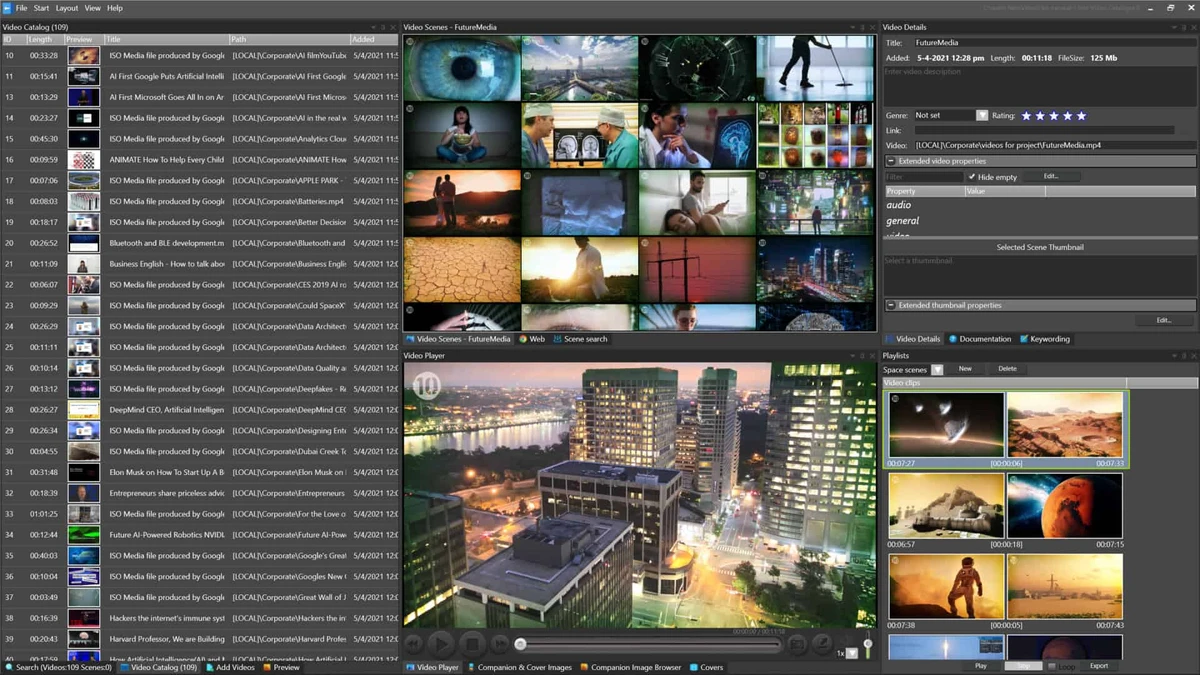

Fast Video Cataloger is a professional Windows application designed to help users organize, search, browse, and manage large collections of digital video files. Unlike traditional media players, the software focuses on video content management, making it easier to locate specific videos and scenes within extensive archives.
The software automatically indexes videos, generates thumbnails, and allows users to enrich content with metadata and keywords. Whether your videos are stored on local drives, external storage devices, USB sticks, DVDs, or cloud-synced folders, Fast Video Cataloger helps keep them searchable and accessible.
Its client-only installation requires no server setup, making it easy to deploy and start testing within minutes.
Features of Fast Video Cataloger
- Automatic Video Indexing
- Indexes video collections automatically to simplify organization and retrieval.
- Helps reduce the time spent manually managing video archives.
- Scene-Based Search and Navigation
- Allows users to locate specific scenes within videos quickly.
- Supports navigation through thumbnail-based previews.
- Automatic Thumbnail Generation
- Creates evenly spaced thumbnails for each video clip.
- Provides a visual overview of video content.
- Integrated Video Player
- Plays videos directly from captured thumbnail positions.
- Enables quick access to relevant scenes.
- Video Archive Management
- Keeps archived videos searchable even when original storage devices are disconnected.
- Supports videos stored on external drives, USB devices, DVDs, and cloud storage locations.
- Metadata and Keyword Management
- Add keywords, images, and metadata to videos and individual scenes.
- Improves search accuracy and content organization.
- Custom Metadata Fields
- Allows organizations to store company-specific information alongside video assets.
- Supports customized catalog structures.
- C# Scripting Support
- Includes integrated scripting capabilities for customization.
- Provides API documentation and sample scripts for advanced users.
- Printable Contact Sheets
- Generates contact sheet images for presentations, discussions, documentation, and content reviews.
User Experience
After using Fast Video Cataloger, I found it particularly effective for managing large video libraries that would otherwise become difficult to navigate. The automatic thumbnail generation creates a visual catalog of video content, making it much easier to identify clips and scenes without opening files individually.
One of the most useful aspects is the ability to search through archived content even when the original storage media is not currently connected. This provides a clear overview of available assets without requiring constant access to every drive.
The integrated player streamlines the workflow by allowing playback directly from thumbnail positions. Combined with metadata tagging and keyword management, the software offers an efficient way to organize and retrieve video content.
Conclusion
Fast Video Cataloger excels as a video asset management and cataloging solution for Windows. Its automatic indexing, thumbnail-based navigation, metadata support, and archive-friendly design make it easy to locate specific videos and scenes within large collections.


