FileLegit Windows Internet & Network Download Managers Apowersoft Video Download Capture
Apowersoft Video Download Capture logo

Apowersoft Video Download Capture 6.6.4.0

  • User Rating:
    ★★★★★
    ★★★★★
    0.0 ★ 0Votes
  • Requirements:
    Windows
  • Version: 6.6.4.0
  • Latest updated: 2 weeks ago
  • License: Free Trial  
  • Publisher: Apowersoft
  • Size: 2 MB
× app stores

Apowersoft Video Download Capture is a multifunctional video utility designed for downloading, recording, converting, and editing online media content. The software focuses on helping users save videos from various online platforms while also providing additional tools for format conversion, screen recording, and basic video editing.

The application can automatically detect online videos from supported websites and add them to the download process. It supports downloading streaming media in different formats and resolutions, allowing users to save online videos, movies, TV episodes, and music videos for offline use.

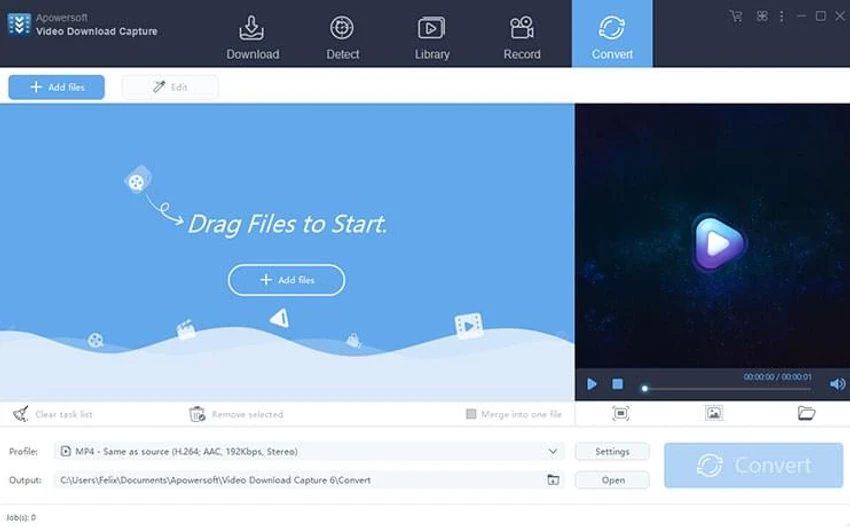
Beyond downloading, Apowersoft Video Download Capture includes a built-in converter that allows users to transform videos into popular formats such as MP4, AVI, MKV, and FLV. The integrated screen recorder expands its functionality by enabling users to capture live streams, video chats, online courses, and other on-screen content.

The software also provides basic editing features, including trimming, cropping, merging, and subtitle insertion. With a built-in media player and support for various streaming protocols, it combines several video-related tasks into a single Windows application.

Features of Apowersoft Video Download Capture

  • Automatically detects and downloads online videos
  • Supports video downloads from multiple websites
  • Downloads streaming videos in different formats and resolutions
  • Supports batch video downloads and conversions
  • Converts videos to MP4, AVI, MKV, FLV, and other formats
  • Records online live streams, video chats, and courses
  • Provides basic video editing tools
  • Includes merge, trim, crop, and subtitle functions
  • Supports streaming protocols including HTTP, FTP, and RTMP
  • Built-in video player for downloaded media

Interface and Usability

Apowersoft Video Download Capture is designed as an all-in-one video management tool, combining downloading, conversion, recording, and editing features in a single interface. The automatic video detection feature is intended to simplify the process of adding online videos for download.

The software provides access to multiple functions without requiring separate applications for each task. Users can download media, convert files, record screens, and perform basic edits from the same program. The built-in player provides a convenient way to preview downloaded files, while batch processing features help users handle multiple videos more efficiently. The wide range of functions makes the application useful for users who need more than a simple video downloader.

Who Should Use Apowersoft Video Download Capture?

  • Users who need to save online videos for offline viewing
  • People working with multiple video formats
  • Users who need basic video conversion tools
  • Those who want to record online streams or video sessions
  • Users looking for a combined downloader and video utility

Conclusion

Apowersoft Video Download Capture provides a broad set of video-focused tools in one application. Its combination of video downloading, format conversion, screen recording, and basic editing makes it more versatile than a standard download manager.

Pros & Cons

✓

Pros

  • Combines downloading, recording, conversion, and editing tools
  • Supports many video formats
  • Includes batch download and conversion options
  • Provides built-in screen recording
  • Includes a built-in media player
✕

Cons

  • Advanced video editing features are not described

Frequently Asked Questions

What is Apowersoft Video Download Capture used for?

Apowersoft Video Download Capture is used to download online videos, record streaming content, convert video formats, and perform basic video editing tasks.

Can Apowersoft Video Download Capture download videos automatically?

Yes. The software can automatically detect online videos and add them to the download process.

Which video formats does Apowersoft Video Download Capture support?

The software supports converting videos into formats including MP4, AVI, MKV, WMV, and FLV, along with other popular formats.

Can the software record live streaming videos?

Yes. Apowersoft Video Download Capture includes a screen recording function for capturing live streams, video chats, online courses, and other on-screen video content.

Does Apowersoft Video Download Capture include video editing tools?

Yes. The software provides basic editing functions such as merging, trimming, cropping, and adding subtitles.

What operating systems support Apowersoft Video Download Capture?

According to the provided system requirements, Apowersoft Video Download Capture supports Windows 7, Windows 8, Windows 10, and Windows 11.

Recommended apps [Freeware]:
  • Microsoft PowerToys 0.100.2 Microsoft PowerToys logo adds powerful productivity tools and customization features to Windows 10 and 11
  • MusicBee 3.6.9668 MusicBee logo a free music player and library manager with tagging, podcast support, album art lookup, and playlists
  • Quick Clipboard Editor 3.4.1.0 Quick Clipboard Editor logo edit, format, and manage clipboard text with powerful tools for productivity and automation
  • QuickImageComment 5.02 QuickImageComment logo Edit IPTC, EXIF, and XMP metadata quickly, a lightweight tool for image comments and photo tagging on Windows
  • Media Player Classic Black Edition 1.9.0 Media Player Classic Black Edition logo a free media player with a modern dark interface and YouTube playback
  • HDR SDR Brightness 1.1.0 HDR SDR Brightness logo Adjust and maintain consistent SDR brightness levels on HDR-enabled displays with a lightweight tray utility for modern monitors and panels.
Recommended apps [Shareware]:
  • DBConvert Studio 4.3.1 DBConvert Studio logo simplifies database migration and synchronization across multiple database platforms.
  • VueScan 9.8.56 VueScan logo Enhance scanner functionality with advanced tools for scanning documents, photos, videos, and slides.
  • Cutting Optimization Pro 5.18.27.3 Cutting Optimization Pro logo Optimize 1D and 2D cutting layouts for wood, metal, glass, and more with Cutting Optimization Pro software
  • System Mechanic Ultimate Defense 26.5.0.227 System Mechanic Ultimate Defense logo Optimize, repair, and secure your Windows PC with System Mechanic Ultimate Defense's all-in-one maintenance suite.
  • AD FastReporter 26.7.1 AD FastReporter logo Active Directory reporting tool that simplifies generating, scheduling, and sharing AD reports efficiently.
  • Cisdem Video Compressor 3.0.0 Cisdem Video Compressor logo Compress video and audio files while preserving quality with customizable settings, batch processing, and support for popular media formats.