Simple IP Config logo

Simple IP Config 2.9.7

  • User Rating:
    ★★★★★
    ★★★★★
    0.0 0Votes
  • Requirements:
    Windows
  • Version: 2.9.7
  • Latest updated: 1 week ago
  • License: Freeware  
  • Publisher: Kurtis Liggett
  • Size: 2.6 MB
×

Simple IP Config is a compact and portable utility designed to help users quickly change Windows network settings, including IP address, subnet mask, gateway, and DNS servers. With its simple interface and small size, it’s perfect for IT professionals, network technicians, or anyone who needs to manage multiple network profiles efficiently.

Overview

Navigating Windows’ network settings can often be cumbersome, especially when you need to switch between multiple configurations. Simple IP Config streamlines this process, offering a lightweight, under-3MB tool that allows fast changes without navigating through multiple system windows. Its portability means it can run directly from a USB drive, making it convenient for on-the-go use. Users can save unlimited network profiles, enable or disable adapters, and access frequently used actions through keyboard shortcuts—all from a minimalistic interface.

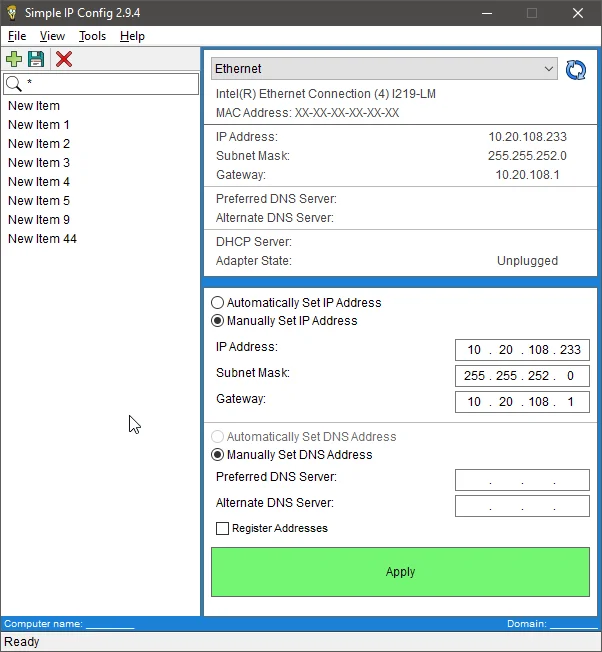
Using Simple IP Config is straightforward. Upon launching, you’re greeted with a clean interface where you can immediately view current network settings. Changing an IP or DNS is a matter of filling in the fields and applying the changes—no need to navigate Windows’ multiple menus. Saving profiles is seamless, and switching between them is nearly instantaneous. The software also supports sending to the system tray, making it easy to keep running in the background without cluttering your desktop. Its small footprint ensures it doesn’t affect system performance, and running from USB is hassle-free.

Features of Simple IP Config

  • View and change IP address, subnet mask, gateway, and DNS servers
  • Simple, user-friendly interface
  • Tiny install size (under 3MB)
  • Portable—run directly from USB
  • Enable or disable network adapters
  • Save unlimited profiles for quick switching
  • Shortcuts for most common actions
  • Send to system tray for later use
  • Multi-language support
  • Free for personal and commercial use

Conclusion

Simple IP Config is a practical, lightweight tool for anyone who needs quick and reliable network configuration. Its portable design, ease of use, and profile management features make it a must-have for IT professionals and frequent network switchers. If you need a no-nonsense solution to manage IP addresses and network settings efficiently, Simple IP Config delivers exactly that.

Pros & Cons

Pros

    • Extremely lightweight and portable
    • Intuitive, simple interface
    • Quick switching between multiple network profiles
    • Useful for IT professionals and frequent network changes
    • Supports system tray and keyboard shortcuts

Cons

    • Limited to basic network configuration
    • No advanced network diagnostics or monitoring tools

Frequently Asked Questions

Can Simple IP Config run on multiple Windows versions?

Yes, it supports most modern Windows versions and is designed to work without installation.

Is it safe to use for commercial purposes?

Yes, Simple IP Config is free for both personal and commercial use.

Can I save multiple network profiles?

Yes, the software allows unlimited profile saving for quick and easy switching.

Does it require installation?

No, it is portable and can run directly from a USB drive.

Recommended apps [Freeware]:
  • Trillian 6.6 Build 15 Trillian logo all-in-one chat software designed to simplify online communication
  • IObit Driver Booster 13.4.0.234 IObit Driver Booster logo updates outdated drivers automatically to boost system stability and gaming performance.
  • EarthTime 6.33.4 EarthTime logo displays world clocks, weather, and local times for 120,000+ cities with customizable alarms and maps.
  • Stretchly 1.21.0 Stretchly logo reminds you to take breaks while working on your computer, promoting better health and productivity.
  • Android Studio 2026.1.1.9 Android Studio logo Google’s official IDE for Android, offering intelligent coding, fast emulators, and cloud integration.
  • Winhance 26.06.12 Winhance logo Windows optimization tool to debloat apps, tweak settings, and customize Windows 10/11
Recommended apps [Shareware]:
  • Audio Transcoder 2.12.24 Audio Transcoder logo all-in-one audio converter and CD ripper supporting MP3, FLAC, AAC, WMA, and more
  • Quick Heal AntiVirus Pro 26.1.0.2 Quick Heal AntiVirus Pro logo real-time malware protection, ransomware defense, and email security
  • Adobe Photoshop 2026 Adobe Photoshop logo powerful image editing and graphic design tool for creating, enhancing, and transforming photos, illustrations
  • Adobe Illustrator 2026 Adobe Illustrator logo professional vector graphic editor for creating logos, illustrations, and scalable designs.
  • Adobe Premiere Pro 2026 Adobe Premiere Pro logo professional 4K video editor with advanced audio, color, and motion graphics tools.
  • Screenpresso 2.2.13 Screenpresso logo a versatile screen capture and video recording tool with editing and annotation features.