


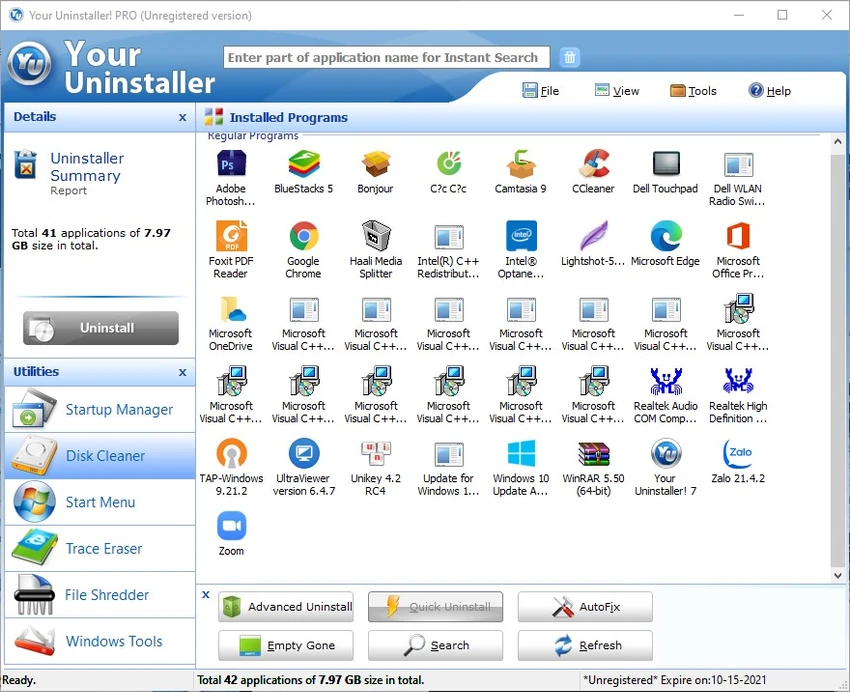

Your Uninstaller! is a Windows utility developed by URSoftware designed to help users completely remove installed applications, including leftover files and system traces. Unlike the default Windows uninstaller, this tool focuses on deep cleanup and system maintenance, aiming to keep the system clean and responsive after frequent software installations and removals.
Overview of Your Uninstaller!
Your Uninstaller! positions itself as a complete uninstallation and system cleanup solution for Windows users. It goes beyond standard program removal by scanning for leftover data and offering additional system utilities such as startup management and disk cleaning. From a usability standpoint, the software is designed for users who want a straightforward way to maintain a clean system without manually hunting for residual files or registry entries after uninstalling programs.
Features of Your Uninstaller!
- Complete uninstallation of installed programs, including corrupted or broken entries
- Deep system scan to detect leftover files and traces after uninstalling software
- Removal of residual “junk artifacts” left behind after standard uninstallation
- Secure file shredding for removing unwanted data traces
- Startup Manager to manage programs that launch with Windows
- Disk Cleaner to remove unnecessary system files and free up space
- Force Uninstall option for difficult or non-standard applications
- Additional system utilities designed to support performance and stability
User Experience
From a practical usage perspective, Your Uninstaller! focuses on simplicity and efficiency. The interface is designed to guide users through uninstallation without requiring advanced technical knowledge. When removing software, the tool doesn’t stop at basic uninstallation. It continues by scanning the system for leftover components, which helps reduce clutter over time—especially useful for users who frequently install and remove applications. The inclusion of tools like Startup Manager and Disk Cleaner also contributes to a more organized system experience, although users primarily engaging with it will likely do so for its core uninstall capabilities.
System Requirements
- Windows 11 / 10 / 8 / 7 / Vista / XP
Who Should Use Your Uninstaller!?
- Users who frequently install and uninstall software
- People dealing with corrupted or hard-to-remove applications
- Windows users looking to clean leftover files after uninstallation
- Those who want basic system cleanup tools included in one utility
Conclusion
Your Uninstaller! is a practical Windows utility for users who want more control over software removal and system cleanup. With features like deep scanning, forced uninstalling, and additional maintenance tools, it provides a more thorough alternative to the default Windows uninstaller.


