


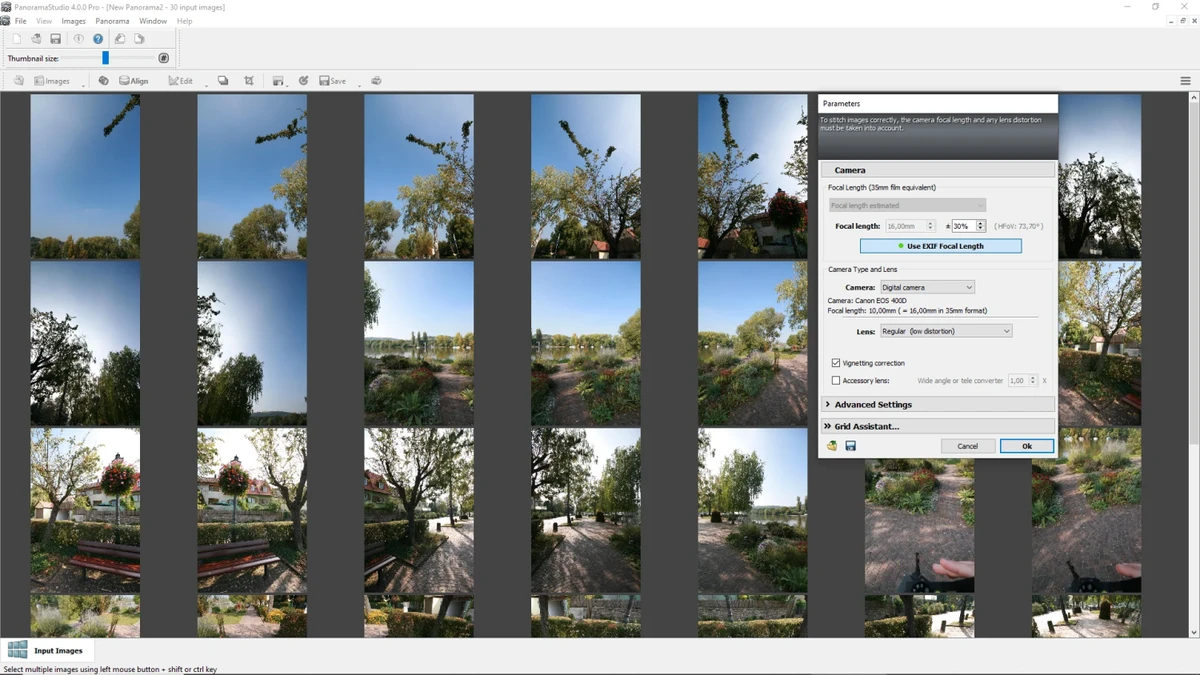

PanoramaStudio is a panorama creation and editing application designed to help users combine multiple photos into large, seamless panoramic images. The software simplifies the process of stitching landscape shots and other image collections together while providing advanced post-processing tools for users who want more control over the final result.
The application automatically aligns and blends images to create smooth panoramic compositions. Users can combine multiple photographs into a single wide image without manually adjusting every connection point, making it useful for creating landscape panoramas, architectural views, and other large-format images.
Beyond automatic panorama creation, PanoramaStudio provides editing features that allow users to refine their projects. The software includes tools for correcting lens distortions, adjusting exposure, applying filters, and manually controlling different stages of panorama creation. PanoramaStudio also supports interactive panorama projects, allowing users to connect panoramic images into virtual tours using hotspots. Export options include various image formats, interactive 3D panoramas, website-ready zoom images, and other presentation formats.
With its combination of automatic processing and detailed editing controls, PanoramaStudio is designed for both casual photographers who want quick results and advanced users who need greater control over panorama production.
Features of PanoramaStudio
- Automatically aligns multiple images into panoramic compositions
- Creates seamless panoramic images through automatic blending
- Provides manual control over panorama creation steps
- Detects focal length automatically
- Corrects lens distortions automatically
- Includes automatic exposure correction
- Offers image editing filters
- Supports interactive panoramas and virtual tours with hotspots
- Exports panoramas in multiple image formats
- Creates interactive 3D panoramas and website zoom images
- Supports printing panoramas in poster size across multiple pages
- Saves panoramas as multi-layered images for further professional editing
Interface and Usability
PanoramaStudio features a clear interface with a large workspace designed for panorama creation. The workflow focuses on making image stitching accessible while still providing tools for users who want to fine-tune their results.
Automatic alignment and blending features reduce the effort required to combine multiple photos, allowing users to create panoramas quickly. For more advanced editing, the software provides manual adjustment options and post-processing controls. The combination of automated tools and detailed editing features makes PanoramaStudio suitable for different experience levels. Beginners can rely on automatic panorama creation, while experienced users can adjust individual aspects of their projects for more precise results.
Who Should Use PanoramaStudio?
- Landscape photographers creating wide scenic views
- Travel photographers combining multiple shots
- Users creating virtual tours and interactive panoramas
- Designers preparing large-format images
- Photographers who need photo stitching and panorama editing tools
Conclusion
PanoramaStudio is a capable panorama creation tool that combines easy photo stitching with advanced editing features. Its automatic alignment, blending, and correction tools make it easier to create professional-looking panoramic images, while its manual controls provide flexibility for experienced users. Whether you are creating landscape panoramas, virtual tours, or large-format images, PanoramaStudio offers a practical set of tools for turning multiple photographs into a single detailed composition.


