


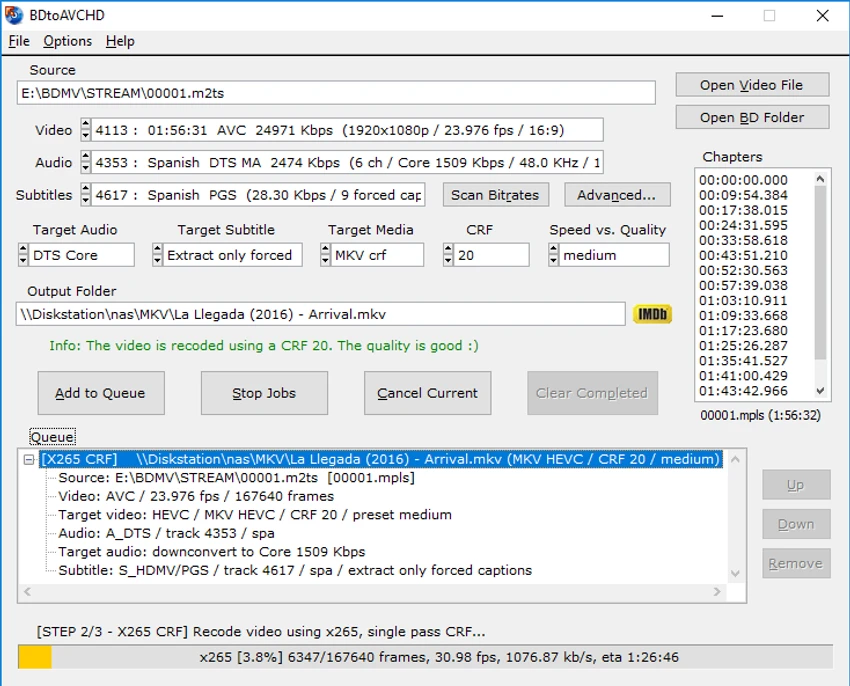

BDtoAVCHD is a multimedia conversion tool designed to create AVCHD discs from Blu-ray or HD MKV files. It converts high-definition content into a DVD-compatible structure while preserving video quality, making it possible to store Blu-ray movies on DVD5 or DVD9 media. The software is especially useful for users who want to back up Blu-ray discs in a smaller format without significantly sacrificing visual quality.
Overview
BDtoAVCHD focuses on converting Blu-ray and HD video content into formats that remain playable on standard Blu-ray players and devices like the PlayStation 3. It generates a complete AVCHD folder structure that can be burned directly to disc or stored on USB drives. In addition to AVCHD creation, it also supports MKV conversion, including 3D Blu-ray to MKV 3D formats. The tool can manage audio tracks, subtitles, chapters, and video bitrate automatically, aiming to maintain balance between compression and quality. It is primarily aimed at users who work with high-definition video backups and disc authoring workflows.
Features of BDtoAVCHD
- Converts Blu-ray and HD MKV files into AVCHD format
- Creates DVD5 / DVD9 folder structures ready for burning
- Supports Blu-ray playback compatibility on most Blu-ray players and PS3
- Extracts full Blu-ray structure from BDMV folders automatically
- Detects and manages audio tracks, subtitles, and chapter data
- Automatic audio conversion (e.g., DTS-HD MA to DTS core, PCM to AC3)
- Intelligent bitrate calculation to maximize disc capacity
- Supports video recompression using x264 (64-bit)
- Queue system for multiple conversion jobs
- Multitasking support for parallel workflow management
- Output options: DVD5, DVD9, USB 4GB, BD-25, custom sizes
- MKV output with optional re-encoding or remux mode
- 3D Blu-ray conversion to AVCHD 3D or MKV 3D SBS/TAB
- Supports HEVC/x265 encoding for MKV output
- No dependency on external codec packs
User Experience
BDtoAVCHD is built for users who already understand Blu-ray structure and video encoding concepts. The interface is functional and task-oriented, focusing on selecting a Blu-ray source and configuring output formats. The software simplifies many technical processes such as bitrate calculation and audio conversion, but users still need some familiarity with video formats to fully control output quality. The job queue system is particularly useful for batch processing multiple Blu-ray conversions, making it efficient for users handling large libraries.
System Requirements
- Windows 7, 8, 10, 11
Who Should Use BDtoAVCHD?
- Users backing up Blu-ray collections to smaller disc formats
- Video enthusiasts working with MKV and Blu-ray conversions
- Home theater users needing AVCHD-compatible playback discs
- Advanced users handling 3D Blu-ray conversions
- People looking to archive high-definition content efficiently
Conclusion & Recommendation
BDtoAVCHD is a powerful and specialized tool for converting Blu-ray content into AVCHD and MKV formats while preserving high-definition quality. Its ability to compress large Blu-ray files into DVD-compatible structures makes it valuable for users focused on backup and home media playback.


