Screenpresso logo

Screenpresso 2.2.13

  • User Rating:
    ★★★★★
    ★★★★★
    5.0 2Votes
  • Requirements:
    Windows
  • Version: 2.2.13
  • Latest updated: 5 days ago
  • License: Free Trial  
  • Publisher: Learnpulse SAS
  • Size: 46 MB
×

Screenpresso is a versatile screen capture tool designed for individuals and businesses alike. It simplifies the process of taking high-quality screenshots and recording videos, while offering editing features to create professional-looking outputs quickly.

Overview

Screenpresso combines simplicity and functionality in a compact package. Whether you need to capture full-screen images, specific windows, or scrolling web pages, this software provides intuitive tools to get the job done. In addition to screenshots, it allows video and webcam recording with audio, making it ideal for tutorials, demonstrations, and presentations. Built-in editing tools enable users to annotate images and videos effortlessly, ensuring every capture is polished and clear. Organized file management and customizable hotkeys further enhance productivity.

Key Features of Screenpresso

  • Full-Screen, Region, and Window Capture: Capture your entire screen, selected areas, or active windows.
  • Scrolling Capture: Automatically capture long web pages or documents in a single image.
  • Video and Webcam Recording: Record screen activity and webcam footage with audio.
  • Editing and Annotation Tools: Crop, resize, and add text, arrows, or shapes to images.
  • Organized File Management: Save and manage captures with easy export options.
  • Customizable Hotkeys: Quickly access capture features using user-defined shortcuts.

User Experience

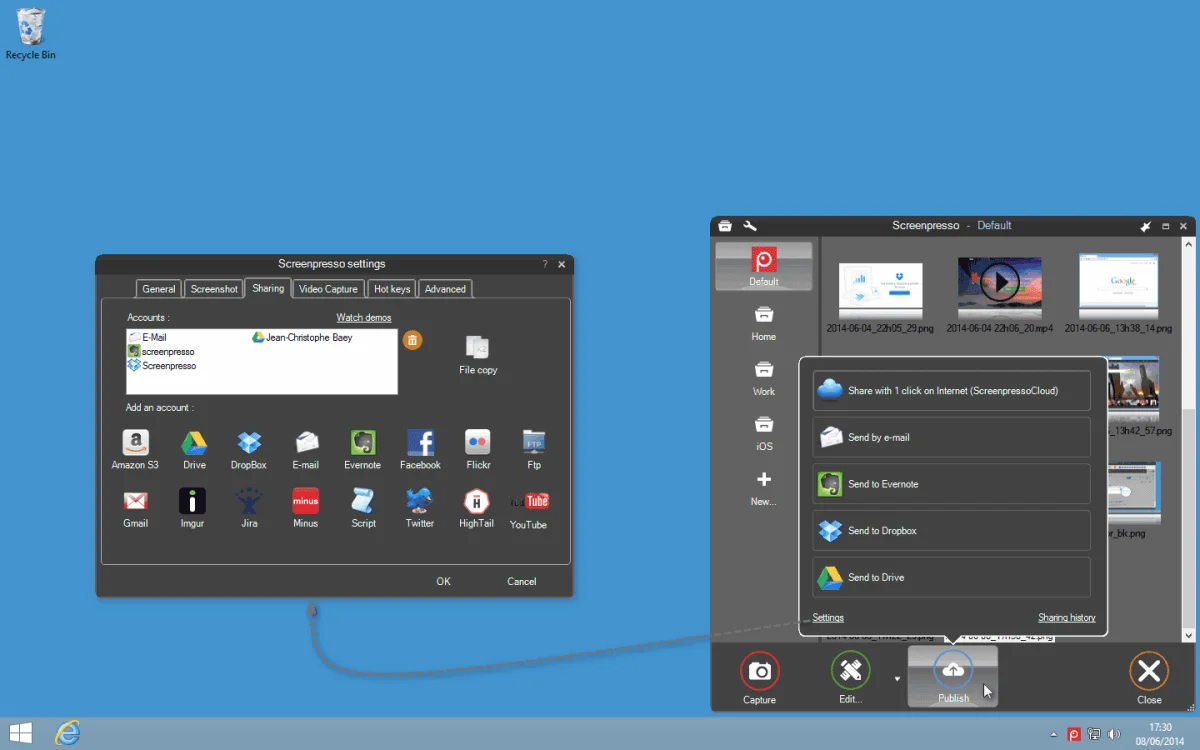
Using Screenpresso feels smooth and intuitive. The interface is clean and easy to navigate, which makes capturing and recording tasks straightforward even for beginners. Taking a screenshot requires just a few clicks, and the scrolling capture feature works reliably for web pages or long documents. Video recording is straightforward, and the ability to include webcam footage adds flexibility for creating tutorials.

The built-in editor is simple yet effective; adding annotations, text, and arrows is fast and responsive. File management is well-organized, allowing quick access to recent captures and easy exporting. Hotkeys can be customized to suit individual workflows, which is a big productivity booster. Overall, Screenpresso balances functionality and ease of use very well.

Who Should Use Screenpresso?

Screenpresso is perfect for content creators, educators, business professionals, and anyone who frequently needs to capture or record their screen. It is especially useful for creating tutorials, presentations, and step-by-step guides.

Conclusion

Screenpresso is a reliable, feature-rich screen capture and recording tool. Its intuitive interface, robust editing tools, and versatile capture options make it an excellent choice for both personal and professional use. If you need a dependable tool to quickly create screenshots or videos with annotations, Screenpresso is worth trying.

Pros & Cons

Pros

    • Easy-to-use interface
    • Supports scrolling screenshots
    • Built-in annotation and editing tools
    • Video and webcam recording with audio
    • Customizable hotkeys

Cons

    • Free version has limited advanced features
    • Video editing capabilities are basic compared to dedicated editors

Frequently Asked Questions

What types of screenshots can I capture with Screenpresso?

Screenpresso allows full-screen, region, and active window captures, as well as scrolling screenshots for long pages or documents.

Can I record videos with Screenpresso?

Yes, you can record screen activity, webcam footage, and audio for tutorials, presentations, or demonstrations.

Does Screenpresso include editing tools?

Yes, it has built-in editing tools for cropping, resizing, and adding text, shapes, or annotations to your screenshots.

Is Screenpresso suitable for professional use?

Absolutely. Its editing features, file management, and customizable hotkeys make it suitable for business and educational environments.

Recommended apps [Freeware]:
  • Trillian 6.6 Build 15 Trillian logo all-in-one chat software designed to simplify online communication
  • Simple IP Config 2.9.7 Simple IP Config logo a lightweight, portable tool for quickly changing Windows IP, DNS, and network settings
  • IObit Driver Booster 13.4.0.234 IObit Driver Booster logo updates outdated drivers automatically to boost system stability and gaming performance.
  • EarthView 7.16.4 EarthView logo dynamic wallpapers and screensavers with day, night, and weather effects
  • DirPrintOK 7.61 DirPrintOK logo fast and portable tool to print or export directory contents in XLS, HTML, CSV, or TXT formats.
  • Stretchly 1.21.0 Stretchly logo reminds you to take breaks while working on your computer, promoting better health and productivity.
Recommended apps [Shareware]:
  • iPubsoft Android Desktop Manager 3.7.22 iPubsoft Android Desktop Manager logo transfer files, manage Android data, back up and restore devices, and organize contacts and SMS from your PC
  • Coolutils Print Maestro 4.2.0.0 Coolutils Print Maestro logo print folder contents, export directory trees, and generate detailed file reports quickly
  • Internet Download Manager (IDM) 6.42 Build 64 Internet Download Manager (IDM) logo boosts download speeds up to 5x, schedules downloads, and supports all major browsers and protocols
  • Foxit PDF Editor 2026.1.1.36485 Foxit PDF Editor logo complete PDF solution for businesses, offering advanced editing, collaboration, and document security features.
  • WinRAR 7.22 WinRAR logo Windows tool for compressing, decompressing, and managing RAR, ZIP, and many other archive formats.
  • Sync Breeze 18.2.32 Sync Breeze logo fast and reliable file synchronization tool for local drives, NAS devices, and enterprise storage systems.