FileLegit Windows Multimedia Screen Recorders Apowersoft Screen Capture Pro
Apowersoft Screen Capture Pro logo

Apowersoft Screen Capture Pro 1.6.1.0

  • User Rating:
    ★★★★★
    ★★★★★
    0.0 ★ 0Votes
  • Requirements:
    Windows
  • Version: 1.6.1.0
  • Latest updated: 2 weeks ago
  • License: Free Trial  
  • Publisher: Apowersoft
  • Size: 2 MB
× app stores

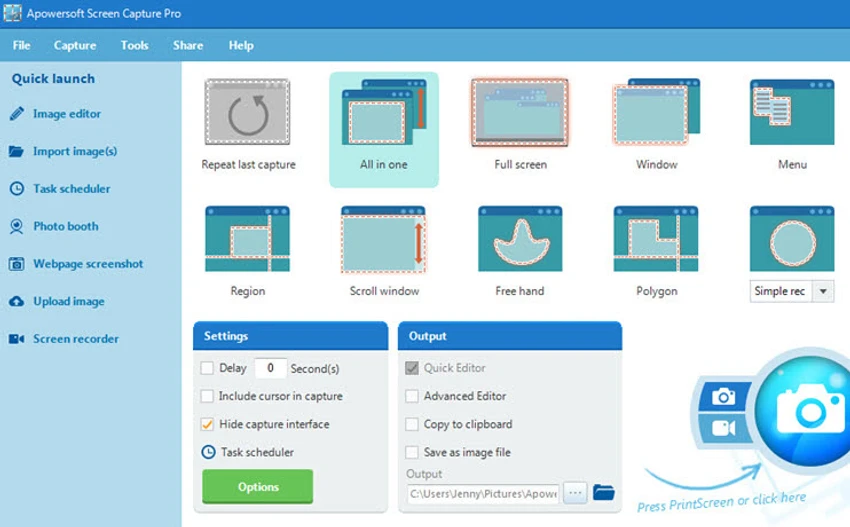
Apowersoft Screen Capture Pro is a multifunctional screenshot and screen recording application designed to help users capture, edit, and share screen content on Windows computers. The software combines screenshot tools, video recording features, image editing options, scheduling functions, and sharing capabilities in a single application. The program provides multiple capture modes, allowing users to capture specific regions, application windows, full screens, or customized areas. Captured images can be saved in formats such as PNG, JPG, BMP, and PDF, while recorded videos can be exported in formats including MP4, WMV, AVI, and FLV.

Apowersoft Screen Capture Pro is designed for various use cases, including creating tutorials, capturing web pages, recording webcam content, documenting software processes, or saving important screen information. The built-in editing tools allow users to modify screenshots immediately after capture by adding annotations, text, arrows, highlights, blur effects, and other visual elements.

The software also includes a professional image editor with additional editing options such as cropping, resizing, rotating, and applying effects. Users can automate screenshot tasks through the scheduler feature, which allows screenshots to be captured at specific times, intervals, and locations. With integrated upload and sharing features, Apowersoft Screen Capture Pro provides a complete workflow from capturing content to editing and distributing images.

Features of Apowersoft Screen Capture Pro

  • Multiple screenshot capture modes
  • Captures full screen, windows, and custom regions
  • Supports image formats including PNG, JPG, BMP, and PDF
  • Records screen videos in MP4, WMV, AVI, FLV, and other formats
  • Supports webcam and webpage capture
  • Instant screenshot annotation tools
  • Adds text, arrows, lines, highlights, and blur effects
  • Includes advanced image editing features
  • Crops, resizes, rotates, and enhances screenshots
  • Supports scheduled screenshot tasks
  • Allows daily and weekly screenshot scheduling
  • Customizes capture time, interval, region, and output folder
  • Uploads images and supports sharing features

Interface and Usability

Apowersoft Screen Capture Pro focuses on accessibility with a user-friendly interface that provides quick access to its main capture and recording functions. Users can select different capture methods depending on whether they need a quick screenshot, a specific area capture, or a complete screen recording. The instant editing tools make it convenient to adjust screenshots immediately after capturing them. Users can add annotations or apply basic modifications without opening another image editing application.

The scheduling feature adds flexibility for users who need automated screenshots at regular intervals. By configuring capture timing, regions, and storage locations, users can let the software perform screenshot tasks automatically. The combination of simple capture tools and advanced editing options makes the application suitable for both casual users and those creating professional visual content.

Who Should Use Apowersoft Screen Capture Pro?

  • Users who frequently capture screenshots
  • Content creators making tutorials
  • Teachers and trainers creating instructional materials
  • Professionals documenting software workflows
  • Users who need scheduled screen captures
  • Anyone requiring screenshot editing and sharing tools

Conclusion

Apowersoft Screen Capture Pro is a versatile screen capture solution that combines screenshots, screen recording, editing, scheduling, and sharing features. Its range of capture modes and built-in editing tools make it suitable for users who need more than a basic screenshot utility.

Pros & Cons

✓

Pros

  • Supports screenshots and screen recording in one tool
  • Provides multiple capture modes
  • Includes built-in annotation and editing tools
  • Supports scheduled screenshot tasks
  • Offers multiple output formats
  • Includes image upload and sharing options
✕

Cons

  • Advanced features may require time to explore
  • System compatibility depends on supported Windows versions

Frequently Asked Questions

What is Apowersoft Screen Capture Pro used for?

Apowersoft Screen Capture Pro is used to capture screenshots, record screen activity, edit images, and share captured content on Windows computers.

What capture modes are available in Apowersoft Screen Capture Pro?

The software supports multiple capture modes, including full-screen capture, window capture, fixed-region capture, and custom-area screenshots.

Can Apowersoft Screen Capture Pro record videos?

Yes. The software supports screen recording and allows users to save videos in formats such as MP4, WMV, AVI, and FLV.

Can I edit screenshots after capturing them?

Yes. Apowersoft Screen Capture Pro includes editing tools for adding annotations, text, arrows, highlights, blur effects, cropping, resizing, rotating, and other adjustments.

Does Apowersoft Screen Capture Pro support scheduled screenshots?

Yes. The software includes a scheduler that allows users to configure automatic screenshots based on specific times, intervals, regions, and output folders.

Which Windows versions support Apowersoft Screen Capture Pro?

According to the provided system requirements, Apowersoft Screen Capture Pro supports Windows Vista, Windows 7, Windows 8, Windows 10, and Windows 11.

Recommended apps [Freeware]:
  • WifiInfoView 3.00 WifiInfoView logo scans nearby Wi-Fi networks and displays detailed technical information in real time
  • Cloudflare WARP 2026.6.850.0 Cloudflare WARP logo Browse faster and more securely with Cloudflare WARP, featuring encrypted connections, WireGuard technology, and Zero Trust support
  • SciTE (SCIntilla) 5.6.4 SciTE (SCIntilla) logo A lightweight text editor with syntax highlighting, search tools, and programming support for developers working with multiple languages.
  • Minimal Image Viewer 2.0.3 Minimal Image Viewer logo A lightweight Windows image viewer with fast startup, wide format support, GPU rendering, and portable privacy-focused design.
  • qBittorrent 5.2.3 qBittorrent logo Manage torrent downloads efficiently with a free, open-source client featuring search tools, remote control, scheduling, and customization.
  • SmartImage 1.3.1 SmartImage logo Find matching images online quickly with a reverse image search tool supporting multiple search engines and flexible input options.
Recommended apps [Shareware]:
  • iBackup Viewer 4.3.14.2 iBackup Viewer logo extract contacts, messages, photos, and app data from iPhone backups
  • PowerDirector 2026 v24.6 PowerDirector logo AI-powered video editor offering templates, effects, and tools for fast, professional video creation
  • ON1 Resize AI 2026.4 ON1 Resize AI logo advanced AI upscaling technology to enlarge photos up to 10x while preserving detail, sharpness, and print quality
  • GiliSoft Audio Editor 3.2.0 GiliSoft Audio Editor logo Quickly trim, merge, batch-process, and convert audio files with a simple, beginner-friendly editor for everyday audio tasks
  • SmarterMail Build 9686 SmarterMail logo Host and manage business email with collaboration tools, spam protection, ActiveSync support, and web-based administration.
  • WinTools.net Professional 26.7.1 WinTools.net Professional logo Optimize Windows performance with tools for cleaning files, managing startup items, adjusting settings, and improving system privacy.