FileLegit Windows Multimedia Screen Recorders Gilisoft Screen Recorder Pro
Gilisoft Screen Recorder Pro logo

Gilisoft Screen Recorder Pro 13.1

  • User Rating:
    ★★★★★
    ★★★★★
    0.0 0Votes
  • Requirements:
    Windows
  • Version: 13.1
  • Latest updated: 1 week ago
  • License: Free Trial  
  • Publisher: Gilisoft
  • Size: 218 MB
× app stores

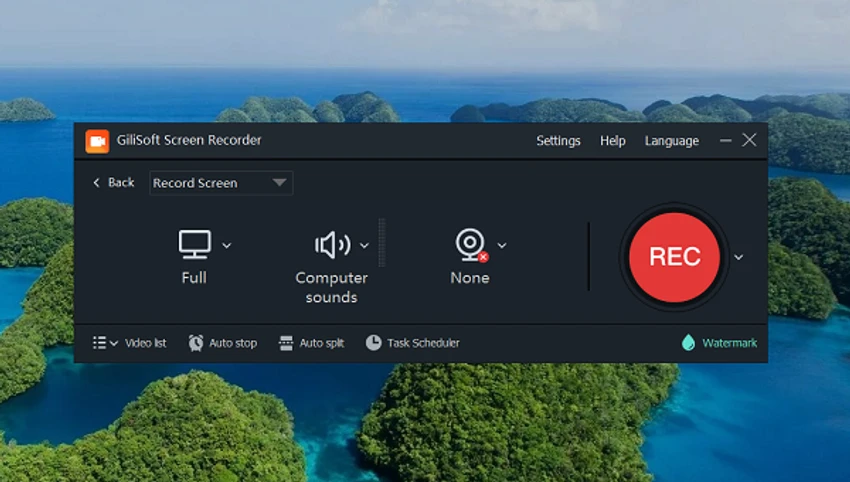
Gilisoft Screen Recorder is a desktop screen capture tool designed for recording on-screen activity, webcam footage, and audio on Windows systems. It is commonly used for tutorials, gameplay recordings, presentations, and online meetings, offering multiple recording modes and output options.

Overview of Gilisoft Screen Recorder

Gilisoft Screen Recorder allows users to capture their entire screen, a selected window, or a custom region while recording audio from system sound, microphone, or both. It also supports webcam recording, making it suitable for content creators and educators. The software includes hardware acceleration through H.264 encoding and NVIDIA CUDA/NVENC support, which helps improve performance during high-quality recordings. It also provides tools for highlighting cursor movements and adding visual effects during capture. Multiple export formats such as MP4, AVI, WMV, and FLV are supported, making it flexible for different platforms and sharing needs.

Features of Gilisoft Screen Recorder

  • Screen recording (full screen, window, or selected region)
  • Webcam recording and external device capture support
  • Simultaneous recording of system audio and microphone
  • Video conference recording with dual audio input support
  • GPU-accelerated H.264 encoding (NVIDIA CUDA/NVENC)
  • Cursor spotlight and hotspot magnification (up to 4x zoom)
  • Customizable recording area during capture
  • Snapshot capture in PNG, JPG, and BMP formats
  • Hotkey support for quick control (start, pause, stop, screenshots)
  • Mouse click effects and cursor highlighting
  • Watermark support (text or image-based)
  • Multiple output formats including MP4, AVI, WMV, FLV, and H.264

User Experience

Gilisoft Screen Recorder offers a functional and feature-rich interface aimed at users who need more than basic screen capture. Setting up a recording is straightforward, with clear options for selecting screen regions, audio sources, and output formats. The inclusion of GPU acceleration helps maintain performance during high-resolution recording sessions, especially for gaming or software demonstrations. Hotkey support makes it easier to control recording without interrupting workflow. While the interface is not the most modern, it provides direct access to most recording tools without unnecessary complexity.

Conclusion

Gilisoft Screen Recorder is a capable screen recording tool that balances ease of use with a strong feature set. With support for GPU acceleration, multiple recording modes, and useful annotation features, it is well-suited for both casual and professional recording tasks.

Pros & Cons

Pros

  • Supports screen, webcam, and audio recording
  • GPU acceleration improves performance
  • Multiple output formats available
  • Useful tools like cursor highlight and hotspot zoom
  • Hotkey support for efficient control
  • Watermark and snapshot features included

Cons

  • Interface feels slightly outdated
  • Limited advanced video editing features
  • Some features may be unnecessary for basic users

Frequently Asked Questions

What is Gilisoft Screen Recorder used for?

It is used to record screen activity, webcam video, and audio for tutorials, meetings, and gameplay.

Does it support audio recording?

Yes, it can record system sound, microphone input, or both simultaneously.

Can it record video conferences?

Yes, it supports recording audio and video from online meetings.

Does it support GPU acceleration?

Yes, it includes H.264 hardware acceleration using NVIDIA CUDA/NVENC.

Recommended apps [Freeware]:
  • UltraSearch 4.9.2.1208 UltraSearch logo locates files and folders on local NTFS drives in seconds without building an index. Fast, precise, and lightweight.
  • Personal Backup 6.4.11.0 Personal Backup logo Schedule and automate file backups to local drives, networks, or FTP servers with Personal Backup for Windows
  • WifiInfoView 3.00 WifiInfoView logo scans nearby Wi-Fi networks and displays detailed technical information in real time
  • HeidiSQL 12.20 HeidiSQL logo manage MySQL, MSSQL, and databases, run queries, edit tables, and export data on Windows
  • AVG Clear 26.6.11050 AVG Clear logo completely removes AVG antivirus products, files, settings, and registry entries from Windows systems
  • UninstallView 1.52 UninstallView logo View detailed information about installed programs and uninstall software on local or remote Windows computers
Recommended apps [Shareware]:
  • Foxit PDF Editor 2026.1.1.36485 Foxit PDF Editor logo complete PDF solution for businesses, offering advanced editing, collaboration, and document security features.
  • VueScan 9.8.56 VueScan logo Enhance scanner functionality with advanced tools for scanning documents, photos, videos, and slides.
  • TubeMate 6.4.6 TubeMate logo downloads online videos, converts media formats, extracts audio, and manages high-quality video downloads
  • Royal TS 7.4.50622 Royal TS logo centralizes remote connections, credential management, automation, and secure team collaboration.
  • Net Monitor for Employees Professional 6.6.6 Net Monitor for Employees Professional logo track screen activity, usage, and productivity in business environments.
  • DroidKit 2.3.9.20260625 DroidKit logo Recover data, unlock Android devices, repair system issues, and manage phone content with DroidKit for Windows