


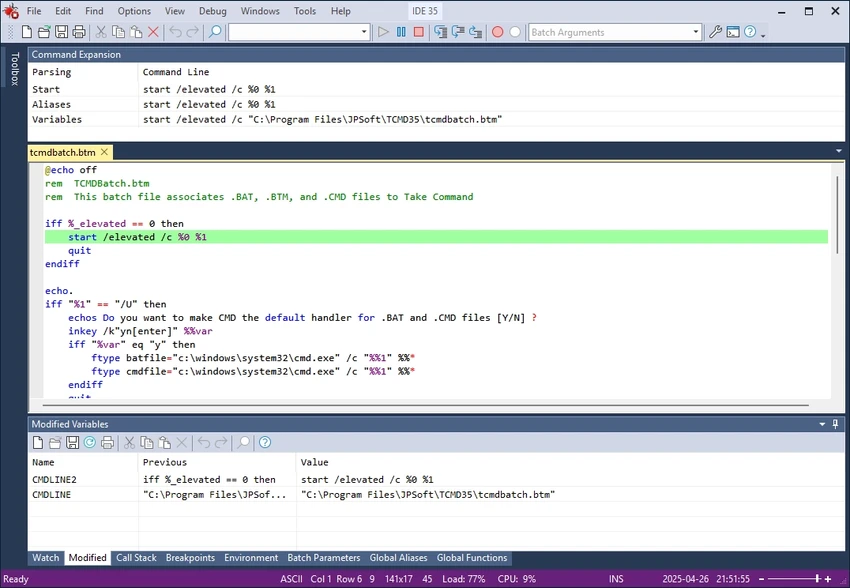

CMDebug is a specialized development tool designed for creating and debugging Windows batch scripts. It provides a graphical IDE and advanced debugging environment for scripts that run in CMD.EXE or TCC-RT, making it easier for developers to build, test, and maintain batch files. It focuses entirely on batch file development, offering a structured environment for writing and troubleshooting scripts.
The tool supports both CMD-compatible batch files (.BAT, .CMD) and TCC-RT scripts (.BTM). It allows developers to switch between CMD syntax mode for compatibility and TCC syntax mode for extended functionality. With its integrated debugging tools and structured editing environment, CMDebug aims to modernize batch scripting by adding visibility and control that traditional CMD environments lack.
Features of CMDebug
- Standalone batch scripting IDE for Windows
- Integrated graphical interface for script development
- Advanced debugger with single-step execution
- Breakpoint support for controlled debugging
- Syntax highlighting and code coloring
- Tooltips and variable inspection
- Tabbed editing windows for multiple scripts
- Watch windows for monitoring variables
- Supports CMD.EXE-compatible batch files (.BAT, .CMD)
- Supports TCC-RT scripts (.BTM)
- Switchable syntax modes (CMD vs TCC)
- Enhanced command behavior for CMD compatibility
- Script encryption support for secure distribution (TCC-RT)
- Compatible with Windows 10, 11, and Windows Server editions
User Experience
CMDebug provides a structured and developer-focused environment compared to traditional text editors used for batch scripting. The debugger is the standout feature, allowing users to step through scripts line by line and identify issues more efficiently. The tabbed interface makes it easy to manage multiple scripts at once, while syntax highlighting and variable inspection improve readability and reduce debugging time. For developers working in CMD or TCC environments, the ability to switch syntax modes is particularly useful, ensuring compatibility without sacrificing advanced features.
Who Should Use CMDebug?
- Developers writing Windows batch scripts
- System administrators automating tasks via CMD or TCC
- Advanced users working with script-based automation
- IT professionals needing structured debugging tools
- Users developing and distributing TCC-RT scripts
Conclusion
CMDebug is a powerful and focused development tool for batch scripting on Windows. Its debugging capabilities, syntax flexibility, and structured IDE environment make it significantly more advanced than standard text-based scripting workflows.


