Zoom Player MAX logo

Zoom Player MAX 22.5

  • User Rating:
    ★★★★★
    ★★★★★
    0.0 ★ 0Votes
  • Requirements:
    Windows
  • Version: 22.5
  • Latest updated: 2 weeks ago
  • License: Free Trial  
  • Publisher: InMatrix
  • Size: 96 MB
× app stores

Zoom Player MAX is a feature-rich media player designed for Windows users who want high-quality video playback with a lightweight and responsive experience. The software supports a wide range of media formats, including DVD, Blu-ray main movie playback, Flash videos, and HD content, while maintaining low system resource usage.

The player is designed to start quickly and provide smooth playback even with high-quality video files. It includes built-in codec support, allowing users to play various media formats without needing extensive additional configuration. Zoom Player MAX also provides useful playback customization options, including color adjustments, video animations, chapter-based navigation, and customizable backgrounds during playback.

In addition to standard video playback, Zoom Player MAX includes advanced features for experienced users, such as Smart Play configuration, audio and video synchronization adjustments, playlist management, remote web control, and support for external control applications. It also offers subtitle support, including strong handling of Vietnamese subtitles, making it a practical choice for users who frequently watch movies with different subtitle formats.

With its combination of performance, format support, and advanced playback controls, Zoom Player MAX is suitable for both casual viewers and users who want more control over their media playback experience.

Features of Zoom Player MAX

  • High-quality video and movie playback
  • Supports DVD, Blu-ray main movie playback, Flash, and HD formats
  • Built-in codec support
  • Fast startup and lightweight performance
  • Vietnamese subtitle display support
  • Browse and view images
  • Adjust video colors and playback animations
  • Chapter-based movie navigation
  • Smart Play configuration and playback controls
  • Audio and video synchronization adjustment
  • Advanced playlist management
  • Video Wall support for multiple screens
  • GuardDog feature for restarting after crashes
  • Video orbiting to help prevent screen burn-in
  • Support for DRM Windows Media formats
  • Web-based remote control interface
  • API support for third-party applications
  • HTML, Flash, and QuickTime interaction support

Interface and Usability

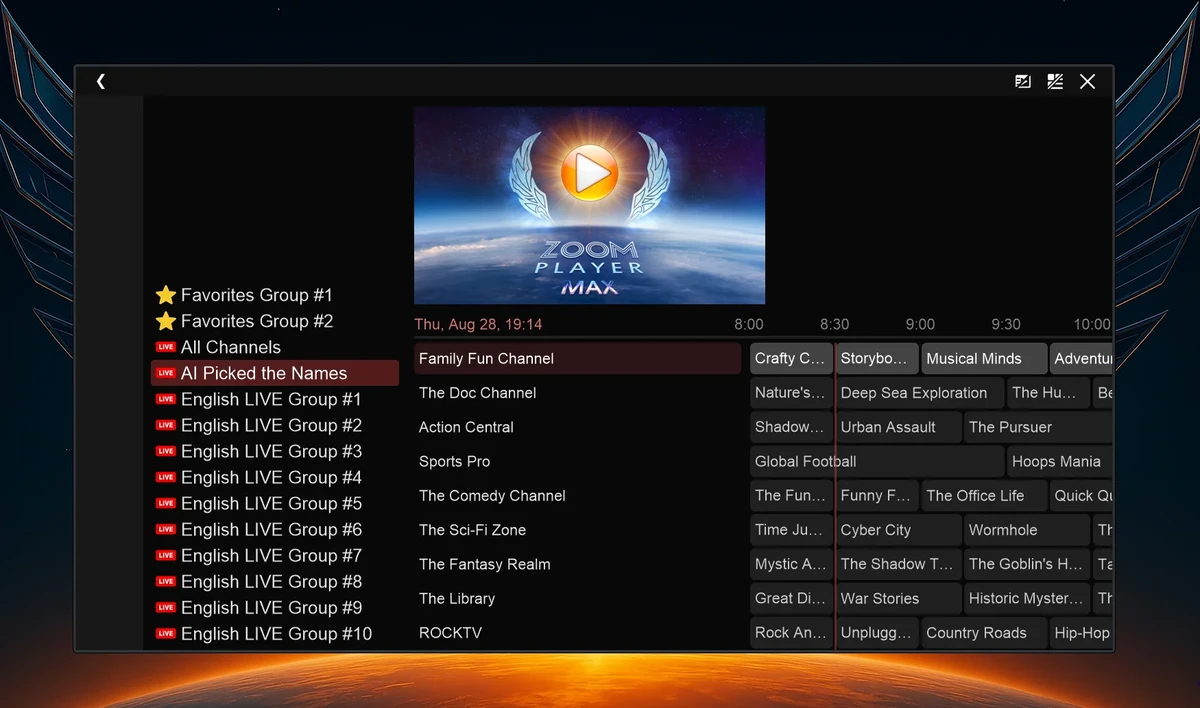
After using Zoom Player MAX, I found the application focused on providing flexible playback controls while keeping performance lightweight. The player launches quickly and handles common video formats without requiring complicated setup.

The interface offers many customization options, which is useful for advanced users who want precise control over playback settings. Features such as subtitle handling, chapter navigation, color adjustment, and playlist management are easy to access once users become familiar with the available controls.

Because Zoom Player MAX includes many professional-level options, new users may need some time to explore its settings. However, the wide range of configuration tools makes it appealing for users who want more control than a basic media player provides.

Who Should Use Zoom Player MAX?

  • Users who watch DVD, Blu-ray, and HD movies on Windows
  • Movie enthusiasts who want advanced playback controls
  • Users needing reliable subtitle support
  • People looking for a lightweight media player
  • Advanced users who want customizable playback settings
  • Users managing large media collections

Conclusion

Zoom Player MAX is a powerful media player that combines efficient performance with a wide range of advanced playback features. Its support for DVD, Blu-ray, HD video, subtitles, and extensive customization options makes it more flexible than many basic media players.

Pros & Cons

✓

Pros

  • Supports many video formats
  • Lightweight and fast startup performance
  • Strong subtitle support
  • Built-in codec support
  • Extensive playback customization options
  • Supports Blu-ray main movie playback
  • Advanced control features for experienced users
  • Remote control and API support
✕

Cons

  • Advanced features may require time to learn
  • Some features are designed mainly for experienced users

Frequently Asked Questions

What is Zoom Player MAX used for?

Zoom Player MAX is used for playing movies, videos, music, and other media files on Windows computers. It supports formats including DVD, Blu-ray, Flash, and HD video.

Does Zoom Player MAX support subtitles?

Yes. Zoom Player MAX supports subtitles and provides strong subtitle display capabilities, including support for Vietnamese subtitles.

Is Zoom Player MAX lightweight?

Yes. One of the main advantages of Zoom Player MAX is its low resource usage and fast startup compared with many feature-rich media players.

Can Zoom Player MAX play Blu-ray movies?

Yes. Zoom Player MAX supports Blu-ray main movie playback with subtitle support.

Does Zoom Player MAX support advanced playback settings?

Yes. The software includes advanced options such as Smart Play configuration, audio synchronization adjustment, playlist management, and external control support.

Who should use Zoom Player MAX?

Zoom Player MAX is suitable for users who want a powerful Windows media player with extensive customization options, high-quality playback, and support for a wide range of video formats.

Recommended apps [Freeware]:
  • ToDoList 9.2.4.0 ToDoList logo customizable task manager for Windows with subtasks, reminders, notes, tracking, and project tools
  • MSI Center 2.0.71.0 MSI Center logo a system utility for MSI devices that manages performance, gaming modes, monitoring, RGB, and hardware optimization tools
  • Foxit Reader 2026.1.2.36540 Foxit Reader logo Read, annotate, fill forms, and print PDF files with Foxit Reader, a lightweight and feature-rich PDF tool for Windows
  • WinContig 5.0.3.4 WinContig logo a portable file defragmentation tool for Windows that optimizes file access without full disk defrag
  • Resolume Arena 7.27.0 rev 14395 Resolume Arena logo Professional software for live video mixing, projection mapping, edge blending, and synchronized audiovisual performances.
  • Multi Commander 16.1 Build 3190 Multi Commander logo Manage files faster with a dual-panel, multi-tab file manager offering advanced tools for sorting, searching, scripting, and archives.
Recommended apps [Shareware]:
  • iBackup Viewer 4.3.14.2 iBackup Viewer logo extract contacts, messages, photos, and app data from iPhone backups
  • Sequence Generator Pro 4.5.0.1649 Sequence Generator Pro logo a Windows astrophotography capture suite for automating imaging, focus, and sequencing.
  • EaseUS VoiceWave 3.5.0 EaseUS VoiceWave logo Transform your voice in real time with EaseUS VoiceWave using AI voice effects for gaming, streaming, and meetings
  • SynthFont2 2.9.2.1 SynthFont2 logo a MIDI editor and player that renders MIDI files into audio using SoundFonts, VST instruments, and SFZ
  • PDF Architect 9.1.133.23134 PDF Architect logo Windows PDF editor for creating, editing, converting, and securing PDF documents efficiently.
  • Gammadyne Mailer 74.0 Gammadyne Mailer logo Automate email campaigns, manage mailing lists, track engagement, and process messages with advanced marketing tools.