Glary Utilities logo

Glary Utilities 6.44.0.48

  • User Rating:
    ★★★★★
    ★★★★★
    0.0 ★ 0Votes
  • Requirements:
    Windows
  • Version: 6.44.0.48
  • Latest updated: 2 months ago
  • License: Freemium  
  • Publisher: Glarysoft
  • Size: 27 MB
× app stores

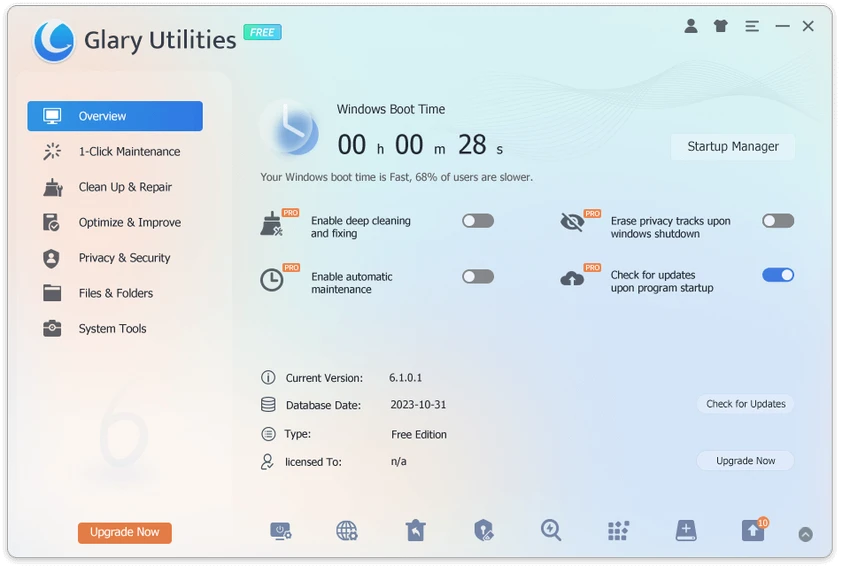
Glary Utilities is a comprehensive all-in-one system maintenance and optimization tool designed to improve the performance, stability, and security of Windows computers. It combines more than 20 utilities into a single interface, allowing users to clean junk files, fix system errors, manage startup programs, and enhance overall system efficiency. With its one-click maintenance feature and wide range of built-in tools, Glary Utilities aims to provide an easy yet powerful solution for keeping PCs running smoothly over time.

Features of Glary Utilities

  • One-click system maintenance for quick optimization
  • Junk file cleanup and disk space recovery
  • Registry cleaning to reduce system errors and crashes
  • Startup manager to disable unnecessary background programs
  • Privacy protection and browser history cleanup
  • Secure file deletion (unrecoverable file removal)
  • Software update checker for installed applications
  • File recovery tool for deleted files
  • Disk space analyzer to identify large files and folders
  • Duplicate file finder to remove redundant data
  • Uninstall manager for removing unused software
  • System performance optimization tools

User Experience

Glary Utilities offers a user-friendly interface that centralizes a large number of system maintenance functions into a single dashboard. The one-click maintenance feature is especially useful for beginners, allowing users to perform essential cleanup and optimization tasks without needing technical knowledge. For more advanced users, individual tools provide deeper control over system performance. The disk cleanup feature helps free up storage by removing temporary files, logs, and cached data, while the registry cleaner targets system errors that may affect stability.

Performance improvements are also achieved through startup management, which allows users to disable unnecessary programs that slow down boot times. Additionally, tools like duplicate file finder and disk space analyzer help users reclaim storage efficiently. The inclusion of file recovery adds an extra layer of utility, making the suite useful not only for optimization but also for data recovery in simple cases.

Overall, Glary Utilities provides a balanced experience between simplicity and depth, making it suitable for both casual users and those who want more control over system maintenance.

Who Should Use Glary Utilities?

  • Windows users wanting to improve PC performance
  • Beginners looking for easy system maintenance tools
  • Users with slow or cluttered computers
  • People needing disk cleanup and optimization tools
  • Users who want an all-in-one maintenance solution

Conclusion

Glary Utilities stands out as a practical and feature-rich system optimization suite that simplifies PC maintenance. By combining cleaning, performance tuning, privacy protection, and recovery tools into one platform, it provides a convenient solution for keeping Windows systems in good condition.

Pros & Cons

✓

Pros

  • All-in-one system maintenance suite
  • Easy one-click optimization for beginners
  • Over 20 built-in system tools
  • Improves performance and frees disk space
  • Includes file recovery and duplicate file finder
  • Privacy cleaning features included
  • User-friendly interface
✕

Cons

  • Some tools overlap in functionality
  • Advanced tuning may require caution for beginners
  • Interface can feel dense due to many features
  • Effectiveness depends on proper usage of tools

Frequently Asked Questions

What is Glary Utilities used for?

Glary Utilities is used to clean, optimize, and maintain Windows PCs by removing junk files, fixing errors, and improving performance.

Is Glary Utilities safe to use?

Yes, it is generally safe when used correctly, but users should be careful with advanced tools like registry cleaning.

Does Glary Utilities improve PC speed?

Yes. It improves performance by cleaning junk files, managing startup programs, and optimizing system resources.

Does it include file recovery?

Yes. It includes a basic file recovery tool for restoring deleted files.

Is Glary Utilities suitable for beginners?

Yes. Its one-click maintenance feature makes it very beginner-friendly.

Recommended apps [Freeware]:
  • PortKiller 3.3.3 PortKiller logo a network utility for monitoring TCP ports, managing processes, and handling tunnels on Windows.
  • VSDC Free Video Editor 11.2.3.729 VSDC Free Video Editor logo a non-linear video editing tool for creating videos with effects, transitions, and multi-format support on Windows
  • Stellarium 26.2 Stellarium logo 3D planetarium software showing stars, constellations, planets, and deep-sky objects in real time.
  • ProgDVB 7.72.3 ProgDVB logo a multimedia player for watching digital TV, IPTV, satellite broadcasts, and online radio on Windows
  • Rufus 4.15 Rufus logo Create bootable USB drives quickly with Rufus, a lightweight Windows tool for installing OS, recovery, and firmware tasks
  • COMSS Boot USB 2021.12 COMSS Boot USB logo COMSS Boot USB combines antivirus rescue disks, disk diagnostics, and system recovery tools in one bootable USB toolkit
Recommended apps [Shareware]:
  • DiskGenius 6.2.0.1829 DiskGenius logo a Windows tool for partition management, data recovery, disk cloning, and backup with advanced features.
  • 4K Video Downloader Plus 26.2.1 4K Video Downloader Plus logo Download videos, audio, playlists, and subtitles in high quality with 4K Video Downloader Plus
  • EF Duplicate Files Manager 26.05 EF Duplicate Files Manager logo finds and removes duplicate files by name, size, or content to reclaim storage space.
  • RecoveryTools zMigrator 26.6 RecoveryTools zMigrator logo Migrate Zimbra emails, contacts, and calendars to multiple formats
  • CrawlRhino SEO Monitor 1.1.18.0 CrawlRhino SEO Monitor logo Monitor website uptime, response times, SEO changes, and HTTP status codes with a lightweight desktop monitoring solution for Windows.
  • Actual File Folders 1.15.5 Actual File Folders logo Speed up folder navigation and access frequently used locations faster with a Windows tool designed for file dialogs.