


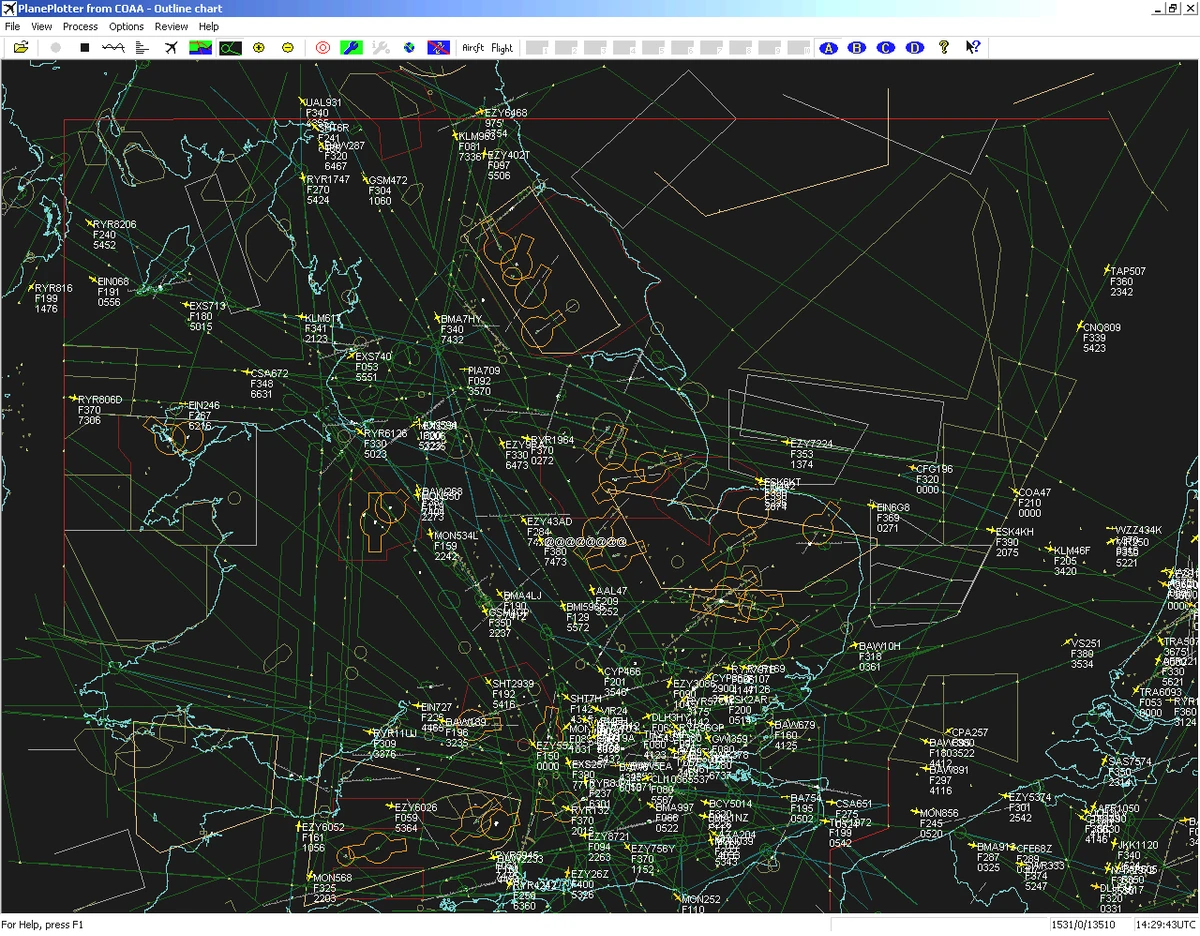

COAA PlanePlotter is a specialized aviation monitoring tool for Windows that receives and decodes real-time digital aircraft transmissions. It transforms raw signals such as ADS-B, ACARS, and HFDL into a radar-like visualization of aircraft positions, altitudes, and movement. Designed for aviation enthusiasts and advanced users, it provides a live operational view of air traffic using multiple data sources and decoding methods.
Overview
COAA PlanePlotter works by collecting and interpreting digital position reports transmitted by aircraft. These include ADS-B position data, ACARS messages, and HF-based HFDL signals when supported by compatible receivers. Once decoded, the software plots aircraft on a chart interface that can resemble radar tracking. Users can overlay the data on aeronautical charts or satellite imagery, making it easier to interpret real-world flight movement in real time.
The software also integrates with external tools and receivers, enabling advanced tracking scenarios such as Mode-S reception and even Google Earth visualization for enhanced geographic context.
Features of COAA PlanePlotter
- Real-time decoding of aircraft transmissions (ADS-B, ACARS, HFDL)
- Radar-style live aircraft position plotting
- Display of aircraft altitude, position, and movement history
- Message table showing decoded aviation data streams
- Data logging and archiving of received transmissions
- Chart overlays using aeronautical maps or satellite imagery
- Integration with Mode-S ADS-B receivers
- Google Earth visualization for real-time aircraft tracking
- Altitude filtering for separating traffic layers
- Direction-finding capability using antenna switching methods
- Support for embedded position reports in aviation messages
User Experience
Using COAA PlanePlotter feels highly technical but rewarding for users interested in aviation monitoring. The interface is functional rather than modern, prioritizing data density over visual polish. The real-time chart updates provide a strong sense of live air traffic movement, especially when multiple aircraft are being tracked simultaneously. The ability to switch between message logs, map views, and external visualization tools like Google Earth adds flexibility, though it requires some learning to configure properly.
For beginners, the system may feel complex due to its reliance on external receivers and aviation terminology. However, once set up, it delivers continuous live tracking with high detail.
Who Should Use PlanePlotter?
COAA PlanePlotter is best suited for:
- Aviation enthusiasts and flight tracking hobbyists
- Users with ADS-B or Mode-S hardware receivers
- Researchers working with aviation data signals
- Radio monitoring and signal decoding enthusiasts
- Advanced users interested in real-time air traffic visualization
Conclusion
COAA PlanePlotter is a powerful niche tool for decoding and visualizing live aircraft communications. It stands out for its ability to combine multiple aviation data sources into a single real-time tracking environment. While it is not designed for casual users, it offers impressive depth for those willing to configure and work with aviation signal hardware and decoding tools.


