AVG Clear logo

AVG Clear 26.6.11050

  • User Rating:
    ★★★★★
    ★★★★★
    0.0 0Votes
  • Requirements:
    Windows
  • Version: 26.6.11050
  • Latest updated: 6 days ago
  • License: Freeware  
  • Publisher: Gen Digital Inc
  • Size: 53.7 MB
× app stores

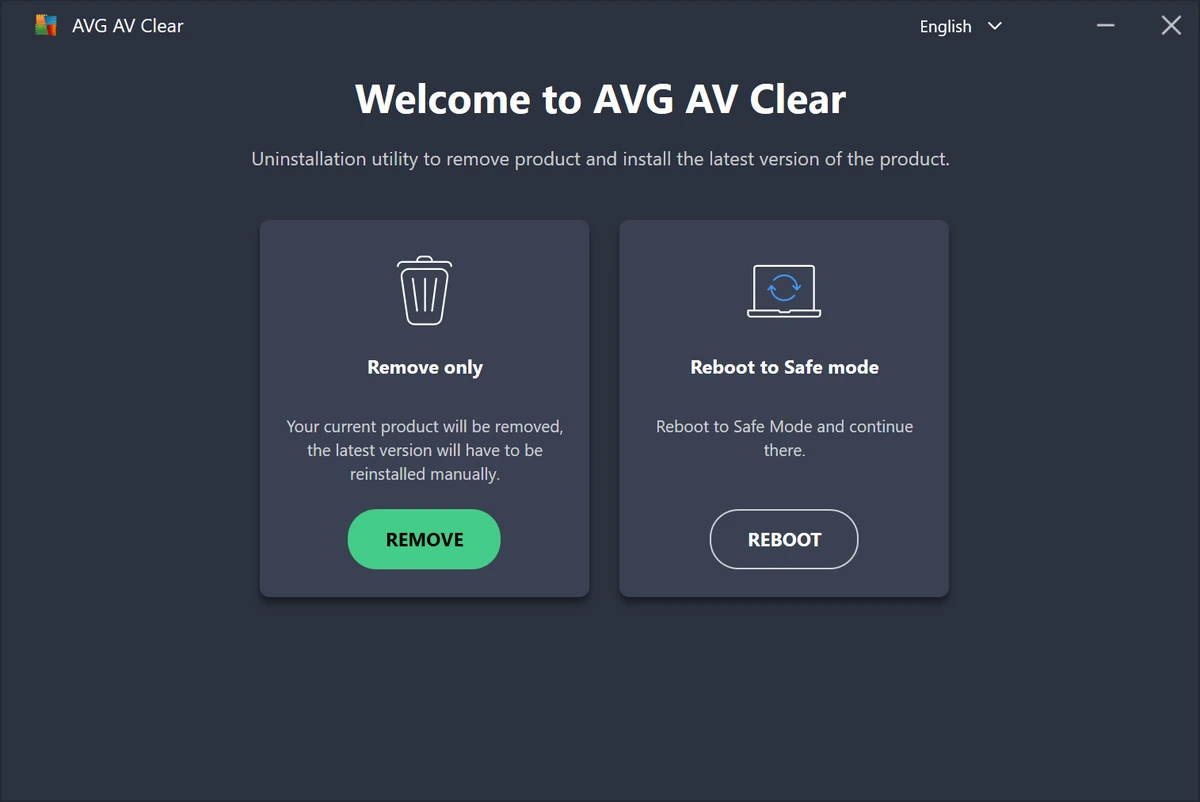
AVG Clear is the official removal utility developed by AVG to completely uninstall AVG products from Windows computers. Unlike the standard Windows uninstall process, the tool is designed to remove leftover files, registry entries, user settings, and other components that may remain after a failed uninstall, repair, or reinstallation attempt. The software serves as a troubleshooting solution for situations where AVG products cannot be removed through conventional methods.

Features of AVG Clear

  • Completely removes installed AVG products
  • Deletes AVG registry entries
  • Removes installation files and folders
  • Removes AVG user settings and configuration data
  • Clears Virus Vault contents
  • Eliminates leftover files associated with AVG installations
  • Designed to resolve failed uninstall or repair scenarios
  • Official utility provided by AVG
  • Supports complete cleanup before reinstalling AVG products
  • Lightweight and straightforward operation
  • Requires system restart after completion

User Experience

After using AVG Clear, it becomes evident that the utility has a single purpose: thoroughly removing AVG software from a system. The tool is particularly useful when a standard uninstall fails or when remnants of a previous AVG installation prevent a successful reinstall. Instead of manually searching for files, folders, and registry entries, AVG Clear automates the cleanup process and removes associated components in one operation.

The interface is straightforward and focused entirely on the removal task. There are no advanced optimization features or additional system maintenance tools, which helps keep the process simple and easy to understand. One important consideration is that AVG Clear removes all AVG-related data, including user preferences and Virus Vault contents. Users planning to retain any settings or quarantined items should review their data before proceeding.

Because the utility is designed specifically for AVG products, it is most valuable as a troubleshooting tool rather than a general-purpose uninstaller. For routine software removal, the standard Windows uninstall process may be sufficient, while advanced third-party uninstallers offer broader application support.

Who Should Use AVG Clear?

  • Users experiencing AVG uninstall failures
  • Users preparing for a clean AVG reinstallation
  • IT support professionals
  • System administrators
  • Technicians troubleshooting antivirus installation issues
  • Users needing complete AVG software removal

Conclusion & Recommendation

AVG Clear is a practical utility for users who need to fully uninstall AVG products and remove residual files that may interfere with future installations. Its focused approach, official support, and thorough cleanup capabilities make it a useful tool to keep available when dealing with stubborn AVG installations.

Pros & Cons

Pros

  • Official removal tool from AVG
  • Removes files, registry entries, and user settings
  • Useful for failed uninstall or reinstall situations
  • Helps eliminate leftover AVG components
  • Simple and focused user experience
  • Effective for troubleshooting installation conflicts
  • Lightweight utility

Cons

  • Limited to AVG products only
  • Removes all AVG settings and Virus Vault contents
  • Requires a system restart after use
  • Not intended as a general software uninstaller

Frequently Asked Questions

What is AVG Clear used for?

AVG Clear is used to completely remove AVG products, including files, registry entries, settings, and related installation components.

Is AVG Clear an antivirus program?

No. AVG Clear is an uninstallation and cleanup utility designed specifically for removing AVG software.

When should I use AVG Clear?

The tool is typically used when a standard AVG uninstall fails, a repair process is unsuccessful, or a clean reinstall is required.

Does AVG Clear remove user settings?

Yes. The utility removes AVG settings, configuration files, and other user-related data associated with the installation.

Will Virus Vault contents be deleted?

Yes. AVG Clear removes Virus Vault contents along with other AVG-related files and settings.

Do I need to restart my computer after using AVG Clear?

Yes. A system restart is required after the removal process is completed.

Which operating systems are supported?

AVG Clear supports Windows 7 and later versions of Windows.

Recommended apps [Freeware]:
  • Visual Studio Code 1.126.0 Visual Studio Code logo Free and powerful code editor from Microsoft with extensions, debugging, Git support, and multi-language development
  • Sysinternals Suite 2026.6.17 Sysinternals Suite logo a powerful collection of Windows tools for system monitoring, troubleshooting, process analysis, and performance optimization.
  • ATTO Disk Benchmark 5.00.3 ATTO Disk Benchmark logo Measure SSD, HDD, RAID, and storage controller performance with ATTO Disk Benchmark on Windows systems
  • Personal Backup 6.4.11.0 Personal Backup logo Schedule and automate file backups to local drives, networks, or FTP servers with Personal Backup for Windows
  • FluentCleaner 26.06.04 FluentCleaner logo a lightweight Windows cleaning tool designed to remove unnecessary files using a modern, minimal WinUI 3 interface
  • AB Download Manager 1.9.2 AB Download Manager logo Download files with features such as queue management, scheduling, speed control, and browser integration.
Recommended apps [Shareware]:
  • Audio Transcoder 2.12.24 Audio Transcoder logo all-in-one audio converter and CD ripper supporting MP3, FLAC, AAC, WMA, and more
  • WinRAR 7.22 WinRAR logo Windows tool for compressing, decompressing, and managing RAR, ZIP, and many other archive formats.
  • Remote Desktop Manager 2026.2.9.0 Remote Desktop Manager logo manage RDP, SSH, VNC, and virtual machines from one secure centralized platform
  • AVG Driver Updater 26.5.10990.0 AVG Driver Updater logo automatically scan and update outdated drivers to improve PC performance and stability on Windows.
  • GiliSoft Exe Lock 12.0.0 GiliSoft Exe Lock logo Protect Windows applications with passwords and prevent unauthorized access using GiliSoft Exe Lock
  • Smart MindMap 11.6.3 Smart MindMap logo AI-powered Windows tool for mind maps, UML, flowcharts, and professional diagram creation