Ant Download Manager logo

Ant Download Manager 2.17.4.96212

  • User Rating:
    ★★★★★
    ★★★★★
    0.0 0Votes
  • Requirements:
    Windows
  • Version: 2.17.4.96212
  • Latest updated: 1 week ago
  • License: Commercial  
  • Publisher: AntGROUP
  • Size: 60 MB
× app stores

Ant Download Manager (AntDM) is a powerful download utility for Windows designed to accelerate file downloads, capture online media, and manage large numbers of download tasks efficiently. It integrates with major web browsers and supports a wide range of protocols, including streaming formats and BitTorrent.

Overview of Ant Download Manager

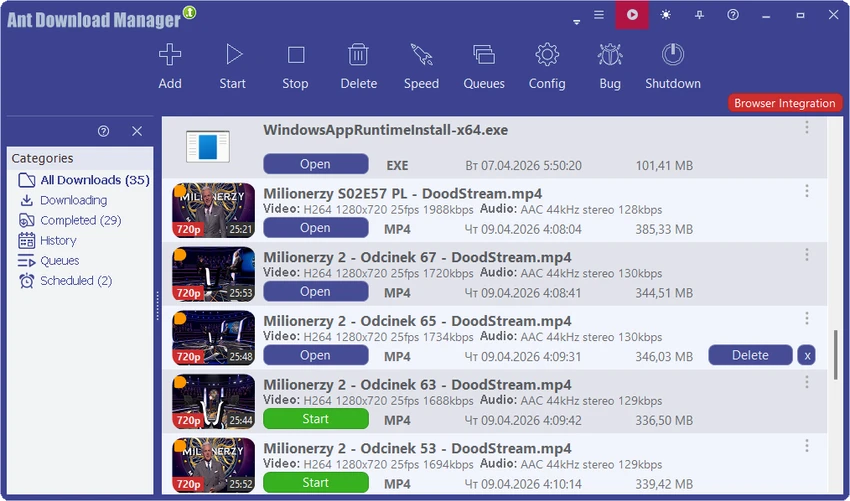
Ant Download Manager is built to improve and manage file downloading from the internet by using multi-threaded download acceleration. It can split files into multiple streams to increase download speed and resume interrupted downloads caused by network failures or system shutdowns. The software integrates directly with popular browsers, automatically capturing downloadable links and media content. It can also function independently, allowing users to manually add or batch-process download links.

In addition to standard file downloads, AntDM supports streaming video/audio capture and P2P torrent downloads, making it a versatile all-in-one download tool.

Features of Ant Download Manager

  • Multi-threaded downloading for faster download speeds
  • Browser integration with Chrome, Edge, Firefox, and other Chromium-based browsers
  • Supports video and audio streaming downloads (M3U8, MPEG-DASH, etc.)
  • Resume capability for interrupted downloads
  • Automatic error recovery and reconnection
  • Download scheduling and queue management
  • Supports HTTP, HTTPS, FTP, FTPS, and proxy servers
  • BitTorrent (P2P) download support
  • Premium link generator (debrid) compatibility
  • Built-in media grabbing for audio and video streams
  • Audio extraction from video files with MP3 conversion
  • Download categorization and task prioritization
  • Activity logs and download history tracking
  • Multilingual support and customizable interface

User Experience

Ant Download Manager provides a familiar download manager interface that is easy to navigate. Users can either rely on automatic browser capture or manually add URLs for downloads. The software performs well when handling large or multiple downloads thanks to its segmented downloading system. It is particularly useful for users who frequently download large media files or streaming content. Integration with browsers is generally smooth, although users can also disable extensions and operate the tool independently if preferred. The scheduling and queue features are helpful for managing downloads efficiently over time.

Who Should Use Ant Download Manager?

  • Users who frequently download large files from the internet
  • People downloading streaming video and audio content
  • Torrent users who want a unified download manager
  • Professionals managing bulk downloads
  • Users who want faster and more reliable downloads than browser default tools

Conclusion

Ant Download Manager is a capable and versatile tool for users who need more control and speed than standard browser downloads. With support for streaming media, torrents, and multi-threaded acceleration, it is well-suited for heavy download users.

Pros & Cons

Pros

  • Significant download speed improvements via multi-threading
  • Supports many protocols and streaming formats
  • Browser integration for automatic link capture
  • Resume and recovery for interrupted downloads
  • Includes torrent and premium link support
  • Flexible scheduling and queue system

Cons

  • Interface is functional but not highly modern
  • Advanced features may be overwhelming for casual users
  • Some features depend on browser extensions
  • Premium/debrid features may require external services

Frequently Asked Questions

What is Ant Download Manager used for?

It is used to download files faster, manage downloads, and capture streaming media from websites.

Does Ant Download Manager support video downloads?

Yes, it can capture and download streaming video and audio from many websites.

Can it resume interrupted downloads?

Yes, it supports resuming downloads after interruptions or network failures.

Does it support torrents?

Yes, it includes BitTorrent (P2P) support.

Recommended apps [Freeware]:
  • Glow 26.9 Glow logo advanced Windows system analysis tool offering deep hardware insights, diagnostics, benchmarks, and system optimization utilities
  • CheckMail 5.23.6 CheckMail logo a POP3 email checker that lets users preview, manage, and delete emails before downloading them
  • WifiInfoView 3.00 WifiInfoView logo scans nearby Wi-Fi networks and displays detailed technical information in real time
  • Digital Clock 5.2.2 Digital Clock logo customizable desktop clock app with skins, alarms, opacity control, and system tray support
  • GLview 7.4.4 GLview logo displays detailed OpenGL, Vulkan, DirectX, and GPU information, helping users analyze graphics hardware and driver capabilities
  • TeraCopy 4.0.0.28 TeraCopy logo Windows file transfer tool that speeds up copying, resumes transfers, and improves reliability with error recovery
Recommended apps [Shareware]:
  • Sequence Generator Pro 4.5.0.1649 Sequence Generator Pro logo a Windows astrophotography capture suite for automating imaging, focus, and sequencing.
  • Lyric Video Studio 1.5.49 Lyric Video Studio logo a Windows app for creating lyric videos with AI tools, subtitles, motion tracking, and 4K video editing
  • Rollback RX 12.91 Rollback RX logo instant system restore software for Windows lets users recover PCs via snapshots in seconds
  • REAPER 7.76 REAPER logo a powerful digital audio workstation for multitrack recording, MIDI editing, mixing, and professional audio production
  • DaVinci Resolve 21.0.1 DaVinci Resolve logo a professional video editor with advanced color grading, AI tools, and high-end post-production features.
  • CoolUtils PDF Combine 8.1.0.76/13 CoolUtils PDF Combine logo Windows tool for merging multiple PDF files into one, with bookmarks, encryption, and batch processing