


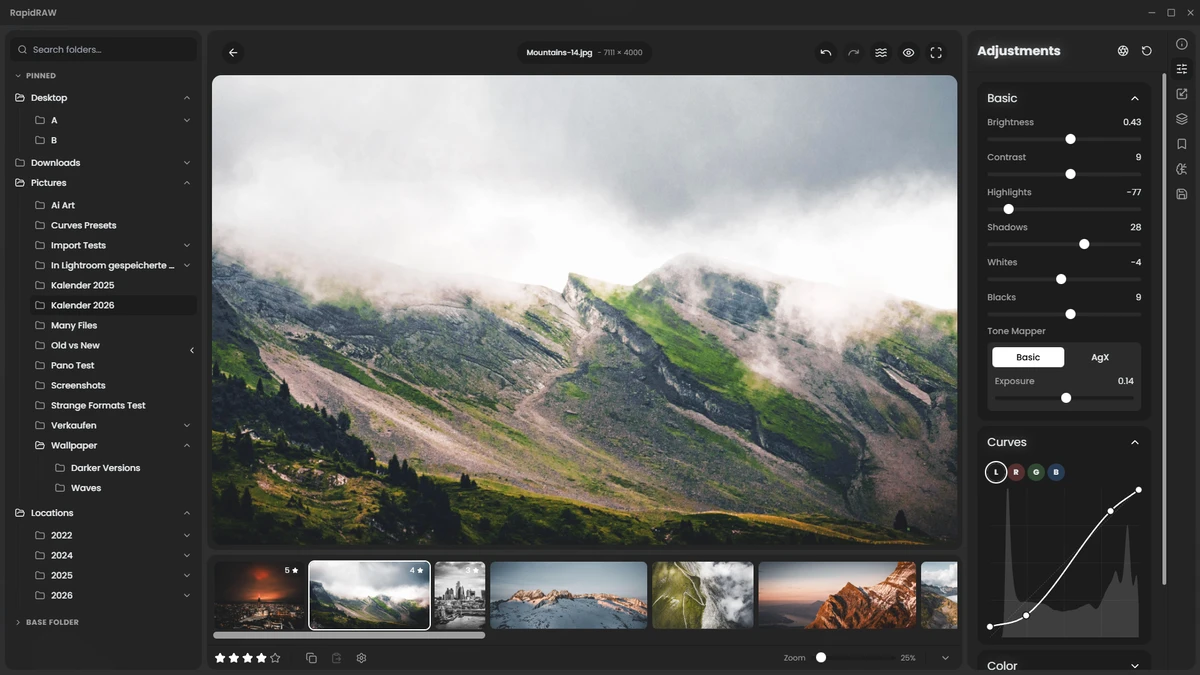

RapidRAW is a modern, high-performance photo editing application designed as a lightweight alternative to Adobe Lightroom®. It focuses on speed, efficiency, and a streamlined editing workflow while still offering professional-grade tools for RAW image processing.
Despite its small installation size (under 20MB), RapidRAW delivers advanced editing capabilities powered by GPU acceleration and a modern rendering pipeline. It is available on Windows, macOS, Linux, and Android, making it a cross-platform solution for photographers and content creators. The software emphasizes non-destructive editing, meaning all adjustments are saved separately from the original image file, preserving the integrity of RAW and JPEG photos.
Features of RapidRAW
Core Editing Engine
- GPU-accelerated 32-bit image processing pipeline (WGSL-based)
- Full RAW image support via rawler
- JPEG compatibility included
- Non-destructive editing using .rrdata sidecar files
- Lens correction (distortion, chromatic aberration, vignette via Lensfun)
- High-speed preview rendering with instant feedback
Masking & AI Tools
- Layer-based masking system
- AI subject detection
- AI depth, sky, and foreground masking
- Combine AI and manual masks for precision control
- Generative edits for adding or removing objects using text prompts (optional AI backend)
Professional Editing Controls
- Exposure, highlights, shadows, whites, and blacks adjustment
- Tone mapping including AgX support
- Tone curves (Luma and RGB channels)
- Color grading with temperature, tint, vibrance, and saturation
- HSL color mixer and color wheels
- Sharpening, clarity, structure, and noise reduction
- LUT support, dehaze, vignette, glow, halation, flares, and film grain
- Perspective correction, crop, rotation, and warping tools
Library & Workflow Tools
- Image library management with folder-based navigation
- Recursive folder browsing
- Virtual copies for non-destructive variations
- Star ratings, color labels, and tagging system
- Batch editing and batch export tools
- EXIF metadata viewer
- Filmstrip navigation for quick image browsing
- File operations including import, rename, move, duplicate, and copy
Productivity & Interface
- Preset creation, saving, and sharing
- Copy/paste edit settings between images
- Full undo/redo history system
- Customizable modern UI with multilingual support
- Resizable panels and smooth animations
- Built-in panorama stitcher and collage maker
- Film negative conversion tool
- Flexible export options (format, watermarking, naming, resizing, metadata control)
User Experience
After using RapidRAW, the most noticeable strength is its speed. The GPU-accelerated pipeline makes editing feel responsive, with adjustments appearing almost instantly even on large RAW files. This gives it a fluid workflow similar to high-end professional tools.
The interface is clean and modern, with a focus on usability rather than overwhelming menus. Tools are organized logically, making it easy to switch between editing, masking, and library management. AI-powered masking is particularly useful for isolating subjects, skies, or backgrounds without manual selection. Combined with traditional masking tools, it allows for precise editing control without slowing down the workflow.
The non-destructive editing system using sidecar files ensures that original photos remain untouched, which is essential for professional workflows. Batch processing and preset systems also significantly speed up repetitive editing tasks. Overall, RapidRAW feels like a lightweight but powerful editing environment that balances performance, simplicity, and advanced features.
Who Should Use RapidRAW?
- Photographers looking for a Lightroom alternative
- Users working with RAW image workflows
- Content creators needing fast batch editing tools
- Designers who prefer lightweight software
- Users wanting AI-assisted masking and editing tools
Conclusion
RapidRAW is a powerful and lightweight RAW photo editor that combines GPU acceleration, AI-assisted masking, and non-destructive editing in a compact package. Its performance-oriented design makes it especially appealing for photographers who want fast, responsive editing without the overhead of larger applications.


