MobaXterm logo

MobaXterm 26.4

  • User Rating:
    ★★★★★
    ★★★★★
    0.0 ★ 0Votes
  • Requirements:
    Windows
  • Version: 26.4
  • Latest updated: 3 weeks ago
  • License: Freemium  
  • Publisher: Mobatek
  • Size: 44 MB
× app stores

MobaXterm is a comprehensive remote computing application for Windows that combines an advanced terminal, an embedded X11 server, an SSH client, remote desktop tools, and numerous Unix commands into a single interface. Instead of relying on multiple utilities for remote administration, MobaXterm provides everything needed to manage servers, network devices, and remote desktops from one application. Designed for developers, system administrators, webmasters, and IT professionals, MobaXterm simplifies remote workflows by integrating popular protocols such as SSH, RDP, VNC, FTP, Mosh, and X11 forwarding while offering a familiar tabbed interface.

Features of MobaXterm

  • Embedded X11 server based on X.Org.
  • Automatic DISPLAY export for remote Unix applications.
  • Secure X11 forwarding over SSH.
  • Tabbed terminal based on PuTTY.
  • Anti-aliased fonts and macro support.
  • Built-in Unix/Linux commands, including bash, grep, awk, sed, rsync, ls, and cat.
  • Automatic SFTP browser when connected through SSH.
  • Session manager supporting multiple remote protocols.
  • Support for SSH, RDP, VNC, FTP, Mosh, Telnet, Rlogin, and X11.
  • Plugin support for extending functionality.
  • Multiple remote sessions within a single interface.

User Experience

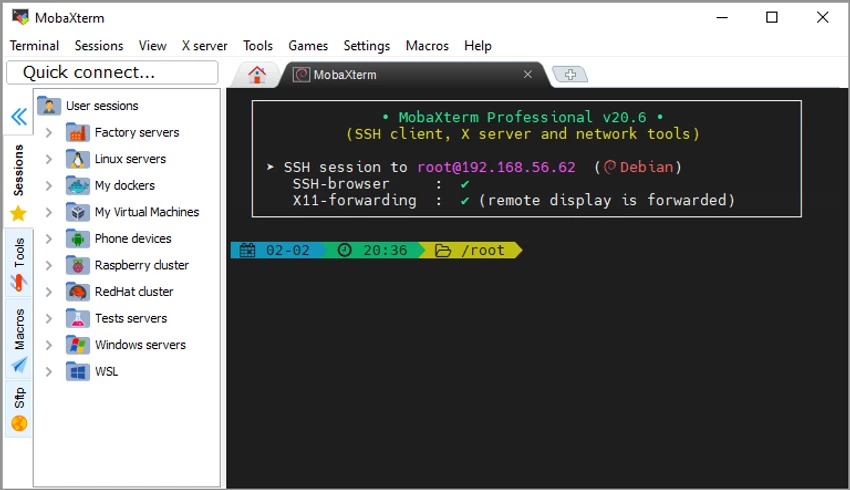
MobaXterm brings together a wide range of remote access and administration tools into one well-organized application. Instead of switching between separate SSH clients, FTP applications, and remote desktop software, everything is accessible from a single interface. The tabbed layout makes it easy to manage multiple remote sessions simultaneously, while the built-in session manager keeps connections organized. One feature I found particularly useful is the automatic SFTP browser that appears when connecting via SSH, making remote file management much faster without launching a separate file transfer application.

The embedded X11 server also simplifies running graphical Linux applications on Windows, allowing remote GUI applications to appear seamlessly on the desktop through secure SSH forwarding. For users familiar with Unix environments, the inclusion of common command-line utilities such as bash, grep, awk, sed, and rsync makes Windows feel much closer to a Linux workstation.

Although MobaXterm offers a large number of features, the interface remains surprisingly approachable. Beginners can quickly establish remote connections, while advanced users benefit from macros, plugins, session management, and support for numerous network protocols.

Pricing

Free Home Edition

Includes:

  • Full X11 server and SSH support.
  • Remote desktop support (RDP, VNC, Xdmcp).
  • Remote terminal support (SSH, Telnet, Rlogin, Mosh).
  • X11 forwarding.
  • Automatic SFTP browser.
  • Master password protection.
  • Plugin support.
  • Full documentation.
  • Up to 12 saved sessions.
  • Up to 2 SSH tunnels.
  • Up to 4 macros.
  • Up to 360 seconds for TFTP, NFS, and Cron services.

Pro Edition

Starting at $69.00 per year. Additional features include:

  • Unlimited sessions.
  • Unlimited SSH tunnels.
  • Unlimited macros.
  • Unlimited runtime for network daemons.
  • Enhanced security settings.
  • Custom startup messages and logos.
  • Profile script customization.
  • Ability to remove unwanted bundled tools, games, and screensavers.
  • Deployment for company environments.
  • Lifetime right to use the purchased version.
  • Updates included for the subscription period.

Who Should Use MobaXterm?

  • System administrators.
  • Network engineers.
  • Linux and Unix administrators.
  • Software developers.
  • Webmasters.
  • IT support professionals.
  • Users who frequently manage remote servers or virtual machines.

Conclusion

MobaXterm excels by bringing together nearly every essential remote administration tool into a single application. Whether you're connecting through SSH, managing remote desktops, transferring files, or running graphical Linux applications on Windows, it provides a streamlined and efficient workflow.

Pros & Cons

✓

Pros

  • Combines multiple remote networking tools in one application.
  • Built-in SSH, RDP, VNC, FTP, and X11 support.
  • Embedded X11 server works out of the box.
  • Automatic SFTP browser improves remote file management.
  • Includes many Unix/Linux command-line tools.
  • Tabbed interface for managing multiple sessions.
  • Plugin support extends functionality.
  • Suitable for developers and IT professionals.
✕

Cons

  • Free version limits the number of sessions, SSH tunnels, and macros.
  • Some advanced administration features require the Pro edition.
  • Extensive feature set may be more than casual users need.

Frequently Asked Questions

What is MobaXterm?

MobaXterm is an all-in-one remote computing application for Windows that combines an advanced terminal, an embedded X11 server, SSH client, remote desktop tools, file transfer capabilities, and Unix command-line utilities.

Which remote protocols does MobaXterm support?

MobaXterm supports a variety of remote protocols, including SSH, RDP, VNC, FTP, Mosh, Telnet, Rlogin, X11, and Xdmcp.

Does MobaXterm include an SFTP client?

Yes. When you connect to a remote server using SSH, MobaXterm automatically opens an integrated SFTP browser, allowing you to transfer and manage remote files alongside your terminal session.

Can I run Linux graphical applications on Windows with MobaXterm?

Yes. MobaXterm includes a built-in X11 server and supports X11 forwarding, allowing graphical applications running on remote Unix or Linux systems to be displayed on your Windows desktop.

What are the limitations of the free version?

The free Home Edition limits users to 12 saved sessions, 2 SSH tunnels, 4 macros, and a maximum runtime of 360 seconds for TFTP, NFS, and Cron services. It still includes core features such as SSH, RDP, VNC, X11 forwarding, automatic SFTP browsing, and plugin support.

Is MobaXterm suitable for beginners?

Yes. Although it offers many advanced networking features, MobaXterm presents them through a well-organized interface that makes establishing remote connections and managing sessions relatively straightforward, even for users who are new to remote administration.

Recommended apps [Freeware]:
  • VidCoder 12.23 VidCoder logo Convert, encode, and rip DVDs and Blu-rays with VidCoder, a powerful open-source video transcoding tool for Windows
  • MakeMKV 1.18.4 MakeMKV logo disc ripper that converts DVD and Blu-ray discs into MKV files while preserving audio, video, subtitles, and metadata
  • QontrolPanel 1.18.2 QontrolPanel logo system tray audio tool for quickly switching output devices, managing inputs, and controlling app volume on Windows
  • Norton 360 Remover 26.6.11050.2580 Norton 360 Remover logo a utility that completely uninstalls Norton 360 security software, removing leftover files and settings
  • NVIDIA App 11.0.8.299 NVIDIA App logo Manage GPU settings, update drivers, optimize games, and capture gameplay with a unified tool for NVIDIA graphics users.
  • HWiNFO 8.50 HWiNFO logo Analyze hardware components, monitor system sensors, generate detailed reports, and evaluate PC performance with a free diagnostic tool.
Recommended apps [Shareware]:
  • ON1 Photo RAW 2026.4 ON1 Photo RAW logo advanced AI masking, creative filters, and photo enlargement tools for photographers
  • Softros LAN Messenger 12.6.3.0 Softros LAN Messenger logo secure encrypted LAN messaging, group chat, and file sharing for office communication
  • HTTP Debugger Pro 10.5 HTTP Debugger Pro logo captures and analyzes HTTP and HTTPS traffic from browsers and apps, helping developers debug web requests in real time
  • Fast Video Cutter Joiner 7.1.4.0 Fast Video Cutter Joiner logo a lightweight video editing tool for quickly cutting, trimming, and joining videos
  • Learn to Speak English 12.0.0.40 Learn to Speak English logo interactive language software with real-world scenarios, speech recognition and flexible learning paths.
  • WeBuilder 2025 v18.7.0.277 WeBuilder logo Lightweight web code editor with syntax highlighting, FTP publishing, code snippets, and support for modern web technologies.