FileLegit Windows Internet & Network Download Managers ChrisPC Free VideoTube Downloader
ChrisPC Free VideoTube Downloader logo

ChrisPC Free VideoTube Downloader 15.26.0908

  • User Rating:
    ★★★★★
    ★★★★★
    0.0 ★ 0Votes
  • Requirements:
    Windows
  • Version: 15.26.0908
  • Latest updated: 2 months ago
  • License: Freeware  
  • Publisher: Chris P.C. srl
  • Size: 30 MB
× ❮ app stores ❯

Saving online videos for offline viewing can be useful for users who want to watch content without an internet connection. ChrisPC Free VideoTube Downloader provides a convenient way to download videos and playlists from popular video websites and convert them into widely supported formats. The software combines a simple interface with support for multiple streaming technologies, making it suitable for users who need more than a basic video downloader. It can handle online videos, playlists, live streams, and different output formats while keeping the workflow accessible.

Overview

ChrisPC Free VideoTube Downloader is a Windows application designed for downloading online videos from various video platforms. It supports websites such as YouTube, Dailymotion, Vimeo, Metacafe, and several other video services. After downloading content, users can convert videos into formats compatible with devices and media players, including iPad, iPhone, iPod, MPEG-4 H.264, MP3, and AC3. The software also supports downloading playlists, recording live streams, downloading subtitles, and handling modern streaming formats such as M3U8, MPD, and F4M.

Features of ChrisPC Free VideoTube Downloader

Video Downloading

  • Download videos from multiple online platforms
  • Download YouTube videos and playlists
  • Supports websites including:
    • YouTube
    • Dailymotion
    • Vimeo
    • Metacafe
    • BBC iPlayer
    • ITV Player
    • ABC
    • FOX
    • CBS.com
    • Prosieben
    • Blip.tv
    • CBC.ca
    • Other supported video websites

Video Conversion

  • Convert downloaded videos into different formats
  • Supports:
    • iPad-compatible formats
    • iPhone-compatible formats
    • iPod-compatible formats
    • MPEG-4 H.264
    • MP3
    • AC3

Advanced Download Features

  • Improved download speed for:
    • M3U8 streams
    • MPD streams
    • F4M streams
  • Segmented downloads for faster YouTube downloads
  • Detect HTML5 video streams
  • Detect:
    • M3U8
    • F4M
    • MPD
    • MP4
    • M4A
    • M4V
    • MP3 streams
  • Download history with search options
  • Find downloaded videos by:
    • Title
    • Author
    • Download date

Subtitle Support

  • Automatically select subtitle languages
  • Supports subtitle downloads from:
    • YouTube
    • ITV
    • BBC
    • CBS
    • ABC
    • NBC
    • FOX
    • Other supported websites

Live Stream Recording

  • Record live streams from:
    • YouTube
    • Livestream
    • Ustream
    • M3U8 HLS streams
    • F4M HDS streams

User Experience

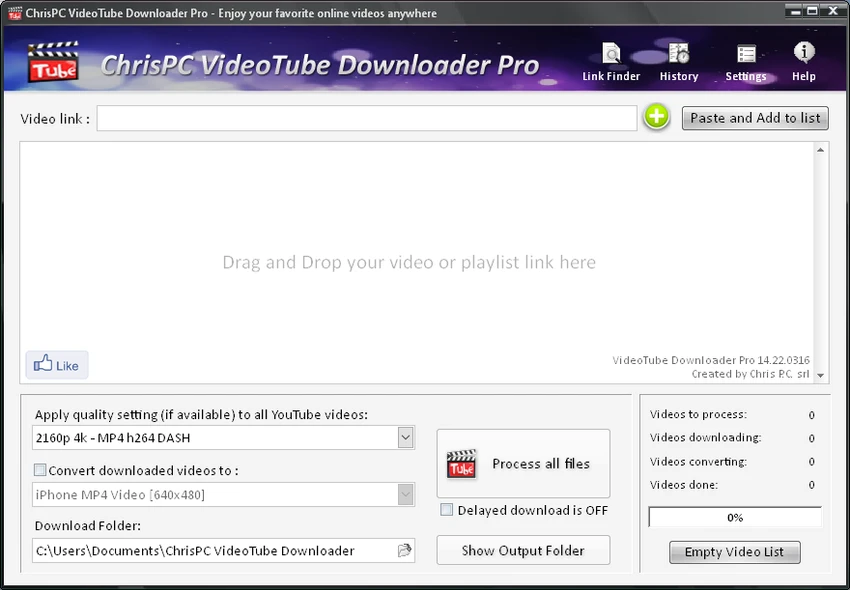
ChrisPC Free VideoTube Downloader provides a user-friendly approach to downloading online videos. The interface is designed around a simple workflow, allowing users to locate a video, start a download, and select conversion options without dealing with complicated settings. One of the strongest aspects of the application is its broad website compatibility. Instead of focusing only on a single platform, it supports a variety of video services, making it useful for users who collect content from different sources. The improved Link Finder engine helps identify modern streaming formats, including HTML5 videos and adaptive streaming technologies such as M3U8, MPD, and F4M. This expands the range of content the software can process compared with simpler download tools.

Download performance is another important area. The updated segmented download option and improvements for streaming formats are designed to make downloads faster. According to the provided information, M3U8, MPD, and F4M stream downloads can achieve significant speed improvements. The download history feature is also practical. Instead of manually searching through folders, users can review previous downloads and locate videos by title, author, or date. The software includes subtitle downloading and live stream recording features, adding more flexibility for users who work with different types of online video content.

Who Should Use ChrisPC Free VideoTube Downloader?

  • Users who save online videos for offline viewing
  • People downloading playlists
  • Users who need video format conversion
  • Anyone working with multiple video platforms
  • Users who need subtitle downloads
  • People recording supported live streams

Conclusion

ChrisPC Free VideoTube Downloader offers a versatile solution for downloading and converting online videos on Windows. Its support for multiple websites, modern streaming formats, playlists, subtitles, and live streams makes it more flexible than basic download utilities.

Pros & Cons

✓

Pros

  • Supports many video websites
  • Downloads YouTube videos and playlists
  • Includes video conversion options
  • Supports multiple streaming formats
  • Handles M3U8, MPD, and F4M streams
  • Includes download history management
  • Supports subtitle downloads
  • Can record supported live streams
  • Offers segmented downloading for improved speed
✕

Cons

  • Requires a good internet connection for best performance
  • Free version has download limitations for some websites
  • Feature set may be more than casual users need

Frequently Asked Questions

What is ChrisPC Free VideoTube Downloader?

ChrisPC Free VideoTube Downloader is a Windows application that allows users to download online videos, playlists, and live streams from supported websites.

Which websites does ChrisPC Free VideoTube Downloader support?

The software supports platforms including YouTube, Dailymotion, Vimeo, Metacafe, BBC iPlayer, ITV Player, ABC, FOX, CBS.com, and other video websites.

Can ChrisPC Free VideoTube Downloader convert videos?

Yes. Downloaded videos can be converted into formats compatible with devices and media players, including MPEG-4 H.264, MP3, and AC3.

Does it support YouTube playlists?

Yes. The software can download YouTube videos and playlists.

Can it download subtitles?

Yes. The application can automatically select and download subtitle languages from supported websites.

Does ChrisPC Free VideoTube Downloader support live streams?

Yes. It can record supported live streams from services and streaming formats such as YouTube, Livestream, Ustream, M3U8 HLS, and F4M HDS.

What are the system requirements?

The software supports Windows 7, Windows 8, Windows 10, and Windows 11. It requires a 1000 MHz processor or higher, more than 1 GB of RAM, approximately 400 MB of free disk space, and Internet Explorer 11 or higher.

Recommended apps [Freeware]:
  • FluentCleaner 1.17.227 Classic / 26.08.03 FluentCleaner logo a lightweight Windows cleaning tool designed to remove unnecessary files using a modern, minimal WinUI 3 interface
  • Viber for Windows 28.3.1 Viber for Windows logo make free calls, send messages, and sync chats across devices via WiFi or 3G
  • Power-user 1.7.85.410 Power-user logo Office add-in offering templates, icons, charts, maps, and diagrams to boost productivity in PowerPoint, Excel, and Word
  • PrivaZer 4.0.124.3 PrivaZer logo a privacy cleaning tool that removes PC traces, frees disk space, and helps protect personal data
  • VideoCacheView 3.11 VideoCacheView logo extracts cached video files from browsers, allowing users to save and play supported videos offline
  • DipTrace 5.3.0.1 DipTrace logo Design schematics, create multilayer PCB layouts, verify circuits, and generate manufacturing files with integrated design tools.
Recommended apps [Shareware]:
  • SkyDemon 4.3.1 SkyDemon logo Plan flights with real-time aeronautical data, dynamic charts, NOTAMs, METAR, TAF, and intelligent route planning using SkyDemon
  • Digimizer 6.5.4 Digimizer logo image analysis tool for precise measurements, object detection, and scientific image processing
  • Text Edit Plus 16.5 Text Edit Plus logo a lightweight text editor with text analysis, word frequency statistics, and document editing tools
  • VovSoft PDF to Text Converter 1.5 VovSoft PDF to Text Converter logo convert PDF files to editable TXT documents offline with batch processing
  • BootIt Bare Metal 2.12 BootIt Bare Metal logo combines partition management, multi-boot support, and disk imaging into one powerful tool for Windows users
  • Perplexity 1.7.0 Perplexity logo Get AI-powered answers, summaries, and research help with source links using this modern search and productivity tool.