WD Drive Utilities logo

WD Drive Utilities 2.1.6.511

  • User Rating:
    ★★★★★
    ★★★★★
    0.0 0Votes
  • Requirements:
    Windows
  • Version: 2.1.6.511
  • Latest updated: 1 week ago
  • License: Freeware  
  • Publisher: Western Digital Technologies
  • Size: 16.5 MB
× app stores

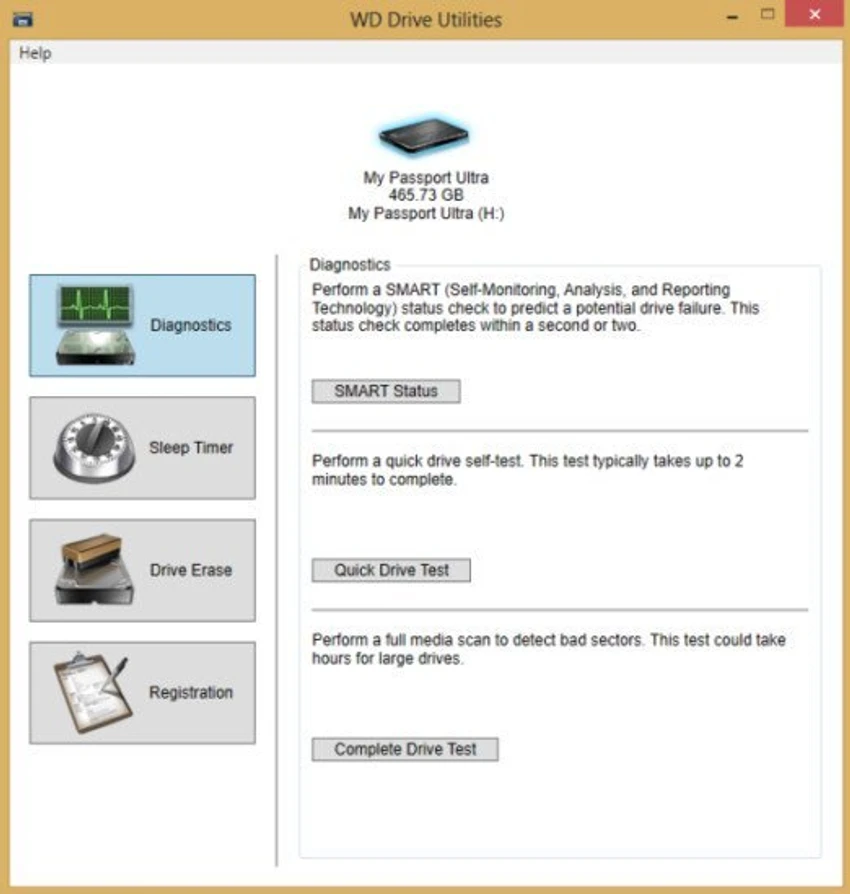
WD Drive Utilities is a lightweight system utility developed by Western Digital to help users manage, configure, and diagnose WD external hard drives. It provides essential tools for checking drive health, running diagnostics, and optimizing performance. The software is designed specifically for Western Digital USB and FireWire external drives, offering users a simple way to monitor storage devices and detect potential issues before they become serious problems.

Features of WD Drive Utilities

  • Diagnose and test Western Digital external hard drives
  • Run quick and full drive health checks
  • Identify potential disk issues early
  • Optimize and configure drive settings
  • Support for WD USB and FireWire external drives
  • Perform surface-level error detection tests
  • Monitor drive performance and stability
  • Compatible with Windows Vista, 7, 8, 8.1, and 10 (32-bit and 64-bit)

User Experience

After reviewing WD Drive Utilities, the software presents itself as a focused and straightforward tool for managing Western Digital storage devices. The interface is minimal and designed for ease of use, making it accessible even for users without technical expertise. The primary value of the application lies in its diagnostic capabilities. Users can run different levels of tests to evaluate the condition of their external drives. Quick tests provide fast feedback on basic functionality, while full diagnostics perform more thorough checks of the drive’s sectors and overall health. This makes the tool especially useful for identifying early signs of drive degradation or performance issues. If a drive begins to slow down or behave unpredictably, running a full diagnostic scan can help determine whether there are underlying hardware problems.

Because the software is purpose-built for Western Digital devices, it integrates closely with supported hardware, ensuring accurate readings and reliable results. However, its usefulness is limited to WD-branded external drives, and it does not serve as a general-purpose disk management tool. Overall, WD Drive Utilities is a practical companion for maintaining drive health and ensuring data reliability on supported devices.

Conclusion

WD Drive Utilities provides essential diagnostic and management features for Western Digital external drives. Its simplicity and reliability make it a useful companion for monitoring drive health and preventing data loss.

Pros & Cons

Pros

  • Simple and user-friendly interface
  • Accurate diagnostics for WD external drives
  • Quick and full drive testing options
  • Helps detect potential hardware issues early
  • Lightweight and easy to install
  • Official tool from Western Digital

Cons

  • Only works with Western Digital drives
  • Limited functionality compared to full disk management suites
  • No advanced recovery or partition tools

Frequently Asked Questions

What is WD Drive Utilities used for?

WD Drive Utilities is used to manage, test, and diagnose Western Digital external hard drives.

Does it work with non-WD drives?

No. It is designed specifically for Western Digital storage devices.

Can it check drive health?

Yes. It includes quick and full diagnostic tests for drive health assessment.

Is WD Drive Utilities free?

Yes. It is provided free by Western Digital.

What operating systems are supported?

It supports Windows Vista, 7, 8, 8.1, and 10 (32-bit and 64-bit).

Recommended apps [Freeware]:
  • HWMonitor 1.64 HWMonitor logo a free system tool that monitors CPU, GPU, voltages, temperatures, and fan speeds in real time.
  • Glow 26.9 Glow logo advanced Windows system analysis tool offering deep hardware insights, diagnostics, benchmarks, and system optimization utilities
  • NewFileTime 8.28 NewFileTime logo a lightweight Windows utility that lets users change file creation, modification, and access timestamps easily
  • Vivaldi Browser 8.0.4033.54 Vivaldi Browser logo a Chromium-based browser with built-in mail, calendar, notes, ad blocker, and deep customization features.
  • MSI Center 2.0.71.0 MSI Center logo a system utility for MSI devices that manages performance, gaming modes, monitoring, RGB, and hardware optimization tools
  • Power-user 1.7.84.406 Power-user logo Office add-in offering templates, icons, charts, maps, and diagrams to boost productivity in PowerPoint, Excel, and Word
Recommended apps [Shareware]:
  • Wondershare AllMyTube 7.4.9.2 Wondershare AllMyTube logo download and convert videos from YouTube and 100+ sites into multiple formats for offline viewing.
  • DiskGenius 6.2.0.1829 DiskGenius logo a Windows tool for partition management, data recovery, disk cloning, and backup with advanced features.
  • Roboform 9.9.4.6 Roboform logo a secure password manager using AES-256 encryption, autofill, and cross-device sync for safer login management
  • Total PDF Converter 6.5.0.171 Total PDF Converter logo converts PDF to DOC, XLS, images, TXT, PDF/A and more with batch processing and advanced tools.
  • NTFS Permissions Auditor 26.6.27 NTFS Permissions Auditor logo analyze Windows folder permissions, audit NTFS access rights, and export detailed security reports
  • DaVinci Resolve 21.0.1 DaVinci Resolve logo a professional video editor with advanced color grading, AI tools, and high-end post-production features.