Training Manager logo

Training Manager 2026 v4.10.4002

  • User Rating:
    ★★★★★
    ★★★★★
    0.0 0Votes
  • Requirements:
    Windows
  • Version: 2026 v4.10.4002
  • Latest updated: 4 days ago
  • License: Freeware  
  • Publisher: Kaizen Software Solutions
  • Size: 52 MB
× app stores

Training Manager is a training administration and compliance tracking solution designed to help organizations manage employee training records, certifications, class schedules, and compliance requirements from a centralized database. The software enables businesses to consolidate training information from multiple sources into a single repository, making it easier to monitor employee qualifications, schedule recurring training, generate compliance reports, and maintain accurate training histories across the organization.

Features of Training Manager

  • Track company-wide training records and training status
  • View individual employee training progress
  • Assign required training by employee, job role, or group
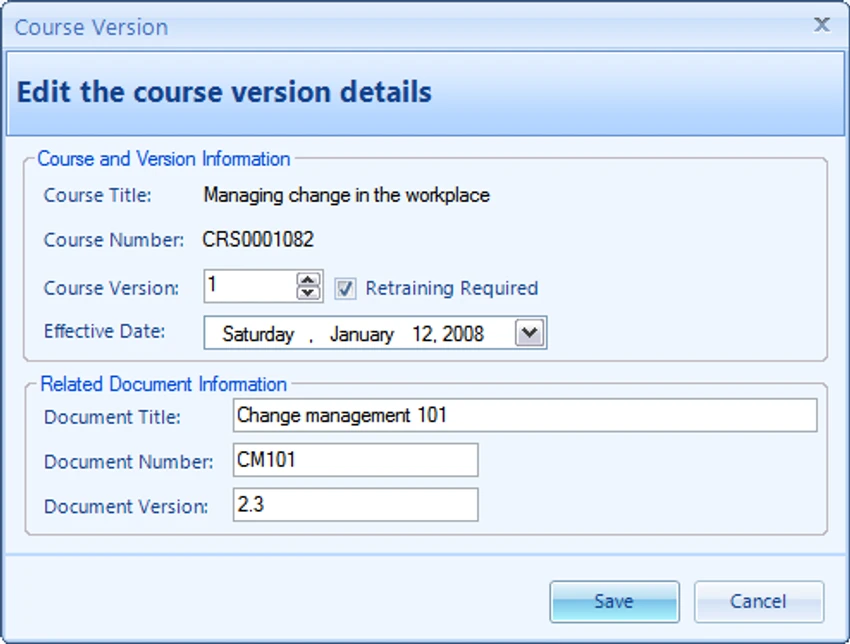
  • Manage recurring and retraining requirements
  • Require retraining based on time intervals, course versions, or one-time completion
  • Schedule training classes and manage enrollments
  • Record attendance, completions, and cancellations
  • Track training credits, hours, and assessment scores
  • Generate training compliance reports
  • Print employee transcripts
  • Create employee training plans
  • Track training costs by individual, group, course, category, or supervisor
  • Store file attachments with training records
  • Import course and personnel data
  • Export reports and data in multiple formats
  • Audit trail reporting for tracking data changes
  • User account management with configurable access permissions
  • Email class session reminders through the default email client
  • Centralized training records repository
  • Supports Windows 10 and later

User Experience

After reviewing Training Manager, it is clear that the software is designed to simplify one of the more challenging administrative tasks within organizations: maintaining accurate and up-to-date training records. The centralized database approach is one of its strongest advantages. Organizations that currently rely on spreadsheets, paper records, or multiple disconnected systems can benefit from having all training information stored in a single location.

The training assignment system offers flexibility by allowing administrators to assign courses based on individual employees, job functions, or groups. This makes it easier to manage organization-wide training requirements while still accommodating role-specific needs. Compliance monitoring is another area where the software performs well. Rather than manually reviewing records to determine whether employees are current with required training, administrators can generate reports that highlight overdue and upcoming requirements.

Scheduling and enrollment management help streamline class administration. Training sessions, attendance records, cancellations, and completion statuses can all be managed within the same system, reducing administrative overhead. The reporting tools are particularly valuable for organizations that must demonstrate compliance with internal policies, industry regulations, or safety standards. Employee transcripts, training plans, and compliance reports can be generated without manually compiling data from multiple sources. The audit trail functionality also adds accountability by tracking changes made to records, which can be useful in regulated environments.

Who Should Use Training Manager?

  • Human resources departments
  • Safety and compliance managers
  • Corporate training coordinators
  • Manufacturing organizations
  • Healthcare organizations
  • Educational institutions
  • Government agencies
  • Companies with recurring certification requirements

Conclusion

Training Manager provides an efficient way to organize, track, and report employee training across an organization. By centralizing training records, automating compliance monitoring, and simplifying reporting, it helps reduce administrative workload while improving visibility into workforce qualifications.

Pros & Cons

Pros

  • Centralized employee training records management
  • Strong compliance reporting capabilities
  • Supports recurring training and retraining requirements
  • Flexible training assignment options
  • Training scheduling and enrollment management
  • Employee transcripts and training plan reporting
  • Audit trail for record tracking
  • Cost tracking across multiple categories
  • User permissions and role-based access controls
  • Data import and export functionality

Cons

  • Primarily designed for training administration rather than broader HR management
  • May offer more functionality than needed for very small organizations

Frequently Asked Questions

What is Training Manager used for?

Training Manager is used to track employee training records, certifications, attendance, compliance requirements, and training schedules within an organization.

Can Training Manager track recurring training requirements?

Yes. The software supports retraining requirements based on calendar schedules, course versions, or one-time completion rules.

Does Training Manager generate compliance reports?

Yes. It can generate reports showing training compliance, overdue courses, and upcoming training requirements.

Can employee training plans and transcripts be printed?

Yes. The software includes reporting tools for employee transcripts and individual training plans.

Does Training Manager support multiple users?

Yes. User accounts can be created with configurable permissions to control access to training records and administrative functions.

What are the system requirements?

Training Manager requires Windows 10 or later. During installation, .NET 8.0 will be downloaded and installed if it is not already available on the system.

Recommended apps [Freeware]:
  • WinScan2PDF 9.77 WinScan2PDF logo scan documents and save them as PDFs or JPEGs with minimal setup and low CPU usage.
  • Exportizer 10.3.4.822 Exportizer logo view, edit, and export databases to Excel, CSV, SQL, and more with advanced conversion tools.
  • HeidiSQL 12.20 HeidiSQL logo manage MySQL, MSSQL, and databases, run queries, edit tables, and export data on Windows
  • TeraCopy 4.0.0.28 TeraCopy logo Windows file transfer tool that speeds up copying, resumes transfers, and improves reliability with error recovery
  • Adobe Acrobat Reader DC 2026.001.21691 Adobe Acrobat Reader DC logo trusted PDF viewer for reading, printing, and annotating PDFs with strong security and cloud sync support
  • Proton VPN 4.4.1 Proton VPN logo secure, open-source VPN for Windows offering strong privacy, no-logs protection, and encrypted internet access
Recommended apps [Shareware]:
  • Syncovery 12.2.1 Syncovery logo fast backup and file synchronization tool with real-time sync, versioning, and advanced automation features
  • Remo Recover Windows 6.0.0.260 Remo Recover Windows logo Recover deleted, formatted, and lost files with Remo Recover Windows, a comprehensive data recovery solution
  • DP Animation Maker 3.5.51 DP Animation Maker logo a simple Windows tool for creating animated images, GIFs, and videos with effects, objects, and music.
  • ThunderSoft Watermark Remover 6.3.0 ThunderSoft Watermark Remover logo removes watermarks, logos, and unwanted objects with easy selection and photo editing tools
  • TubeMate 6.4.6 TubeMate logo downloads online videos, converts media formats, extracts audio, and manages high-quality video downloads
  • n-Track Studio 10.3.1.10917 n-Track Studio logo a powerful multitrack audio recording and editing software with MIDI support, VST plugins, live effects, and professional mixing tool