


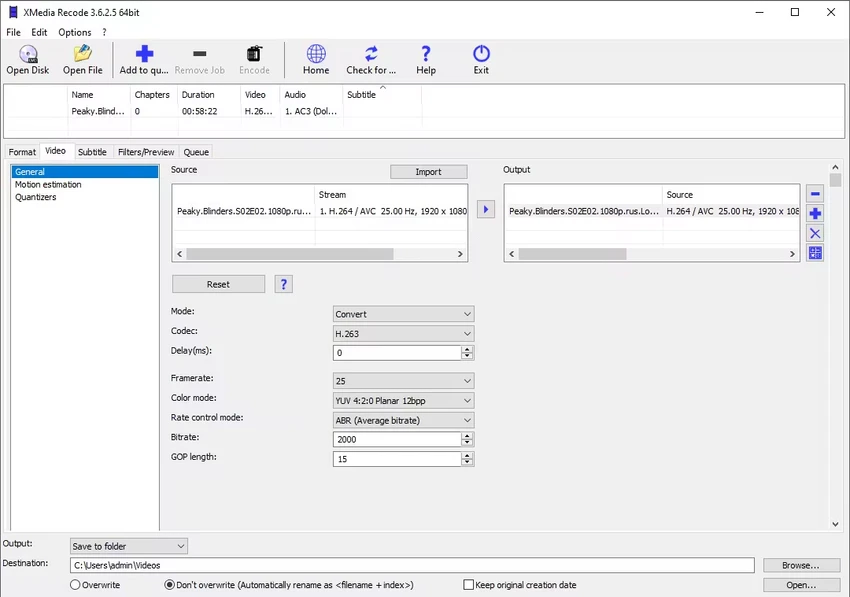

XMedia Recode is a free all-in-one video and audio converter for Windows that supports an extensive range of media formats. Besides format conversion, it provides basic editing tools, subtitle handling, and GPU acceleration to improve processing speed.
After using XMedia Recode, I found it to be a capable media conversion tool designed for users who need flexibility and extensive format support. It can handle video and audio conversion, batch processing, Blu-ray and DVD conversion, and basic editing functions without requiring complicated workflows. One of its standout features is GPU acceleration support for AMD, Nvidia, and Intel hardware, which helps reduce conversion times when working with large media files. Despite its powerful feature set, most settings remain accessible from the main window, making the software relatively straightforward to navigate.
Features of XMedia Recode
- Convert video and audio files between numerous formats.
- Supports popular formats including MP4, MKV, AVI, WebM, AAC, AC3, FLAC, H.264, HEVC/H.265, SVT-AV1, WMA, and WMV.
- Batch video conversion for processing multiple files simultaneously.
- GPU acceleration using AMD, Nvidia, and Intel graphics technologies.
- Convert non-copy-protected Blu-rays and DVDs to digital formats.
- Adjust advanced settings such as bitrate, frame rate, keyframe interval, and rate control.
- Basic video editing tools including cutting, rotating, and scaling.
- Audio adjustments such as volume control and sample rate modification.
- Add or extract subtitle files in SRT, ASS, and SSA formats.
- Convert videos with embedded subtitles.
- Job monitoring through the dedicated "Jobs" tab.
- Preserves video parameters after conversion.
- Compatible with Windows 7, 8, 8.1, 10, and 11.
User Experience
In everyday use, XMedia Recode feels more advanced than many basic converters, but it remains manageable thanks to its organized interface. I appreciated being able to fine-tune encoding settings such as bitrate and frame rate directly from the main window without digging through complicated menus. Batch conversion worked smoothly during testing, and the Jobs tab made it easy to track ongoing tasks. GPU acceleration noticeably improved performance when processing larger files. Basic editing tools like trimming and rotation are convenient for quick adjustments without needing separate software. Subtitle support is another useful addition, allowing me to embed or extract subtitle files depending on the project. While the interface focuses more on functionality than aesthetics, it offers plenty of control for users who need more than simple format conversion.
Who Should Use XMedia Recode?
- Users looking for a free and versatile media converter.
- People who frequently convert large collections of video files.
- Content creators who need basic editing tools and subtitle support.
- Advanced users who want control over encoding settings.
- Windows users seeking support for a wide variety of formats.
Conclusion
XMedia Recode combines broad format compatibility, batch processing, GPU acceleration, and basic editing capabilities into a powerful free package. I found it particularly useful for handling multiple conversions and customizing encoding settings. If you need a feature-rich media converter for Windows without paying for premium software, XMedia Recode is well worth trying.


