FileLegit Windows Office & Productivity PDF Tools Coolutils PDF Splitter Pro
Coolutils PDF Splitter Pro logo

Coolutils PDF Splitter Pro 6.1.0.85/57

  • User Rating:
    ★★★★★
    ★★★★★
    0.0 0Votes
  • Requirements:
    Windows
  • Version: 6.1.0.85/57
  • Latest updated: 4 days ago
  • License: Free Trial  
  • Publisher: Coolutils
  • Size: 118 MB
× app stores

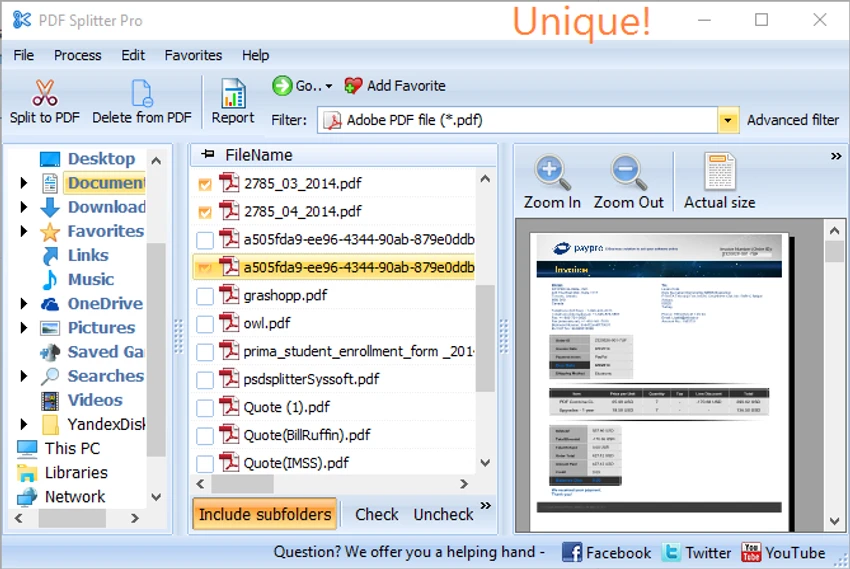
Coolutils PDF Splitter Pro is a professional PDF utility designed to split large PDF documents into smaller, organized files. Built for both individual users and businesses, it offers automatic document separation using keywords or document patterns, along with manual page splitting for files that require custom handling. The software is particularly useful for processing invoices, purchase orders, shipping documents, and other structured PDF files.

Features of Coolutils PDF Splitter Pro

  • Split extremely large PDF files quickly and accurately
  • Automatically split PDFs using custom keywords or phrases
  • Detect document boundaries based on recurring text
  • Split PDF files by invoice number
  • Split PDF files by shipping number
  • Split PDF files by purchase order
  • Split PDF files by medical insurance claim forms
  • Automatically include detected document numbers in output filenames
  • Manual PDF splitting with page preview
  • Create custom page breaks for documents without a fixed structure

User Experience

After using Coolutils PDF Splitter Pro, I found that it is designed to simplify repetitive PDF processing tasks. The interface is clean and focuses on selecting a splitting method rather than overwhelming users with unnecessary options. The automatic keyword detection feature is especially useful when working with business documents. Instead of manually separating hundreds or even thousands of pages, I could specify a recurring phrase or identifier, allowing the software to divide the PDF whenever that text appeared.

Another practical feature is automatic file naming. When splitting invoices or similar documents, the software can append the detected invoice or document number to the output filename, making the resulting files easier to organize and locate.

For PDFs that don't follow a consistent format, the manual splitting mode provides flexibility by allowing page previews and custom split points. This makes it suitable for handling a variety of document layouts. Overall, Coolutils PDF Splitter Pro offers an efficient workflow for users who regularly process large, structured PDF files.

Who Should Use Coolutils PDF Splitter Pro?

  • Businesses processing large batches of PDF documents
  • Accounting teams managing invoices
  • Logistics departments handling shipping documentation
  • Offices organizing purchase orders
  • Healthcare organizations processing claim forms
  • Users who regularly split lengthy PDF files into separate documents

Conclusion

Coolutils PDF Splitter Pro is a dedicated PDF utility that streamlines the task of separating large PDF documents into smaller, organized files. Its automatic keyword-based splitting, customizable file naming, and manual page splitting options make it a practical choice for business environments where document organization is a daily task.

Pros & Cons

Pros

  • Fast processing of large PDF documents
  • Automatic splitting using keywords or recurring text
  • Supports invoice, purchase order, shipping number, and claim form separation
  • Automatic output file naming
  • Manual page splitting with preview
  • Straightforward and easy-to-use interface

Cons

  • Focused exclusively on PDF splitting rather than complete PDF editing

Frequently Asked Questions

What is Coolutils PDF Splitter Pro used for?

It is used to split large PDF documents into smaller files using keywords, recurring text, or manually selected page breaks.

Can it automatically split invoices and business documents?

Yes. The software can detect predefined keywords such as invoice numbers, purchase orders, shipping numbers, or other recurring phrases and split the PDF automatically.

Does Coolutils PDF Splitter Pro support manual splitting?

Yes. It includes a manual mode that allows users to preview pages and create custom split points.

Can output files be renamed automatically?

Yes. The software can automatically include detected document numbers in the resulting filenames for easier organization.

Which Windows versions are supported?

The available information indicates support for Windows 7, Windows 8, Windows 10, and Windows 11.

Recommended apps [Freeware]:
  • EarthView 7.16.6 EarthView logo dynamic wallpapers and screensavers with day, night, and weather effects
  • All in One Runtimes 2.5.0 All in One Runtimes logo Package essential Windows runtime environment packages to improve software compatibility and system stability.
  • Cyberduck 9.5.0.45237 Cyberduck logo Manage FTP, SFTP, and cloud storage services like Google Drive, Dropbox, and Amazon S3 with Cyberduck for Windows
  • Windows 10 Debloater 3.0.3 Windows 10 Debloater logo customize Windows 10 by disabling unwanted features and generating PowerShell scripts
  • Executor 2.3.8 Executor logo a customizable Windows launcher with hotkeys, keyword commands, automation tools, notes, and workflow enhancements
  • Urban VPN 5.2.1 Urban VPN logo virtual private network tool designed to help users protect their identity and privacy while browsing the internet
Recommended apps [Shareware]:
  • Internet Download Manager (IDM) 6.43 Build 2 Internet Download Manager (IDM) logo boosts download speeds up to 5x, schedules downloads, and supports all major browsers and protocols
  • Fast Video Cataloger 10.0.4.0 Fast Video Cataloger logo Organize, search, browse, and manage large video collections with Fast Video Cataloger for Windows
  • Digimizer 6.5.4 Digimizer logo image analysis tool for precise measurements, object detection, and scientific image processing
  • EF Mailbox Manager 26.05 EF Mailbox Manager logo Manage multiple POP3 email accounts, remove spam on the server, and download messages securely
  • O&O SafeErase 21.3.26142 O&O SafeErase logo securely deletes files, drives, and internet traces using certified methods to prevent data recovery on Windows
  • CoolUtils PDF Combine 8.1.0.76/13 CoolUtils PDF Combine logo Windows tool for merging multiple PDF files into one, with bookmarks, encryption, and batch processing