


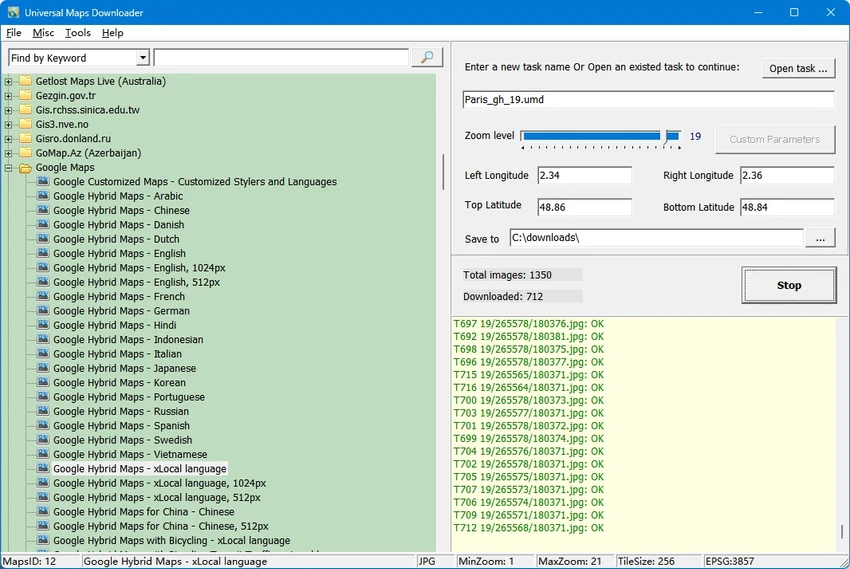

Universal Maps Downloader is a Windows application that allows users to download map tile images from a wide range of online map providers for offline use. Unlike tools limited to a single mapping service, it supports Google Maps, Yahoo Maps, Bing Maps, OpenStreetMap, Yandex Maps, Ovi Maps, MapQuest Maps, and more than 500 map types.
Downloaded map tiles are stored locally and can be viewed offline using the included Maps Viewer. The software also provides utilities to combine downloaded tiles into larger BMP, JPG, or TIFF images, or export them as an MBTiles database for compatible mapping applications. Compared with Offline Map Maker, Universal Maps Downloader focuses on downloading a single zoom level for each project and does not support KML, GPX, or HTML output.
Features of Universal Maps Downloader
- Download map tiles from multiple online map providers
- Supports Google Maps, Bing Maps, Yahoo Maps, OpenStreetMap, Yandex Maps, Ovi Maps, MapQuest Maps, and more
- Compatible with over 500 map types
- Save downloaded map images locally for offline viewing
- Built-in Maps Viewer for browsing downloaded maps
- Combine map tiles into large BMP, JPG, or TIFF images
- Export downloaded tiles to MBTiles database format
- User-friendly interface
- Fast download speed, depending on your internet connection
- Produces clear and detailed map images
- Suitable for offline map viewing and basic mapping projects
Interface and Usability
Universal Maps Downloader features a straightforward interface that emphasizes functionality over appearance. Creating a download project is simple, allowing users to select the desired map provider, specify the download area and zoom level, and choose an output location.
The workflow is easy to understand, especially for users familiar with map tile downloading. Integrated tools such as Maps Viewer and Maps Combiner reduce the need for additional software when viewing or merging downloaded maps. Although the interface looks dated compared to modern applications, navigation remains intuitive and practical for its intended purpose.
Who Should Use Universal Maps Downloader?
- Users who need offline access to maps from multiple providers
- Travelers preparing maps before going offline
- Researchers and educators creating map-based materials
- Developers working with map tile resources
- Users who need to combine downloaded map tiles into larger images
Conclusion
Universal Maps Downloader is a dependable solution for users who need offline access to maps from a wide variety of online providers. Its support for more than 500 map types, built-in viewing tools, image combining capabilities, and MBTiles export make it a practical choice for offline mapping projects.


